
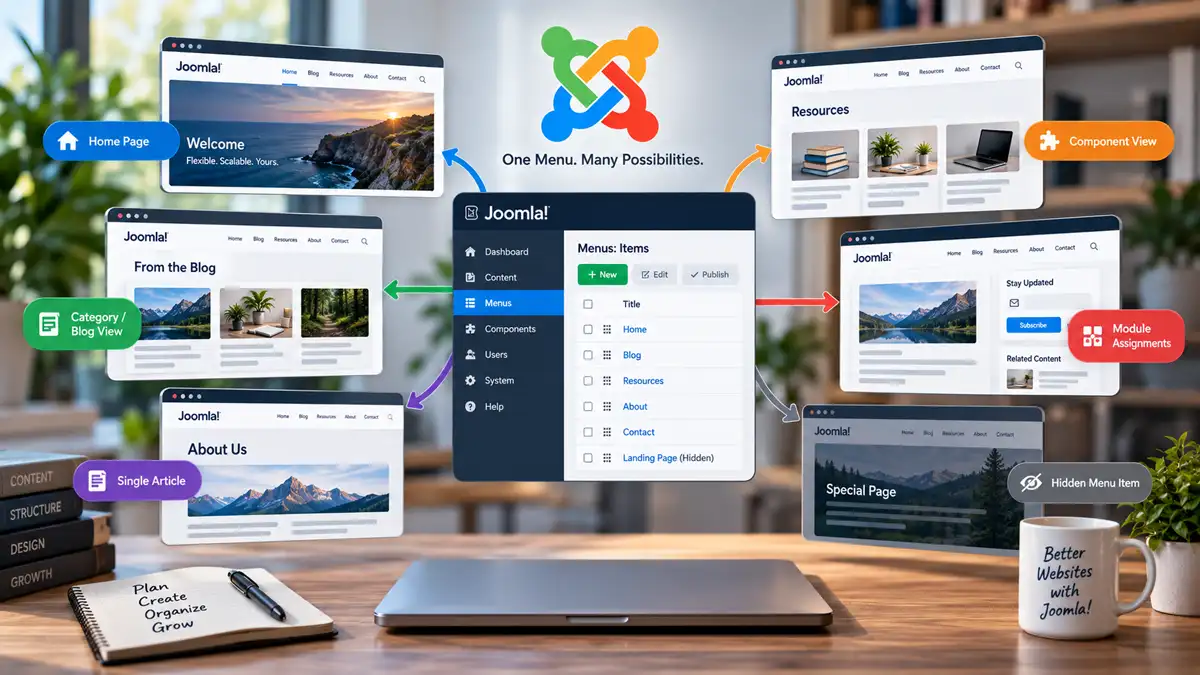
Menus are usually associated with navigation. You create a link, place it in a menu, and visitors use it to move from one part of a website to another. Joomla menu items certainly perform this job, but their role goes considerably further.
A menu item can determine what Joomla displays, provide context for a page, work with module assignments, and influence which Template Style is used. Menu items can even be useful when you don't want the resulting link to appear in the site's visible navigation at all.
Understanding that broader role helps explain why Joomla's menu system is so closely connected to the way a site is structured. Instead of thinking of a menu item as simply a link to an existing page, it is more useful to think of it as one of the ways Joomla establishes how a particular view of the site should be presented.
A Joomla Menu Item Is More Than a Link
In a basic website, it is easy to imagine navigation as a collection of links pointing to pages that already exist. Joomla approaches the relationship somewhat differently.
When you create a menu item, you select a Menu Item Type. That type tells Joomla what the menu item is intended to display.
It might display a single article, a category blog, a list of articles, featured articles, a contact, or a view provided by another component. Different menu item types then provide settings appropriate to what they display.
This means a Joomla menu item isn't simply storing a destination URL. It represents a configured way of requesting and presenting a particular view.
That distinction becomes increasingly important as a site grows. Two menu items may belong to the same navigation system while asking Joomla to display completely different kinds of content. Conversely, Joomla content doesn't necessarily require its own visible navigation link simply because visitors need to reach it.
Menu Item Types Determine What Joomla Displays
The Menu Item Type is one of the first decisions made when creating a Joomla menu item because it establishes what that item does.
If you want a menu item to display one article, you can select the appropriate article view. If you want a blog-style page containing articles from a category, a Category Blog menu item can create that view. Other menu item types expose other components and layouts.
There is no need to memorize every type Joomla or an installed extension makes available. The important concept is that the menu item is configuring a view rather than merely linking to a file or static page.
This also illustrates the difference between Joomla categories and menus.
Categories organize content. A category can contain a collection of related articles regardless of whether that category ever appears directly in the site's navigation. A menu item can then provide a particular way for visitors to access or view that content, such as presenting articles from the category as a blog.
If you're planning the content side of that structure, Joomla Categories: How to Structure Content Without Overcomplicating It looks more closely at building a category hierarchy that remains manageable as a site grows.
Menu Items Help Establish Page Context
Navigation may be the visible result of a menu, but Joomla can also use the active menu item as part of the context for displaying a page.
This is where menu items begin to affect parts of the site that may initially seem unrelated to navigation.
A particular menu-item context can be associated with a Template Style. Modules can be assigned according to menu items. The menu item itself can also contain settings affecting the view it represents.
As a result, reaching content within one menu-item context may not be equivalent to treating that content as an isolated page with no surrounding site structure.
This is one reason Joomla behaviour can sometimes appear confusing when someone thinks only in terms of articles and URLs. The article may be the primary content being displayed, but Joomla is also working within the broader application and menu context used to reach that view.
You don't need to understand every detail of Joomla's routing system to make good use of menus. What matters for everyday site architecture is recognizing that menu items can provide meaningful context, and that changing the menu structure can therefore have consequences beyond changing which navigation links visitors see.
Menu Items Can Control Template Styles
Template Styles provide a straightforward example of this relationship.
A Joomla site can have a default Template Style while alternative styles are assigned to particular menu items. When Joomla is displaying a page within the context of one of those menu items, the assigned style can be used instead of the site's default.
This makes it possible for different sections of a website to use different configurations of the same template without requiring each configuration to become a separate template.
The important point here isn't the Template Style feature itself. It is what the feature demonstrates about menu items: a menu assignment can affect how the resulting page is presented, not merely whether a visitor can click a navigation link to reach it.
For a closer look at that relationship, see Using Joomla Template Styles Across Your Website.
Menu Items Are Important for Module Assignments
Modules provide another practical reason to think about menu items as part of Joomla's site architecture.
A Joomla site may have modules that should appear throughout the website and others that belong only in particular areas. A newsletter signup might be appropriate throughout a publishing section. A category-specific call to action might belong only around a particular group of pages. Other modules might need to be excluded from areas where they would be distracting or irrelevant.
Joomla uses menu-item assignments to determine where those modules appear.
This gives the menu structure another job. It can provide a framework for deciding which supporting content surrounds the primary component output on different parts of the website.
It also means module planning and menu planning shouldn't always be treated as unrelated tasks. If a section of the site needs its own combination of modules, having a clear menu-item structure for that section can make those assignments easier to understand and maintain.
The same maintainability principle applies here as elsewhere in Joomla: use the flexibility where it solves a real problem, but don't create unnecessary menu structures solely to produce tiny variations that could be handled more simply.
The Same Content Can Exist in Different Menu Contexts
Joomla content and menu items don't have a simple one-to-one relationship.
An article can exist without having its own dedicated link in the site's main navigation. It may be reached through a category view, an internal link from another article, a search result, or another appropriate route through the site.
At the same time, menu items can establish intentional entry points and views for content. This is especially important when you want Joomla to have a defined menu context for a page even though that page doesn't deserve a prominent place in the site's visible navigation.
That distinction is useful when planning larger sites because visible navigation has a different job from the underlying menu architecture.
Your primary navigation should help visitors understand and move through the website. It shouldn't become overcrowded simply because Joomla benefits from having additional menu items for other purposes.
Why Hidden Menus Are Useful in Joomla
This is where the commonly used idea of a hidden menu becomes useful.
A hidden menu isn't a fundamentally different type of Joomla menu. The practical idea is to maintain menu items that Joomla can use without publishing that menu as part of the site's normal visitor-facing navigation.
Whether you use a separate hidden menu or keep an individual menu item from appearing in a displayed menu, this allows a page to have a deliberate menu-item context without forcing another link into the site's visible navigation.
For example, a site might contain a landing page, campaign page, resource, special article view, or another destination that visitors reach through contextual links rather than the main navigation. Creating an appropriate menu item can still be useful even though displaying that item in the site's primary menu would add unnecessary clutter.
A hidden menu can therefore separate two questions that are easy to confuse:
- Does Joomla benefit from having a menu item for this view?
- Should visitors see a link to it in the site's visible navigation?
The answers don't always have to be the same.
This is particularly valuable when the menu item is being used to establish settings, module assignments, Template Style behaviour, or a deliberate route for a page that isn't intended to become a primary navigation destination.
A hidden menu shouldn't become a dumping ground for unexplained menu items. Give it a clear purpose and use descriptive menu-item titles so that someone maintaining the site later can understand why each item exists.
It is also worth distinguishing a hidden menu from access control. Keeping a menu or menu item out of visible navigation does not by itself make the destination private. If content should be restricted to particular users, Joomla's access controls should be used for that purpose.
Plan Menu Structure Deliberately
Once menu items are understood as more than navigation links, it becomes easier to see why menu structure deserves deliberate planning.
That doesn't mean every site needs an elaborate hierarchy of menus and hidden menu items. In fact, unnecessary complexity can make Joomla harder to maintain.
A better approach is to create menu items because they have a clear architectural or navigational purpose.
When deciding whether a menu item belongs in the site structure, consider questions such as:
- What content or component view is this menu item intended to display?
- Does it belong in visible navigation, or does it serve another architectural purpose?
- Does this part of the site require particular module assignments?
- Does it need a different Template Style or other menu-specific configuration?
- Will its purpose still be clear to someone maintaining the site later?
This is also a good reason not to design the site's menus independently from its content structure. Categories, menu items, modules, templates, and component views perform different jobs, but they work together to produce the pages visitors actually experience.
Keeping those responsibilities distinct makes the architecture easier to reason about. Categories shouldn't be created simply because you need another navigation link, and visible navigation shouldn't be overloaded simply because you need another useful menu-item context.
Building a More Predictable Joomla Site
Joomla's menu system becomes much easier to understand once menu items stop being treated as simple links.
A menu item tells Joomla what kind of view to display and can provide configuration and context around that view. Other parts of Joomla can then use menu-item relationships for purposes such as module assignments and Template Styles.
Hidden menus extend that idea further by allowing useful menu-item contexts to exist without requiring every item to appear in visitor-facing navigation.
This doesn't mean menu items control every aspect of a Joomla page, nor does every piece of content need its own menu item. It means menus form one important layer of Joomla's site architecture alongside content organization, components, modules, templates, and routing.
Once those responsibilities are understood, decisions about where content belongs, how visitors should reach it, and how different sections of the site should be presented become much easier to make deliberately.
The Joomla Publishing Guide takes the broader view, bringing content organization and publishing decisions together as part of building a Joomla site that remains understandable and manageable as it grows.
Related Joomla Content Articles
Explore additional articles covering Joomla content organization, structure, and publishing.