
Publishing with Joomla can be as simple as writing an article and making it available on a website, but the CMS also provides the structure needed to manage a much broader publishing operation. Articles, categories, menus, modules, users, permissions, custom fields, publishing controls, and other core features can work together as parts of a single content system.
That makes Joomla suitable for more than conventional blogs. It can support magazines, journals, news and community websites, multi-author publications, knowledge-based resources, and other websites where content needs to be created, organized, presented, and maintained over time.
Not every publication needs to use every Joomla feature. A small publication can begin with a straightforward structure and introduce more sophisticated workflows or content organization as its needs develop. Understanding how the main publishing capabilities fit together makes it easier to decide which ones serve a useful purpose.
This guide looks at Joomla from that publishing perspective. It covers planning and organizing a publication, managing the path from draft to published content, working with authors and permissions, using structured content where appropriate, presenting articles to readers, and keeping the publishing system manageable as the website grows.
Understanding Joomla as a Publishing Platform
Joomla is a content management system, which means the content being published does not have to be treated as a collection of isolated web pages. Articles can be stored and organized independently from many of the ways readers eventually encounter them. The same underlying content can participate in category views, featured-content pages, menu destinations, modules, search results, and other parts of the website without creating separate copies of the article.
This separation between content, organization, and presentation is central to Joomla's usefulness as a publishing platform. Publishers can concentrate on creating and organizing content while menus, modules, templates, and Joomla's different content views determine how that material is exposed throughout the website.
Joomla Core Provides the Publishing Foundation
Many of the capabilities needed for a structured publication are available in Joomla core. Articles provide the primary publishing unit, while categories establish the main organizational hierarchy. Menus create navigational paths and configured views of content, and modules can promote or supplement published material throughout selected areas of the website.
Joomla also provides features that become useful when the publishing operation grows more sophisticated. Articles can be scheduled for publication, assigned to different authors, tagged, featured, restricted by access level, supplemented with custom fields, and managed through different stages of an editorial process.
Content and Presentation Serve Different Purposes
One useful way to think about Joomla publishing is to separate the content itself from the mechanisms used to present and promote it. An article contains the information being published. Its category helps establish where it belongs editorially. A menu item might provide a browsable destination for that category, while modules can surface selected articles elsewhere on the website.
The template then controls much of the visual presentation surrounding that content. Changing how articles are displayed therefore does not necessarily require changing how they are written or organized. This separation can be particularly valuable for publications that expect their design to evolve while their content archive continues to grow.

A useful publishing principle: Organize content according to what it is and how it relates to the publication. Decide how and where to display that content as a separate question.
A Publishing System Can Remain Simple
Having access to a sophisticated CMS does not mean a publication needs a sophisticated configuration. A solo publisher may need little more than articles, a few durable categories, straightforward navigation, and a consistent publishing routine. Joomla's additional capabilities can remain unused until they solve an actual problem.
A publication with several contributors may eventually need clearer permissions, editorial review stages, scheduled content, structured fields, or more deliberate ways to promote different types of material. Those features become valuable because the publishing operation has created a need for them, not simply because Joomla makes them available.
Keeping the configuration proportional to the publication's needs also makes the website easier to understand for the people responsible for operating it.
Publishing Is an Ongoing Process
A publication is not finished when an article is published. New content changes the size and shape of the archive, important older material may need to remain discoverable, articles may require updates, and the structure that worked for a small website may need adjustment as subjects and audiences develop.
Thinking of Joomla as a publishing platform therefore includes the entire lifecycle of content: planning it, creating it, reviewing it, publishing it, helping readers discover it, maintaining it, and eventually deciding whether older material should be updated, consolidated, or retired.
The first step is to decide what kind of publication the Joomla website is intended to become and what structure it needs to support that purpose.
Planning a Joomla Publication
A Joomla publication benefits from having a clear editorial purpose before its structure is built in the CMS. The objective is not to design every category, workflow, or navigation path in advance. It is to understand what the website intends to publish well enough that its initial structure reflects real content rather than hypothetical possibilities.
This becomes increasingly important when a publication contains several types of material or involves multiple contributors. Decisions about content, editorial responsibilities, and reader discovery can all influence how Joomla should eventually be configured.
Define What the Publication Will Cover
Start with the editorial scope rather than Joomla's available features. A publication should have a reasonably clear understanding of its principal subjects, the audience it intends to serve, and the kinds of material it expects to publish regularly.
A local publication, for example, might cover community news, events, local government, business, and culture. A specialist publication might produce news, analysis, tutorials, interviews, and reviews around a narrower subject. These distinctions provide a better foundation for Joomla's content structure than beginning by creating categories simply because they seem potentially useful.
The scope does not need to account for every article that might eventually be published. It should be broad enough to allow the publication to develop while still making clear what belongs within it.
Identify Durable Subject Areas
Once the editorial scope is understood, identify the subjects likely to remain important over time. These are potential candidates for the publication's primary categories and browsing destinations.
Durability matters because a publication can accumulate a substantial archive. A category created for a temporary campaign, a single event, or a subject that produces only occasional content may eventually become an awkward part of the permanent structure. More temporary or cross-cutting relationships can often be handled without changing the main category hierarchy.
Plan around recurring content: The strongest initial structure usually reflects subjects and content types the publication expects to support repeatedly, rather than every topic it might cover once.
Consider the Types of Content You Will Publish
Subject matter is only one part of editorial planning. Publications may also produce different types of content that serve different purposes. News may be time-sensitive, while tutorials and reference material are expected to remain useful for much longer. Reviews, interviews, opinion pieces, announcements, and other formats can have their own publishing requirements.
These differences do not automatically require separate Joomla categories or elaborate content types. They are worth identifying because they can influence publishing routines, article presentation, custom fields, author information, scheduling, and how material is promoted to readers.
Recurring information may also benefit from consistent treatment rather than being embedded manually in every article. Joomla's custom fields can support that kind of structured information when the publication has a genuine need for it.
Think About How Readers Will Discover Content
Readers rarely experience a publication through its administrative structure. They may arrive directly at an article from a search engine, follow a link from another article, browse a category, select something promoted on the homepage, or return to an important evergreen resource.
Planning should therefore consider which destinations need to remain consistently discoverable. Major subject areas may deserve navigation links or dedicated category views, while individual articles can be surfaced through contextual links, modules, featured-content areas, and other parts of the site.
This does not mean every category needs to appear in the main menu. Joomla allows the editorial structure and navigation structure to serve different purposes. The publication can maintain a detailed internal organization while exposing a simpler set of useful paths to readers.
Plan for the Publishing Operation You Actually Have
The people producing the content are another part of the publishing architecture. A solo publisher has different operational needs from a publication with writers, editors, and administrators.
For one person, an informal but repeatable routine may be sufficient: draft the article, prepare supporting media, review its category and metadata, preview the page, and publish or schedule it. Adding formal approval stages would provide little value if the same person performs every role.
As more contributors become involved, clearer responsibilities can become useful. Joomla's permissions and workflow capabilities can support distinctions between creating, reviewing, publishing, and administering content when the operation requires them.
Start With Enough Structure, Not the Final Structure
No initial plan can predict exactly how a publication will develop. New subjects may become important, some planned areas may receive little content, and the ways readers use the website may reveal opportunities that were not apparent at launch.
The goal is therefore not to create the final version of the publishing architecture before the first article appears. It is to establish enough structure to publish consistently without creating systems that must be maintained before they provide any benefit.
Before translating that plan into Joomla, it can help to confirm that the publication has made the decisions that will shape its initial structure:
- Editorial scope: what the publication covers and who it is intended to serve;
- Durable subject areas: the recurring subjects likely to form the main content structure;
- Content types: the kinds of material the publication expects to produce regularly;
- Reader discovery: the important destinations and paths through which readers should encounter content;
- Editorial responsibilities: who will create, review, approve, and publish content;
- Structured information: recurring information that may eventually benefit from custom fields or another consistent treatment.
Once that foundation is clear, it can be translated into the articles, categories, featured content, tags, and other Joomla elements that organize the publication.
Organizing Articles and Content
Once the publication's editorial direction is established, those decisions need to be reflected in Joomla's content structure. For most publications, articles and categories provide the foundation. Featured content and tags can then create additional ways to promote or connect material without changing that primary organization.
The objective is not to classify content in as many ways as possible. A useful structure should make publishing decisions easier, help readers understand the archive, and remain manageable as the number of articles increases.
Articles Are the Primary Publishing Unit
Most editorial content in Joomla can be published as articles. News stories, tutorials, reviews, interviews, opinion pieces, announcements, and long-form features do not need separate systems simply because they serve different editorial purposes.
An article can carry information beyond its main body, including its category, author, publishing information, tags, images, metadata, and custom fields. This allows Joomla to manage the article as a structured piece of content while the site's configuration determines how that information is used or presented.
Using a common article system also makes the archive easier to manage. Different areas of the publication can present articles in different ways without requiring the publisher to maintain separate copies or unrelated publishing processes for each section.
Categories Establish the Main Editorial Structure
Categories are the primary way Joomla organizes articles. For a publication, they generally work best when they represent durable editorial areas that readers and publishers can continue to understand as the archive grows.
A publication covering technology, for example, might use categories for hardware, software, security, and industry news. A local publication might organize material around news, business, community, arts and culture, and other recurring areas. The appropriate structure depends on the publication rather than on a universal Joomla configuration.
Joomla supports categories within categories, which makes deeper hierarchies possible when there is enough content to justify them. A broad Sports category could eventually contain more specific sections if the publication regularly covers several distinct sports. That hierarchy should solve a real organizational problem rather than anticipate an archive that does not yet exist.
Categories can also become useful reader destinations. Joomla can display articles belonging to a category through blog and list layouts, allowing an editorial section to develop naturally as content is added instead of requiring a manually maintained landing page for every subject.
Use Featured Content for Editorial Emphasis
Not every important article needs a new category or permanent place in the navigation. Sometimes the requirement is simply to give selected content greater visibility for a period of time.
Joomla's featured status provides a way to distinguish selected articles without changing where they belong editorially. A publication can use featured articles to support a homepage or another configured view that highlights material from across several categories.
This can be useful for a major story, an important evergreen resource, a newly published feature, or a selection of articles the publisher wants readers to encounter more readily. When the editorial emphasis changes, the featured status can change while the article remains in its original category.
Separate importance from organization: An article does not need a special category simply because it deserves additional visibility. Categories describe where content belongs; featured status can help determine what receives editorial emphasis.
Use Tags for Relationships Across the Main Structure
Tags can connect articles that share a subject or characteristic without requiring that relationship to become part of the category hierarchy. Because an article can have multiple tags, they are particularly useful for recurring themes that appear across different editorial sections.
For example, a publication with separate Business, Technology, and Community categories might publish articles in all three that relate to artificial intelligence. An Artificial Intelligence tag could connect that material without requiring the publication to reorganize its primary categories around the topic.
The same flexibility can create clutter if tags are added without a clear purpose. Slight variations of the same subject, one-off tags, and tags created simply because a phrase appears in an article can produce weak archive pages. A useful tag should normally represent a recurring relationship that readers may benefit from exploring across multiple articles.
Avoid Making Every Editorial Distinction Structural
Publications often have more editorial distinctions than they need categories. An article might simultaneously be a review, belong to a particular subject, be written by a particular contributor, form part of a recurring series, and relate to several topics.
Trying to represent every one of those characteristics through categories can make the primary hierarchy difficult to understand. Joomla provides other mechanisms for representing useful relationships, including tags, authors, custom fields, menu views, and modules.
The strongest category structure usually answers a relatively simple question: where does this article primarily belong within the publication? Other mechanisms can then describe or expose additional relationships where they are useful.
The main Joomla publishing mechanisms can therefore be thought of according to the different roles they play:
| Joomla feature | Primary publishing role |
|---|---|
| Article | Stores the primary editorial content being published. |
| Category | Establishes where an article primarily belongs within the publication's editorial structure. |
| Featured status | Gives selected articles additional editorial emphasis without changing where they belong. |
| Tag | Connects articles through recurring subjects or characteristics that cross the main category structure. |
| Menu item | Creates a reader-facing destination or navigation path to content. |
| Module | Promotes, connects, or supplements content in selected areas of the website. |
| Custom field | Stores recurring structured information that benefits from consistent treatment. |
Used together, these mechanisms allow the publication to represent different editorial relationships without forcing them all into the category hierarchy.
Let the Structure Develop With the Archive
Content organization should be stable, but it does not need to remain unchanged indefinitely. As the publication develops, some categories may accumulate enough material to justify subdivision, while others may prove too narrow to remain useful.
Changes should be made deliberately because restructuring an established publication can affect navigation, URLs, internal links, and reader expectations.
With a practical content structure in place, the next consideration is how articles move from an initial draft to finished, published content.
Building a Publishing Workflow
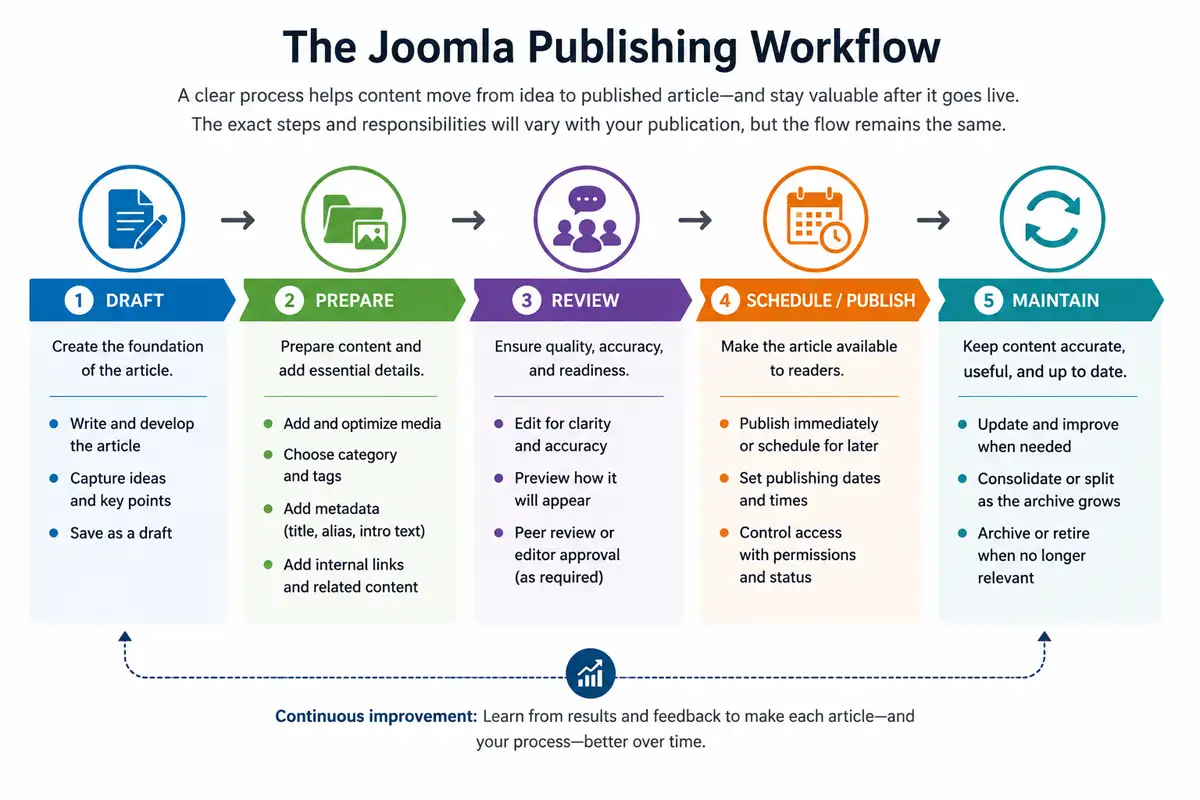
A publishing workflow describes the path content follows from an initial draft to something readers can see. For a small Joomla website, that path may involve only one person writing, reviewing, and publishing an article. A larger publication may need several people to contribute at different stages before content is ready for release.
Joomla can support both approaches. The important consideration is not how many workflow features can be configured, but how much editorial control the publication actually needs.
Start With a Repeatable Publishing Routine
Even when one person manages the entire publication, a consistent routine can reduce mistakes and make publishing easier to sustain. An article might move through drafting, editorial and media preparation, review, publication, and eventually ongoing maintenance.
Some of these steps take place within Joomla while others are editorial practices rather than CMS features. What matters is that important tasks do not depend entirely on remembering them differently for every article.
A simple routine can also make future growth easier. If additional contributors eventually become involved, an existing publishing process can be divided among people more easily than an informal process that changes from article to article.
Use Publishing Status to Control Availability
Joomla articles have a publishing state that helps determine their availability. An article can remain unpublished while it is being prepared and then be published when it is ready for the website. Articles can also be archived when they should remain stored without participating normally in the active publication, while trashed articles are set aside for eventual deletion.
These states provide a basic content lifecycle without requiring a formal editorial workflow. For many smaller publications, they may provide all the control that is necessary.
Schedule Content When Timing Matters
Joomla can schedule when an article begins and stops being published. This is useful when content needs to appear at a particular time without requiring someone to manually change its status at that moment.
Scheduled publishing can support announcements, time-sensitive editorial calendars, coordinated releases, recurring features, or content prepared in advance. An article can be completed and reviewed earlier while its publication date remains aligned with the editorial plan.
An optional finishing date can also be useful for material that should no longer remain actively published after a particular point. It should be used with care, however, because removing an article from normal availability can affect links and readers who return to its URL. Content that has simply become older does not normally need to disappear automatically.
Scheduling is an editorial tool: Use publishing dates to support a real timing requirement, not simply to make the CMS appear more organized. Evergreen content can usually remain published until there is an editorial reason to update, replace, archive, or retire it.
Add Review Stages When the Team Needs Them
As a publication gains contributors, the difference between writing an article and approving it for publication can become important. A writer may prepare the content, an editor may review it, and another person may be responsible for final publication.
Joomla's workflow capabilities can support more structured editorial processes by allowing content to move through defined stages and transitions. A publication could, for example, distinguish between material that is being drafted, awaiting editorial review, approved, and ready for publication.
The appropriate workflow depends on how the publication operates. A two-person team may need only a simple review step, while a larger organization may have reasons to separate writing, editing, approval, and publication. Formal stages should solve an actual coordination problem rather than add administration for its own sake.
Keep Editorial and Technical Responsibilities Distinct
Publishing content does not necessarily require control over the entire Joomla website. As more people become involved, it becomes useful to distinguish editorial responsibilities from administrative responsibilities.
A contributor may need to create or edit articles without changing extensions, templates, menus, or global configuration. An editor may require broader control over content while still having no reason to administer the technical platform.
Keeping these responsibilities distinct can make the publishing environment easier to understand and reduce the amount of site administration each contributor needs to encounter. Joomla's user groups, permissions, and access controls provide the mechanisms for establishing those boundaries.
Review the Workflow as the Publication Changes
A workflow that suits a publication today may become unnecessarily restrictive or insufficient as the operation changes. Additional contributors, greater publishing frequency, new content formats, or recurring editorial problems can all justify reviewing the process.
A useful workflow should make responsibilities clearer and reduce missed steps without becoming an obstacle to publishing. If stages no longer contribute to that purpose, the process is worth simplifying.
Authors, Users, and Editorial Permissions
When several people contribute to a Joomla publication, they do not necessarily need the same access to the website. Someone who writes articles has different responsibilities from an editor who reviews content or an administrator who maintains the CMS.
Joomla's user and permission system makes it possible to separate these responsibilities. Assigning access according to what people actually need to do can keep the editorial environment manageable while limiting unnecessary administrative control.
Start With Editorial Roles
Before configuring permissions, identify the roles that actually exist within the publishing operation. A small publication may combine most responsibilities under one or two people, while a larger operation may divide them among several contributors.
These roles should describe real responsibilities rather than simply reproduce every permission Joomla makes available. If the same person edits and publishes content, there may be no practical reason to separate those tasks into different editorial roles.
Thinking about responsibilities first makes it easier to decide what Joomla access each person requires. It also provides a clearer model when new contributors join the publication later.
A publication might translate those responsibilities into roles such as the following:
| Example role | Typical responsibility |
|---|---|
| Writer | Creates and develops editorial content without needing control over the broader website. |
| Editor | Reviews, revises, and prepares content according to the publication's editorial standards. |
| Publisher | Approves completed content and controls when it becomes available to readers. |
| Administrator | Maintains Joomla and the wider site configuration rather than handling only editorial tasks. |
These are examples rather than required Joomla roles. The useful distinction is between the responsibilities people actually have, not the number of roles the website can be configured to support.
Use Permissions to Limit What Contributors Can Do
Joomla's access control system can determine which actions different users or groups are allowed to perform. This can include distinctions between creating content, editing content, changing its publishing state, or administering other areas of the website.
For a publication, the practical goal is usually to give contributors enough access to perform their work without giving them control over unrelated parts of the site. A writer who only creates and edits articles, for example, generally does not need access to template settings or system configuration.
Grant access for the job being performed: More access is not inherently more convenient. A focused editorial environment can be easier to work with when contributors see and control the parts of Joomla relevant to their responsibilities.
Distinguish Permissions From Access Levels
Permissions and access levels solve different problems in Joomla. Permissions determine what a user is allowed to do within the system, while access levels help determine who is allowed to view particular content.
For many public publications, most articles will simply be available to everyone. Access levels become more important when the site also contains material intended for registered users, members, staff, subscribers, or another defined audience.
This distinction allows a publication to manage editorial responsibility separately from content visibility. Someone's ability to edit or publish an article is not the same question as which visitors should be able to read it.
Keep the Permission Structure Understandable
Joomla provides considerable flexibility for configuring users, groups, permissions, and access. That flexibility is valuable when a publication has complex requirements, but a complicated permission structure can become difficult to understand and maintain.
Begin with an arrangement that represents the real editorial operation, adding groups or exceptions when a specific responsibility or access requirement justifies them.
It is also worth reviewing user access as the team changes. Accounts belonging to people who no longer contribute should not retain unnecessary privileges, and contributors whose responsibilities change may need their access adjusted.
Extending Articles with Custom Fields
Most published information fits naturally within an article's title, body, images, author information, and other standard Joomla properties. Some publications, however, repeatedly publish additional information that benefits from being stored and presented consistently.
Joomla custom fields provide a way to add that structured information to articles without requiring publishers to place everything manually into the article body. Used selectively, fields can make recurring content easier to enter, present, and maintain.
Use Fields for Information With a Consistent Purpose
A custom field is most useful when the same kind of information appears repeatedly across a group of articles. A review publication might record a rating or product specification, an events publication might need a location, and an author-focused publication could associate additional information with content in a consistent format.
In each case, the information has a defined purpose beyond simply being another paragraph in the article. Giving it a dedicated field can make the publishing process more consistent and provide the template with a predictable piece of information to display.
For publishers, the important question is whether a recurring piece of information benefits from having its own structure rather than which field types Joomla makes available.
Separate Structured Information From Editorial Content
Article text and structured information serve different purposes. The article body is appropriate for the narrative or editorial material readers are intended to consume as a whole. Fields are better suited to discrete pieces of information that have a consistent meaning across multiple items.
For example, manually adding a labelled location, date, or rating into every article can work, but each author may format it differently. If that information is an established part of the publication's content model, a field can provide a consistent place to enter it.
This separation can also make future presentation changes easier. When information is stored consistently, its display can potentially be changed without editors having to find and rewrite the same element within many individual article bodies.
Use Field Groups When the Structure Benefits From Them
As the number of custom fields increases, related fields can be organized into field groups. This can make the editing environment easier to understand, particularly when a publication uses several structured values for the same kind of content.
A group should represent a meaningful collection rather than simply becoming another layer of administration. If a publication uses only one or two straightforward fields, additional grouping may provide little benefit.
Avoid Turning Every Article Detail Into a Field
Structured content can become excessive. Once custom fields are introduced, it can be tempting to separate many small pieces of an article into individual inputs because doing so appears more organized.
That can make writing and editing more cumbersome without improving the published result. It can also make the site's content model harder to change if a large number of fields become tied to a particular editorial format.
Use structure where consistency has value: A custom field should solve a recurring publishing or presentation need. Ordinary editorial content should generally remain ordinary article content.
Plan Fields With Presentation in Mind
Creating a field is only part of the decision. Publishers should also consider whether readers need to see the information, where it should appear, and whether its presentation needs to remain consistent across a particular type of article.
How field output ultimately appears depends on Joomla and the site's template. More specialized presentation can involve layouts or overrides, which belong to template implementation rather than the editorial role of custom fields.
Custom fields therefore allow Joomla's article system to accommodate recurring structured information without requiring a separate content system for every specialized requirement. Joomla Custom Fields: Structured Content Without Extra Extensions explores field types, field groups, configuration, editorial use, and front-end presentation in greater depth. The next consideration is how readers discover and move through the resulting publication.
Presenting and Promoting Published Content
Publishing an article makes content available, but a publication also needs ways for readers to discover it. Some visitors will arrive directly at individual articles, while others will browse the homepage, follow navigation, explore a subject area, or continue from one piece of content to another.
Joomla provides several ways to create these paths without changing the underlying organization of the articles. Menus can expose important destinations, category and featured views can assemble content dynamically, and modules can promote selected material in different areas of the website.
Use Menus to Create Useful Publishing Destinations
Menus provide access to more than individual pages. A menu item can display a category of articles, featured content, or another configured view, allowing publishers to create durable destinations around material already managed within Joomla.
A publication might provide navigation for its major editorial sections while allowing individual articles to be discovered through those sections, search, internal links, and other parts of the site. Individual articles therefore do not normally need their own place in the main navigation.
The distinction between editorial structure and navigation remains important. Categories describe how articles are organized within the publication, while menus determine which paths are useful enough to expose directly to readers.
Let Content Views Maintain Collections of Articles
Category and featured views can reduce the need to maintain collections of article links manually. As new material is published, Joomla can include it in the appropriate view according to the content and configuration already in place.
This is particularly useful for active publications. A category destination can continue to represent an editorial subject as its archive grows, while a featured view can bring together selected material from different parts of the site.
The visual layout depends on the template and site configuration, but recurring content views can generally be assembled from information already associated with the articles rather than maintained manually.
Use Modules to Promote and Connect Content
Modules can provide additional discovery without requiring promotional elements to be inserted manually into every article. Depending on the publication, they might expose recent content, related subject areas, important resources, newsletter invitations, secondary navigation, or selected editorial promotions.
Because modules can be assigned to different areas of the website, the surrounding content can also reflect where the reader is. A publication does not necessarily need to show the same recommendations or supporting elements beside every article.
Modules can therefore connect parts of a publication while keeping those connections manageable from a central location. They are most useful where they provide a meaningful additional path through the content.
Keep Important Content Discoverable Over Time
Chronological publishing naturally gives recent material greater visibility. As the archive grows, valuable older articles can become increasingly difficult to encounter even when their information remains useful.
Evergreen guides, reference material, popular resources, and other important content may therefore need stronger discovery paths than their original publication date provides. Menus, modules, category destinations, featured status, and contextual internal links can all help keep that material connected to the active publication.
Publication date should not determine long-term visibility: Important evergreen content can remain prominent because it continues to serve readers, even after newer articles have entered the archive.
Keep Presentation Separate From Content Ownership
A publication's design will influence how all of these elements appear, but visual presentation should not require the editorial structure to be rebuilt around a particular layout. Articles should remain useful content entities, categories should retain their editorial meaning, and navigation should continue to represent useful reader paths.
The template can then determine how article pages, category views, modules, navigation, typography, and other elements are presented. This separation makes it easier for a publication to evolve visually without unnecessarily restructuring the content itself.
Template selection, architecture, customization, dependencies, and maintainability are substantial subjects in their own right. From a publishing perspective, the important requirement is that presentation supports the content structure and makes the publication easier to read and explore.
As the archive continues to expand, discovery is only one concern. The publication also needs to keep its content, structure, and editorial practices understandable over time.
Managing a Growing Publication
A publication becomes more difficult to manage gradually rather than all at once. Each new article adds relatively little complexity, but over time the archive accumulates categories, tags, links, authors, media, navigation paths, and editorial decisions that need to remain understandable.
Growth does not necessarily require a more complicated Joomla configuration. Often the more useful response is to maintain the structure already in place and introduce additional organization only when the existing system no longer serves the publication well.
Review the Content Structure Periodically
Categories and other organizational decisions that made sense when the publication was smaller may not remain equally useful. Some categories may grow broad enough to contain several distinct subjects, while others may receive too little content to justify remaining separate.
Tags can develop similar problems. New tags may be created without awareness of existing ones, slightly different terms can begin representing the same subject, and some tag archives may never develop into useful collections.
Periodic review can identify these issues before they become embedded across a much larger archive. The purpose is not to reorganize the site routinely, but to confirm that its structure still represents the content accurately.
Maintain Consistency as More People Contribute
Additional contributors can increase publishing capacity, but they also introduce more opportunities for inconsistent editorial decisions. Writers may categorize similar articles differently, create unnecessary tags, format recurring information inconsistently, or follow different approaches to titles, images, links, and metadata.
A lightweight set of publishing conventions can reduce these differences. The publication might establish expectations for category and tag selection, article preparation, image handling, internal linking, metadata, and the steps an article should pass through before publication.
These conventions do not need to become an extensive rulebook. They should document recurring decisions that contributors would otherwise have to interpret independently.
Update, Consolidate, or Retire Older Content Deliberately
An expanding archive eventually contains material that is no longer equally useful. Some articles remain accurate for years, while others become outdated, overlap with newer content, or describe subjects that are no longer relevant to the publication.
Older content should therefore be reviewed according to its continuing purpose rather than its age alone. An article may need updated information, stronger internal links, or improved presentation. Several overlapping articles may be better consolidated into one stronger resource. Content with no continuing value may eventually be retired.
Removing or substantially restructuring established content can affect URLs, incoming links, navigation, and search visibility. Those consequences should be considered before making changes simply to make the archive appear cleaner.
Maintain rather than constantly reorganize: A stable publishing structure with deliberate improvements is generally easier to manage than one that is repeatedly rebuilt whenever the archive changes.
Keep Editorially Important Content Connected
As the archive changes, useful connections between articles can weaken. Older content may point to resources that have since been replaced or reorganized, while important material can become increasingly isolated from the active publication.
Internal links, category destinations, modules, featured content, and cornerstone resources can help maintain useful relationships throughout the archive. Reviewing those connections periodically can reveal articles that have become isolated or sections that are difficult to reach.
Let Evidence Guide Structural Changes
A larger archive provides information that was unavailable when the publication was first planned. Publishers can see which subjects have developed substantial bodies of content, which sections readers use, which resources continue attracting attention, and where navigation or organization creates difficulty.
That evidence provides a stronger basis for structural decisions than trying to predict every future requirement at launch. A new category, navigation destination, content field, or editorial process is easier to justify when an existing publishing need has demonstrated why it is necessary.
Search Visibility for Joomla Publications
A well-organized publication also creates a stronger foundation for search visibility. Search engines need to discover individual articles, understand relationships between content, and identify which parts of a website are important. Many of the publishing decisions discussed throughout this guide contribute to that process.
Clear categories, useful navigation, descriptive titles and URLs, contextual internal links, and accessible paths to important content can help both readers and search engines understand the publication. Maintaining older material and avoiding unnecessary duplication also become increasingly important as the archive grows.
Search optimization should not determine every editorial decision. Categories, tags, navigation, and other structural elements should have a useful publishing purpose rather than being created solely to produce additional pages for search engines.
Joomla-specific SEO also involves subjects such as routing, metadata, canonical URLs, indexing, structured data, and technical configuration. Those concerns extend beyond the publishing system itself and are better addressed as focused SEO topics.
Templates, Performance, and Maintenance
A publishing system does not operate independently from the rest of the website. The template affects how readers experience articles and content views, performance affects how readily those pages can be accessed, and ongoing maintenance keeps the underlying Joomla installation dependable as the publication develops.
For publishers, template selection should begin with the needs of the content. Articles should be readable, navigation should remain clear, important publishing information should be presented appropriately, and the design should accommodate the kinds of content the publication produces without requiring unnecessary complexity.
Template selection, architecture, customization, dependencies, and long-term maintainability deserve more detailed treatment than they can receive within a publishing guide. Here, the important consideration is how those choices support the content and publishing operation.
Performance and maintenance require similar attention over the life of the site. Images, extensions, templates, hosting, updates, backups, and accumulated technical dependencies can all affect a growing publication. Publishers do not need to solve every technical concern while planning their editorial structure, but they should recognize that the content archive and the platform supporting it both require ongoing care.
Keep responsibilities connected but distinct: Publishing, design, search visibility, performance, and maintenance influence one another, but each can be managed as its own area of responsibility. A strong Joomla publication does not need to collapse them into one complicated system.
Where to Go Next
Joomla provides a publishing foundation that can remain straightforward for a small website while supporting considerably more structure when a publication needs it. Articles and categories can form the core of the archive, while workflows, permissions, custom fields, menus, modules, and other features can be introduced according to real editorial requirements.
The central principle is to let the publishing operation determine the complexity of the CMS rather than the other way around. Start with a clear editorial purpose and enough structure to publish consistently. As the archive, audience, and team develop, Joomla provides room to introduce stronger organization and processes without requiring every possible decision to be made at the beginning.
If your primary goal is building and operating a blog, the Joomla Blogging Guide looks specifically at planning a blog, organizing its content, publishing articles, designing for readers, and managing the site as it grows.
Design, search visibility, performance, maintenance, and specialized publishing requirements can each be explored in greater depth as those needs arise. The publishing foundation remains the same: well-organized content, deliberate editorial processes, and a structure that can remain understandable as the website evolves.