
Joomla can be much more than a platform for building traditional websites. Its built-in content management features make it well-suited to blogs, personal publications, magazines, journals, and other websites where regularly publishing and organizing content is a priority.
One of Joomla's strengths for bloggers is that many of the tools needed to build a structured publishing website are already part of the core CMS. Articles, categories, tags, menus, modules, custom fields, access controls, and flexible content layouts can work together without requiring a page builder or a large collection of extensions.
That flexibility also means there are decisions worth making before you start publishing. A simple blog can grow into hundreds or thousands of articles over time. Thinking about categories, navigation, article presentation, URLs, internal linking, templates, and maintenance early can make the website considerably easier to manage as it grows.
This guide explains how to approach blogging with Joomla from that broader perspective. Rather than documenting every setting in the administrator interface, it focuses on building a practical foundation for publishing: understanding Joomla's content structure, planning and organizing a blog, creating and presenting articles, choosing an appropriate template, improving search visibility, and keeping the website manageable over the long term.
Is Joomla a Good Platform for Blogging?
Joomla is a capable blogging platform, particularly when a blog is expected to become part of a larger content-driven website. Blogging is not treated as a separate system within the CMS. Articles, categories, menus, modules, tags, users, access levels, and other publishing tools work together as part of the same content platform.
That can be more flexibility than a small personal blog initially needs, but it becomes increasingly useful as a website grows. Joomla can support a straightforward collection of posts while also providing the structure needed for multiple subjects, evergreen resources, featured content, newsletters, contributors, and other elements of a larger publication.
Where Joomla Works Well for Bloggers
Joomla is particularly useful when content needs more organization than a chronological stream of posts. Articles can be grouped into categories, exposed through different menu views, promoted through modules, and connected to related material without creating separate copies of the content.
- Structured content organization: Categories and subcategories can organize articles around durable subject areas.
- Flexible navigation: Menu items can display individual articles, category blogs, featured content, and other views without forcing the content structure and navigation structure to be identical.
- Reusable supporting content: Modules can provide navigation, related content, newsletter forms, calls to action, and other elements across selected areas of the site.
- Built-in publishing controls: Scheduling, featured articles, permissions, access levels, metadata, and tags provide room for a publishing workflow to become more sophisticated over time.
- Room to grow: A relatively simple blog can develop into a broader publication without moving its existing articles into another content system.
You do not need to use all of these capabilities from the beginning. A personal blog may need only a few categories, straightforward navigation, and a clean article layout. Additional structure can be introduced when the content and audience provide a reason for it.
When Joomla May Be More Than You Need
Joomla will not be the right choice for every blogger. Someone who only wants a simple hosted service for occasionally publishing personal posts may prefer a platform that handles most technical decisions automatically.
Operating Joomla means taking responsibility for a CMS, including hosting, updates, backups, security, and the basic structure of the website. In return, you gain considerably more control over the content, presentation, organization, and future direction of the site.
If you are still comparing platforms, WordPress vs Joomla: Choosing the Right CMS examines that decision in greater detail. For the rest of this guide, the assumption is that you have chosen Joomla and want to build a blog around its publishing strengths.
Understanding Joomla's Content Structure
Before building a blog with Joomla, it helps to understand how the main pieces of the CMS fit together. Joomla separates the content you publish from many of the ways that content is organized, displayed, and navigated.
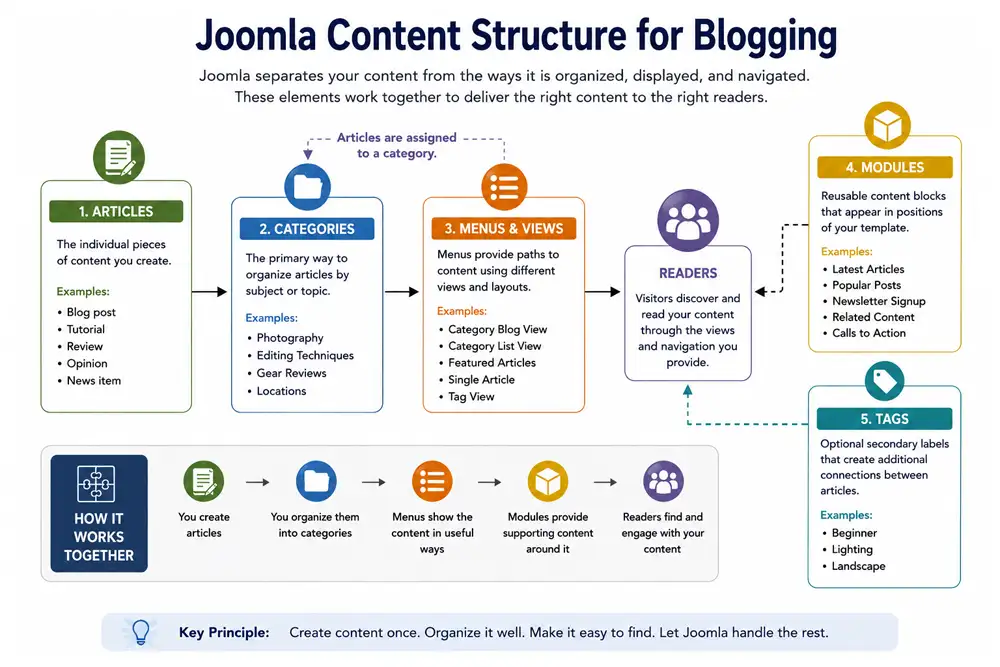
At the centre of a typical Joomla blog are articles and categories. Menus provide paths to that content, modules add reusable supporting elements around it, and tags can create additional relationships between articles.
A useful principle: Joomla stores an article as content and provides different ways to make that content available to readers. The article does not need to be manually placed on a particular page simply to become part of the website.
Articles and Categories Form the Foundation
An article is the main unit of published content. A tutorial, review, opinion piece, news item, announcement, or long-form resource can all use the same underlying article system.
Categories provide the primary organizational structure for those articles. For a blog, they usually work best when they represent durable subject areas rather than temporary groupings. Joomla supports nested categories, but additional hierarchy should have a clear purpose. A smaller structure built around meaningful distinctions is usually easier to maintain than a large tree created for content that does not yet exist.
Menus Control How Readers Reach the Content
Joomla menus do more than create links in a navigation bar. A menu item can display a single article, a category as a blog or list, featured articles, and other types of views.
This creates an important distinction between content organization and navigation. Creating a category does not mean that category needs a place in the main menu, and publishing an article does not require creating a dedicated menu item for it.
Keep navigation selective: Your Joomla content structure can be more detailed than your main menu. Navigation should expose the destinations readers are most likely to need rather than reproduce the entire structure of the CMS.
Modules and Tags Create Additional Connections
Modules are reusable blocks of content or functionality displayed in positions provided by the template. A blog might use them for recent articles, secondary navigation, newsletter signup forms, calls to action, or recommended reading.
Because modules can be assigned to selected areas of a website, the same supporting content does not have to be manually inserted into individual articles. For a deeper look at this part of Joomla's page structure, see WordPress Widgets vs Joomla Modules for Page Structure.
Tags provide another way to connect related content. Unlike the primary category structure, an article can have multiple tags, making them useful for relationships that cross category boundaries. They should still be used deliberately; creating a tag for every minor topic can produce an unnecessary collection of thin archive pages.
How the Pieces Work Together
| Joomla Element | Primary Role | Blog Example |
|---|---|---|
| Article | The individual piece of published content | A camera review or photography tutorial |
| Category | The article's main organizational grouping | Equipment or Photography Techniques |
| Menu item | A navigational path or configured content view | A Photography Techniques category blog |
| Module | Reusable supporting content or functionality | Latest Articles or newsletter signup |
| Tag | A secondary relationship between content | Beginner Photography |
These elements work together without needing to mirror one another. Categories organize the content, menus expose useful destinations, modules support the surrounding experience, and tags provide additional relationships where they are genuinely useful.
You do not need to predict every subject the blog will ever cover. Begin with a structure that reflects what you expect to publish now and allow it to expand when the content provides a reason.
Planning Your Joomla Blog
It is possible to install Joomla, create a category, publish an article, and start blogging almost immediately. A little planning first, however, can prevent many small decisions from accumulating into a disorganized website later.
The objective is not to predict every article you will ever publish. Decide what the blog is primarily about, which subjects deserve durable sections, how readers should browse those subjects, and what kinds of content you expect to publish regularly.
Start With Subjects, Not Joomla Features
Begin with the content rather than the administrator interface. Write down the major subjects the publication will cover and look for natural groupings. Those groups are potential categories, but not every recurring idea needs one.
A useful category should help both the publisher and the reader understand the archive. If two subjects will normally be browsed together, separating them may create unnecessary complexity. If one subject is expected to contain a substantial body of distinct material, giving it its own category may make sense.
Think About How Readers Will Browse
Readers may arrive from search, an internal link, a newsletter, social media, or the homepage. Once they finish an article, the site should make it reasonably easy to understand where they are and what related material is available.
That does not mean every article needs several navigation systems around it. A clear main menu, useful category destinations, contextual internal links, and a small number of relevant modules can provide enough discovery for many blogs.
Plan for the Content You Can Actually Maintain
It is easy to design an ambitious publication structure before enough content exists to support it. Empty categories, thin sections, and navigation links leading to one or two articles make a site feel unfinished.
Start with the structure justified by the content you expect to publish in the near term. Joomla makes it possible to introduce new categories, menu items, modules, and workflows later without rebuilding the entire site.
Keep the first version manageable: A simple structure that reflects real content is more useful than an elaborate structure built around future possibilities.
Establish a Repeatable Publishing Routine
Planning also includes how content will move from idea to published article. Even a solo blogger benefits from a consistent routine for drafting, preparing images, assigning categories, adding internal links, reviewing metadata, previewing the front end, and publishing.
That routine does not need to be formal. Its purpose is to reduce forgotten steps and make publishing easier to sustain as the archive grows.
Once the basic plan is established, you can translate it into Joomla categories, menu items, blog layouts, and supporting modules.
Creating a Blog Structure in Joomla
Once you know how the content should be organized, the next step is to translate that plan into Joomla. For most blogs, the initial implementation can remain simple: create the necessary categories, establish a primary way to browse articles, add navigation for important destinations, and use modules where they improve discovery or support the publishing experience.
Create the Category Structure First
Build categories around the durable subject areas identified during planning. Avoid creating a deep hierarchy simply because Joomla allows it. A flat or shallow structure is often sufficient for a small or medium-sized publication.
Category names should also make sense outside the administrator interface because they may appear in breadcrumbs, page headings, URLs, modules, and other reader-facing areas.
Provide a Primary Blog View
A Category Blog menu item is a common way to present articles from a category in a blog-style layout. Depending on the site, the main Articles or Blog destination might display one broad category, a parent category structure, featured content, or another intentionally configured view.
The important point is that readers have an obvious destination for browsing beyond individual articles. Search traffic may bring someone directly to one page, but the surrounding site should still reveal that the article belongs to a larger publication.
Add Navigation Selectively
Use menu items for destinations that deserve persistent navigation. How Navigation Structure Influences Google Indexing explores the broader relationship between navigation, site structure, and discovery. Major subject areas may warrant direct links, while narrower categories can remain discoverable through category pages, internal links, modules, or other paths.
This is also where URL planning matters. Changing menu relationships and aliases later can affect established URLs, so choose clear, durable paths where possible rather than repeatedly reorganizing them for minor reasons.
Use Modules to Support Discovery
Modules can surface recent content, related subject areas, newsletter signup forms, calls to action, or other useful information without embedding those elements in every article. Use them to support the reading experience rather than filling every available template position.
As the archive develops, modules and internal links can be adjusted to emphasize important resources. A cornerstone guide, for example, can become a natural destination from several related articles without needing to appear in the main navigation everywhere.
Build for the current publication: Joomla gives you room to add complexity later. Begin with the categories, views, navigation, and modules that have a clear job today.
With the blog structure in place, attention can shift to the individual articles and the workflow used to prepare and publish them.
Writing and Publishing Articles
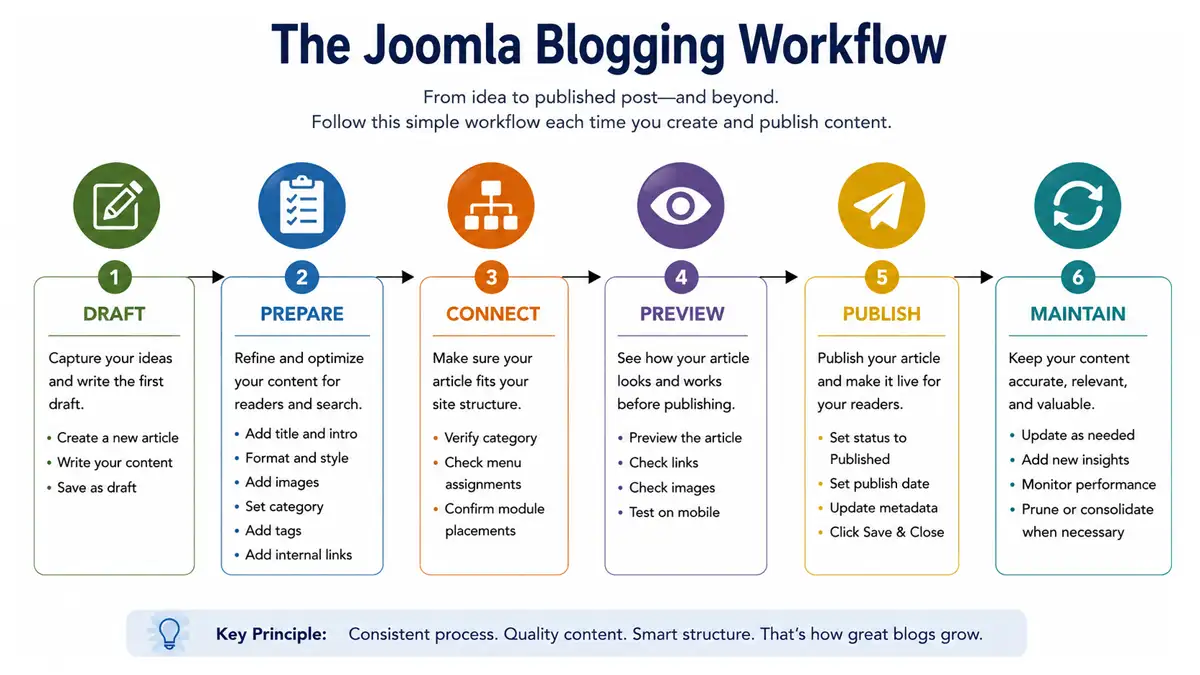
Joomla provides the publishing tools, but consistency is what turns a collection of posts into a coherent publication. A practical workflow should account for the article itself as well as the details that affect how it is organized, presented, discovered, and maintained.
Write for the Reader First
Start with a clear purpose for the article. The title and opening should make the subject apparent, while headings should divide longer material into sections that help readers scan and return to important points.
Use formatting to improve comprehension rather than decorate the page. Lists, tables, callouts, screenshots, and other elements are most useful when they communicate something more efficiently than another block of prose.
Prepare the Joomla Details Consistently
Before publishing, assign the appropriate category and review the alias, introductory text, images, metadata, and publishing settings that apply to the site. Consistency in these details reduces cleanup later and helps similar articles behave predictably across category views, modules, search results, and social sharing.
Use images when they explain, demonstrate, or reinforce the subject. A long article does not need an image at fixed intervals merely to break up text, but genuinely useful visuals can make complex material easier to understand.
Connect the Article to the Existing Site
Internal links help readers continue into related material and help establish relationships within the publication. Why Internal Linking Structure Matters for CMS SEO looks at that site-architecture role in greater depth. Add links where another article or guide genuinely expands the current point rather than inserting them simply to increase link counts.
New articles should also prompt a quick look at older content. Sometimes the strongest internal link is from an established article to the new resource rather than only from the new article outward.
Review the Front End Before Publishing
The editor does not always reveal how an article will behave in the final template. Preview the front end and check headings, images, tables, links, responsive behaviour, spacing, and any modules or calls to action that appear around the content.
A simple publishing routine might be:
- Finish and proofread the article.
- Confirm the title, category, alias, images, and metadata.
- Add useful internal links and check existing content for reciprocal opportunities.
- Preview the article on the front end, including a narrow/mobile viewport.
- Publish or schedule it.
- Revisit it later when the subject, site structure, or related content changes.
The workflow can remain simple: The objective is not to create bureaucracy around publishing. It is to make important checks repeatable so the archive remains consistent as it grows.
A larger publication may eventually introduce contributors, editors, review stages, and formal standards. Those broader editorial workflows belong to the Joomla Publishing Guide; a typical blog can begin with a much lighter process.
Designing a Joomla Blog for Readers
A successful blog design should make content easy to find and comfortable to read. Visual style matters, but on a content-driven website it should support the articles rather than compete with them.
Make the Article the Primary Visual Element
Typography, line length, spacing, heading hierarchy, contrast, and image treatment all affect whether a long article feels approachable. Readers should be able to identify the title, introduction, major sections, links, and supporting elements without fighting the layout.
On mobile devices, this becomes even more important. A layout that feels restrained on a desktop can become crowded when navigation, modules, calls to action, and article content are compressed into a narrow viewport.
Use Supporting Elements With Restraint
Modules, sidebars, related-content blocks, newsletter forms, advertisements, and calls to action can all have legitimate roles, but too many competing elements make the publication harder to read.
Prioritize the content and the reader's likely next step. A useful related link or newsletter invitation is usually more effective than several unrelated promotional blocks competing for attention.
Use Visuals When They Carry Information
Screenshots can clarify an interface, diagrams can explain relationships, and tables can make comparisons easier to scan. Decorative images can contribute to presentation, but they should not become a requirement imposed at arbitrary intervals.
For long-form guides in particular, structural variety matters. Useful visuals, lists, tables, callouts, and shorter sections can make a page easier to navigate without weakening the substance of the content.
The template provides much of the foundation for this experience, which makes template selection an important long-term decision for a content-driven Joomla site.
Choosing a Joomla Template for a Blog
A Joomla template influences much more than colours and branding. It affects typography, article presentation, navigation, module positions, responsive behaviour, and many of the details readers encounter throughout the site.
For a blog, prioritize the layouts you will actually use. Article pages should be comfortable to read, category views should make archives easy to browse, navigation should remain clear, and useful module positions should be available without encouraging unnecessary clutter.
Maintainability matters as well. A template that depends on a large proprietary framework or required page builder may provide extensive design controls, but it also introduces another system that has to be learned, updated, and preserved over time. A simpler template that works naturally with Joomla's core publishing features may be a better fit for a content-focused site.
Responsive behaviour deserves direct testing rather than assumption. Review article pages, menus, category layouts, images, tables, and supporting modules at narrow widths before committing to a design.
Template selection is a substantial subject in its own right. The Joomla Templates Guide will cover template architecture, selection, customization, dependencies, and long-term maintenance in greater depth. For the Blogging Guide, the main requirement is straightforward: choose a template that makes publishing and reading easier rather than adding complexity the blog does not need.
Organizing Content as Your Blog Grows
A new Joomla blog is relatively easy to understand. As the archive grows, the challenge gradually changes from creating enough content to keeping an expanding body of information useful and understandable.
Growth does not automatically require a more complicated Joomla configuration. Often the better approach is to review the structure already in place, strengthen useful relationships, and introduce new organization only where the existing system no longer serves readers well.
Review Categories Before Adding More
Categories that seemed useful at the beginning may become too broad, while others may never accumulate enough content to justify themselves. Review them periodically and ask whether each still represents a meaningful subject area.
Avoid reorganizing established categories casually, especially when changes would affect URLs or navigation. The benefit of a restructuring should outweigh the disruption it creates.
Strengthen Important Content Relationships
As more articles are published, internal linking becomes increasingly valuable. Older articles can point to newer resources, related articles can reinforce one another, and cornerstone Guides can provide stable entry points into major subjects. Growth also creates broader maintenance challenges as websites accumulate content, structure, and dependencies, as discussed in Why Website Maintenance Gets Harder as Sites Grow.
This is also a good time to identify overlapping content. Two articles that answer essentially the same question may be better consolidated, while distinct articles should make their different purposes clear.
Keep Important Resources Discoverable
Chronological archives naturally push older material deeper into the site. Evergreen resources should not become difficult to find simply because they were published months or years ago.
Menus, category pages, modules, contextual links, and cornerstone Guides can all keep valuable content accessible without turning the homepage or main navigation into an exhaustive directory.
Let the archive justify the structure: Add categories, navigation, tags, and other organizational layers when they solve a real discovery problem, not simply because the article count has increased.
As the archive grows, organization also becomes connected to search visibility. The same clear relationships that help readers understand a publication can help search engines discover and interpret its content.
SEO for a Joomla Blog
Search visibility for a Joomla blog depends on more than metadata or an SEO extension. Site structure, useful content, internal relationships, URLs, navigation, performance, and technical configuration all contribute to how easily search engines can discover and understand the publication.
Use Stable, Descriptive Pages and URLs
Give important pages clear titles and durable URLs. Repeatedly changing aliases, menu relationships, or category paths creates unnecessary redirect and indexing work later.
Joomla can produce multiple routes to content when menu structures and aliases are not planned carefully. If duplicate URLs or indexing problems appear, investigate the underlying routing and canonical behaviour rather than assuming that every visible duplicate is a separate article. See Why CMS Websites Create Duplicate URLs and Indexing Issues for the focused treatment of that issue.
Build Search Visibility Around Useful Content
An article should satisfy a real reader need before metadata is considered. Use descriptive titles and headings, write concise search descriptions where appropriate, and make the subject of each page clear without forcing keywords into the prose.
Images should have sensible filenames and alternative text when the image conveys meaningful information. Structured data and other technical enhancements can be useful, but they do not replace clear content and a sound site structure.
Use Internal Links to Establish Relationships
Internal links help readers discover related material and show how subjects connect across the site. The broader relationship between content organization, URLs, navigation, and search visibility is covered in How CMS Structure Influences SEO Over Time. Link naturally between supporting articles and broader cornerstone resources, and revisit older content when new pages create better destinations.
Categories and tags can also create useful archive relationships, but they should not be multiplied solely for SEO. Thin archive pages and overlapping organizational systems can make the site harder to understand rather than easier.
Maintain the Search Foundation
Keep the sitemap current, monitor indexing and crawl reports, maintain redirects when URLs genuinely change, and periodically review older content for broken links, outdated information, or unnecessary overlap.
SEO for a Joomla blog is therefore less about a collection of isolated settings than about maintaining a publication that remains understandable to readers and technically coherent as it grows. Focused GeJay Media articles can handle individual technical problems in greater depth without turning this Blogging Guide into a complete SEO manual.
Performance and Maintenance
Launching a Joomla blog is only the beginning of its lifecycle. Joomla itself, the template, extensions, hosting environment, and content archive will continue to change, making routine maintenance part of operating the publication.
Keep the Technical Stack Manageable
Install extensions because they solve a real requirement, not simply because functionality is available. Every additional extension can introduce updates, compatibility considerations, configuration, and another dependency that may need attention later.
The same principle applies to templates, frameworks, analytics tools, SEO extensions, comment systems, membership components, and other services. A capable site can still become difficult to maintain if too many overlapping systems accumulate.
Establish Basic Maintenance Habits
Keep Joomla and extensions current, maintain reliable backups, review important changes in a safe environment where appropriate, and remove software that is no longer used. Periodically test important forms, navigation, redirects, and other functionality rather than assuming they continue to work indefinitely.
Watch Performance Without Chasing Scores
Large images, excessive scripts, poorly behaving extensions, heavy templates, and hosting limitations can all affect page performance. Website Performance Is a System, Not a Single Fix explains why performance should be evaluated across the complete website rather than reduced to one setting or tool. Measure real problems and address their causes instead of treating a perfect synthetic score as the objective.
Content maintenance matters too. Older articles may need updated links, revised screenshots, stronger internal relationships, consolidation, or retirement. The existing GeJay Media maintenance articles provide deeper treatment of these issues. Why Website Maintenance Should Be Routine develops the recurring-maintenance approach in more detail; the important point for a blogger is to make maintenance a normal part of publishing rather than an emergency response.
Growing from a Blog into a Publication
A blog does not need to remain a chronological collection of posts. As the audience, archive, and range of subjects grow, the site may gradually take on characteristics of a broader publication. Joomla can support that transition without moving the existing articles into a different content system.
The change is usually reflected in how content is planned, organized, presented, and produced. A growing site may introduce distinct editorial sections, cornerstone resources, featured content, newsletters, multiple contributors, scheduled publishing, or a clearer distinction between timely and evergreen material.
At that point, responsibilities may also become more formal. Contributors may prepare drafts while editors review them, publishing standards may be documented, and access levels or workflows may be used to control who can create, edit, approve, or publish content.
None of this is required simply because a blog has accumulated many articles. Additional process should solve an actual publishing problem. A solo publisher with an efficient routine may need very little formal workflow even on a substantial site.
The Joomla Publishing Guide continues from this point. It examines Joomla as a broader content and editorial platform, including publishing workflows, organization, contributors, editorial standards, and the systems that become useful when a site operates more like a publication than a personal blog.
Where to Go Next
A successful Joomla blog does not need to begin with a complicated publishing system. Start with a clear content structure, a manageable set of categories, straightforward navigation, and a template that puts the articles first. Establish a repeatable publishing routine, connect related content as the archive grows, and maintain the technical foundation without adding complexity before it is needed.
From there, use the rest of the GeJay Media Joomla library according to the problem you are trying to solve. The Joomla Templates Guide will take template selection and architecture further, while the Joomla Publishing Guide continues into broader editorial and publication workflows. Focused articles can provide deeper treatment of specific Joomla, SEO, maintenance, and site-architecture issues without forcing every detail into one cornerstone resource.
The goal is not to build the most complicated Joomla blog possible. It is to build a publishing system that remains understandable, useful, and maintainable as the content grows.