
Joomla articles can contain much more than a title and a body of text. Images, author information, publishing dates, categories, tags, and other properties can all contribute to the finished content, but some websites need to store additional information that Joomla does not provide as a standard article property.
A review website might want every review to include a rating. An events publication could need a venue or event date. A tutorial library might identify a difficulty level, while another content-driven website could associate particular information with certain types of articles.
It is possible to add that information manually to the article body, but doing so makes it part of the editorial content. When the same kind of information appears repeatedly and benefits from consistent treatment, Joomla custom fields provide a more structured approach.
Custom fields allow additional information to be defined separately and then completed as part of the normal article-editing process. They can also give the site's template predictable information that can be presented consistently on the front end.
The useful question is therefore not how many custom fields a Joomla website can create. It is which recurring information benefits from having a defined structure of its own.
What Are Joomla Custom Fields?
A Joomla custom field provides a defined place for storing a particular piece of information alongside an article or another supported type of content.
Consider a website that publishes product reviews. The main article can contain the actual review: the introduction, observations, comparisons, conclusions, images, and other editorial material. Some information, however, might appear consistently across every review:
- manufacturer;
- model;
- rating;
- price range;
- product website.
Those values could be typed manually into every article, but the publisher would then be responsible for keeping their labels, formatting, and placement consistent. A custom field gives each recurring value a defined purpose and a predictable place in the publishing system.
This separates editorial content from structured information. The article remains the primary piece of content, while fields carry additional values that mean the same thing from one article to another.
That distinction becomes increasingly useful as an archive grows. A field called Rating, for example, continues to mean Rating whether the website contains ten reviews or ten thousand. The publisher does not need each writer to invent a different way of representing the same information.
A useful principle: Create a custom field when the information has a recurring purpose that benefits from being entered, stored, or presented consistently.
Joomla Custom Fields for WordPress Users
The general idea of custom fields will already be familiar to many people coming to Joomla from WordPress, although the two systems should not be treated as identical implementations.
WordPress associates additional information with posts through its post metadata system. In the WordPress administration context, this metadata has traditionally been referred to as custom fields. A metadata key identifies the information and a corresponding value stores the data associated with a particular post.
WordPress sites can build much more sophisticated editing interfaces and content models around that underlying metadata. Plugins and custom development are commonly used when a site needs managed field groups, more specialized controls, conditional interfaces, or other structured-content features.
Joomla approaches the editorial side of the problem through its own integrated custom-fields system. Fields can be created and configured centrally, organized into field groups, and made available to the appropriate articles. When an editor works with content to which those fields apply, Joomla exposes them as part of the editing interface.
For someone moving from WordPress, the underlying publishing question is therefore familiar:
What information belongs with this article but benefits from being stored separately from the main body?
What changes is how Joomla defines, assigns, organizes, edits, and presents that information. A WordPress user should understand the concept quickly without assuming that Joomla fields correspond directly to a particular WordPress plugin or development pattern.
When Should You Use a Custom Field?
Custom fields are useful because they add structure, but additional structure is not automatically an improvement. A site can become harder to manage if ordinary editorial content is divided into fields without a clear reason.
Use Fields for Recurring Information
A strong candidate for a custom field normally appears across multiple articles and means essentially the same thing each time.
An events website, for example, might repeatedly publish a venue with its event articles. A tutorial website might classify tutorials by difficulty. A review publication could use a consistent rating. In each case, the information has an identifiable role beyond simply being another sentence in the article.
| Type of website | Possible custom fields |
|---|---|
| Review publication | Rating, manufacturer, model |
| Events publication | Event date, venue, location |
| Tutorial library | Difficulty, estimated time |
| Resource directory | Website, location, contact information |
| Specialist publication | Series, issue, supporting resource |
These are examples rather than prescriptions. A website that mentions a venue once does not need a Venue field simply because Joomla makes it possible to create one.
Keep Editorial Content in the Article
The article body remains the appropriate place for information that forms part of the narrative or explanation readers are intended to consume as a whole.
Once custom fields are available, it can be tempting to break many pieces of an article into separate inputs because doing so appears more organized. That can make writing and editing cumbersome without improving the finished page.
A useful test is to ask whether the information has a consistent identity independent of the surrounding prose. A product rating does. An event location may. The third paragraph of an introduction usually does not.
Fields are most useful when the structure itself provides value.
A Real Example: Custom Fields on GeJay Media
GeJay Media uses custom fields as part of its own Joomla publishing environment.
One field group is used for page-title information. Within that group is a field for entering a short page introduction that can be displayed in the header area of the finished page.
That introduction could have been placed manually inside the article body. Doing so, however, would mix the information with the main content and make its placement part of the article itself.
Using a custom field separates those responsibilities. The editor supplies the short introduction as structured information, while the site controls where and how that information appears.
Once the field has been configured for the relevant content, it becomes part of the normal article-editing process, as shown here in the Fields tab.
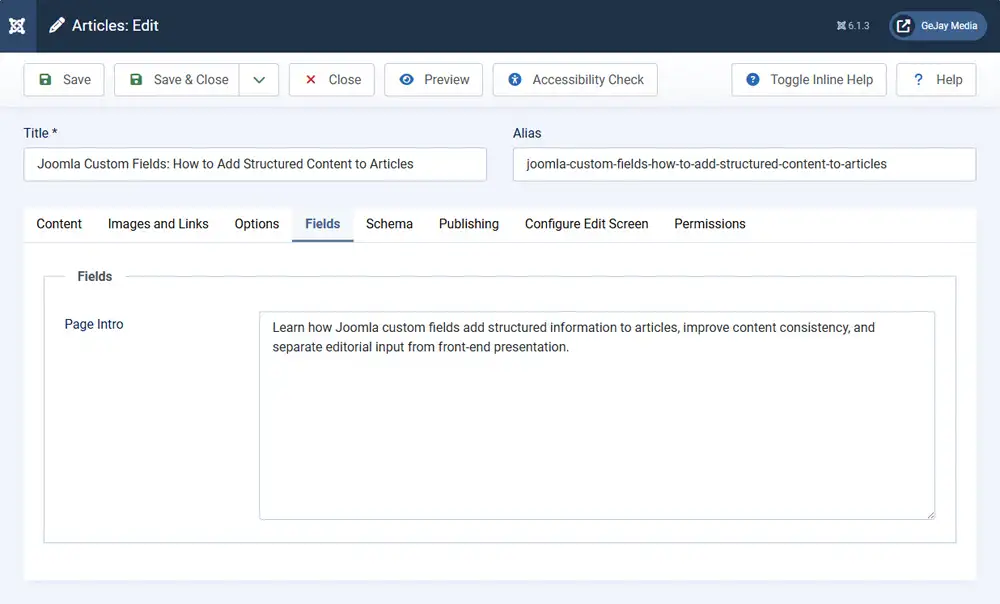
Here, the Page Intro field contains the same short introduction used for this article. The person creating the article can enter that information along with the other article details without rebuilding the page header or adding special markup to the article body.
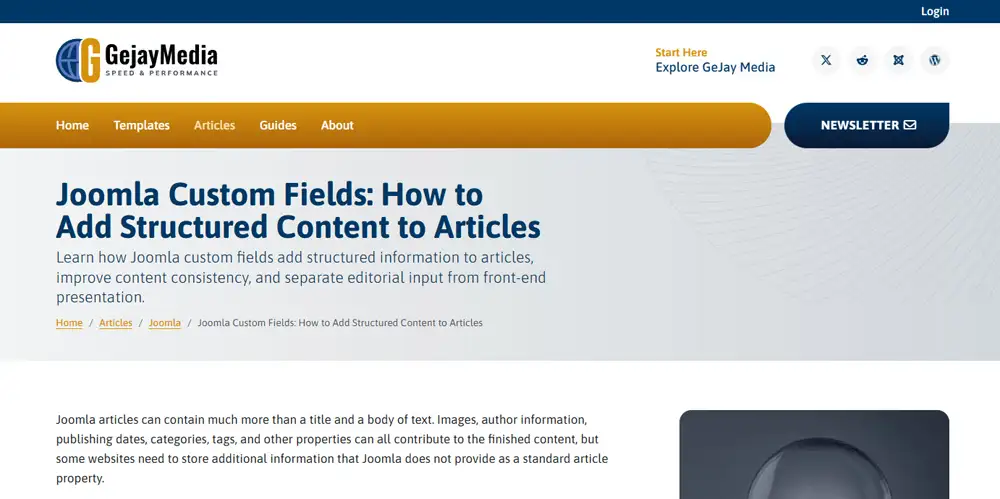
The front end then uses that stored value in its intended location. This demonstrates an important benefit of structured content: the editor supplies the information, while the presentation layer determines how readers see it.
This separation can also help a site remain consistent. If the presentation of the page-title group changes later, the underlying field values do not necessarily have to be rewritten in every article.
Understanding Joomla Custom Field Types
Different kinds of information benefit from different input controls. A date, a predefined choice, a URL, and a short piece of text do not represent the same kind of data, even though all of them could technically be typed into an ordinary text box.
Joomla provides multiple core custom-field types so that the editing control can better reflect the information being stored. Common examples include text-based fields, lists, radio buttons, checkboxes, dates, numbers, URLs, and media-related fields.
The useful decision is not which field type looks most sophisticated. It is which control makes the intended value easiest to enter consistently.
| Information | Possible field approach | Reason |
|---|---|---|
| Short page introduction | Textarea | The value is a short passage of unique editorial text. |
| Difficulty level | List or radio field | Editors choose from a known set of values. |
| Event date | Calendar/date field | The input represents a date rather than arbitrary text. |
| External resource | URL field | The value is expected to be a web address. |
| Applicable features | Checkboxes | More than one predefined option may apply. |
Field type is also a decision worth making carefully at the beginning. Joomla does not allow the type of an existing custom field to be changed through the normal field-editing interface after the field has been saved. If a different type is needed later, replacing an established field can have consequences for content that already stores values against it.
Choose the field type before the field becomes established: Test the editing experience and make sure the selected control suits the information before using the field across a large number of articles.
If an editor should choose one value from an established collection, allowing arbitrary text can create spelling and naming variations. If the information needs to be written uniquely for each article, forcing it into a predefined list creates the opposite problem.
Choose the field type from the information: Decide what editors need to enter and how consistent the possible values should be before choosing the control.
Creating a Custom Field in Joomla
Article custom fields are managed separately from the articles that eventually use them. This allows the site administrator to define the structure once and then make it available as part of the normal content-editing environment.
Create the Field
In the Joomla administrator, article fields are managed from the Content area. When creating a field, begin by giving it a clear title and choosing the field type that matches the information it will store.
The field can also have a name, a label that editors or visitors may see, and a description that helps explain what should be entered. Naming deserves some thought because a field that becomes part of the site's long-term content model may eventually be used across a large number of articles.
A title such as Page Intro, Event Location, or Difficulty communicates a defined purpose. Generic names such as Extra Information become much harder to understand once several fields exist.
Decide Where the Field Applies
A field does not necessarily need to appear for every article on the site. Joomla can make article fields available according to the content categories for which they are intended.
This becomes important when a website contains different kinds of material. An Event Date field might make sense for articles in an Events category but provide no value when someone is editing an ordinary news article or permanent resource.
Restricting fields to the content that actually uses them keeps the editing interface clearer and reduces the chance that editors will encounter inputs that have no purpose for the article they are creating.
For a small website where the field genuinely applies everywhere, broader availability may be appropriate. The configuration should follow the content model rather than impose unnecessary distinctions.
Configure the Display Intentionally
Creating a field and entering a value do not answer every presentation question. The administrator should also consider whether the field label should appear, whether the value belongs on the front end at all, and how the field should participate in the surrounding layout.
Some custom fields exist primarily to supply information that a template or layout will use elsewhere. In other cases, Joomla's normal field display may already provide everything the site requires.
The important point is to think about editing and presentation separately. A well-designed input does not automatically determine the best front-end treatment.
Organizing Related Fields With Field Groups
A website that uses several related custom fields can organize them into field groups.
For example, a review publication might create a group called Review Details containing fields for Rating, Manufacturer, Model, and Product Website. An events site could group Venue, Event Date, and Location.
Field groups can make the editing environment easier to understand because related information appears together rather than as an unrelated collection of inputs.
Depending on how the fields are organized, Joomla can expose them in a general Fields area or under a tab named for the field group. This makes groups useful not only for administration but also for the person entering content.
Grouping is still another layer of structure and should have a purpose. A website with one or two straightforward fields may gain nothing from creating several groups around them.
Group fields for the editor: A field group is most useful when it makes a related set of information easier to recognize and complete during normal publishing.
Adding Custom Field Values to Articles
Once fields have been created and made available to the relevant content, they become part of the article-editing process.
This is where the architectural work becomes useful to writers and editors. They do not need to recreate the field definition or understand every option used to configure it. They simply supply the value appropriate to the article.
If a publication has a Difficulty field with Beginner, Intermediate, and Advanced choices, for example, an editor selects the appropriate value. If the site uses a Page Intro field, the editor writes the short introduction intended for that article.
For a multi-author publication, this can improve consistency considerably. Rather than asking every contributor to remember how a recurring piece of information should be labelled and formatted in the article body, the editing interface provides the expected input.
This is one reason custom fields fit naturally into the broader publishing model described in the Joomla Publishing Guide. The structure can be designed by the people responsible for the website while the day-to-day publishing process remains understandable for the people creating content.
Displaying Custom Fields on the Front End
Storing information and displaying information are related but separate concerns.
A field may contain exactly the right value while still requiring a decision about where that value belongs on the finished page, whether it needs a label, and what surrounding markup or styling it should use.
Use Joomla's Normal Field Display When It Fits
For straightforward requirements, the normal custom-field output may be sufficient. A field can present its value as part of the article without requiring the publisher to build a completely separate content system.
This works particularly well when the value can appear as ordinary supporting information and does not require a highly specialized visual treatment.
Let the Template Handle Presentation
A template determines much of the surrounding presentation of a Joomla article. When a custom field needs to appear in a particular part of that design, the template or an associated layout may need to participate in how the value is rendered.
The GeJay Media page-introduction field is a useful example. The value is entered as structured article information, but its intended destination is part of the page-title presentation rather than an arbitrary position inside the body text.
This makes the relationship between content and design clearer:
- the custom field defines and stores the information;
- the editor supplies the value for an individual article;
- the presentation layer determines how that value appears to readers.
Use Layouts or Overrides Only When They Solve a Real Requirement
More specialized custom-field presentation can involve Joomla layouts or template overrides. Those techniques provide considerably more control, but they also move beyond the basic editorial role of custom fields and into template implementation.
A site should not create an override merely because custom fields are being used. If the normal output already serves the content, additional implementation complexity may provide little benefit.
When the design genuinely requires field values to be integrated into a particular article layout, however, the separation between stored information and presentation becomes especially useful. The field values can remain consistent even while their visual treatment evolves.
The future Joomla Templates Guide will take template architecture, layouts, overrides, dependencies, and long-term presentation decisions further.
Common Custom Field Mistakes
Custom fields can make a content system clearer, but poorly planned fields can create another layer that publishers have to maintain.
Creating Fields for One-Off Information
If a piece of information is unlikely to recur and does not need a predictable structure, placing it naturally in the article may be simpler than creating a permanent field for it.
Turning Too Much Editorial Content Into Fields
Breaking an article into many small inputs can make writing harder and tie the content unnecessarily to a particular model. Narrative, explanation, argument, and other normal editorial material generally belong in the article body.
Creating Fields Before Planning Their Presentation
A field may be easy to create in the administrator but still have no useful destination on the finished page. Before adding a field, consider whether readers need to see it and what role it will play in the design.
Using Inconsistent or Ambiguous Names
Field titles, labels, and groups should remain understandable as the site grows. Similar fields with vague or overlapping purposes can eventually make the editing environment harder to interpret.
Showing Every Field Everywhere
Fields that apply only to one kind of content do not necessarily need to appear while editors work on unrelated articles. Limiting fields to the content that uses them can keep the publishing interface more focused.
Assuming Structure Automatically Improves Content
A field is a tool for representing information consistently. It does not make the underlying content more useful simply by existing.
Prefer the smallest useful content model: Add fields when they make publishing, consistency, presentation, or long-term maintenance meaningfully better.
Planning Custom Fields for a Growing Joomla Site
A few custom fields are easy to change. A mature website with hundreds or thousands of articles using the same fields has a more established content model.
That does not mean every field decision must be permanent from the beginning. It does mean that fields deserve the same kind of deliberate planning as categories, navigation, and other structural parts of a content-driven website.
Before creating a field, consider:
- whether the information will genuinely recur;
- whether it has a consistent meaning across the relevant articles;
- which articles or categories actually need it;
- which input type best represents the information;
- whether related fields should form a group;
- where the value should appear on the front end;
- whether Joomla's normal output is sufficient or specialized presentation will eventually be required.
This does not require designing an elaborate content model before publishing anything. The same principle that applies elsewhere in Joomla still holds: begin with enough structure to meet the requirements you actually have, then expand it when the content warrants it.
That approach keeps custom fields useful rather than allowing them to become another collection of settings that future editors have to understand and maintain.
Where to Go Next
Joomla custom fields provide a practical way to add structured information to articles without forcing every recurring value into the main content body. They can simplify data entry, improve consistency between articles, support multi-author publishing, and give the presentation layer predictable information to work with.
The strongest uses usually begin with a clear publishing requirement rather than with the feature itself. Identify information that genuinely recurs, choose an appropriate field type, make it available only where it serves a purpose, and plan how the stored value should be presented to readers.
For the broader relationship between articles, categories, publishing workflows, contributors, structured content, and reader discovery, see the Joomla Publishing Guide. If you are building a simpler, content-driven site, the Joomla Blogging Guide explains how Joomla's publishing features fit into a practical blogging foundation.
Custom fields do not need to make a Joomla website more complicated. Used selectively, they can do the opposite: give recurring information a clear place in the publishing system so editors do not have to reinvent its structure every time they create an article.
Related Joomla Content Articles
Explore additional articles covering Joomla content organization, structure, and publishing.