

Joomla categories provide the main editorial structure for articles, but that does not mean every subject, content variation, or future idea needs a category of its own. A category works best when it represents a meaningful relationship between multiple pieces of content.
When categories are created too quickly, a Joomla site can end up with thin sections, unnecessary hierarchy, and an administrator structure that becomes harder to understand as the archive grows.
The opposite problem can happen too. A single broad category may eventually contain so many different subjects that it stops helping readers, editors, or site owners understand what the content is actually about.
The goal is not to create the smallest or largest possible category structure. It is to build one that reflects the content you genuinely publish and can adapt when that content changes.
What Joomla Categories Are Actually For
For Joomla articles, categories provide a primary way to group related content. An article normally belongs to one article category, and that relationship can then be used throughout the site for organization, presentation, navigation, permissions, and other publishing decisions.
That makes categories important, but it also means they should have a clear editorial purpose.
A useful category answers a question such as:
- What subject does a group of articles share?
- Would readers reasonably expect to browse these articles together?
- Will the site continue publishing enough content in this category to justify maintaining it separately?
A category shouldn't exist just because Joomla lets you create one.
This becomes more important as a site grows. A simple publication with three or four well-defined categories can be easier to manage than one with dozens of narrowly defined categories containing only one or two articles each.
Start With the Content, Not the Category Manager
One of the easiest ways to overcomplicate Joomla is to design an elaborate category tree before enough content exists to justify it. You might end up deleting unused categories or turning them into subcategories.
Instead, begin with the subjects the site actually publishes.
If a new publication regularly covers hiking, camping, and outdoor equipment, an initial article structure might be as simple as:
Hiking
Camping
Gear
Those categories describe clear subject areas and provide enough separation to organize an early archive.
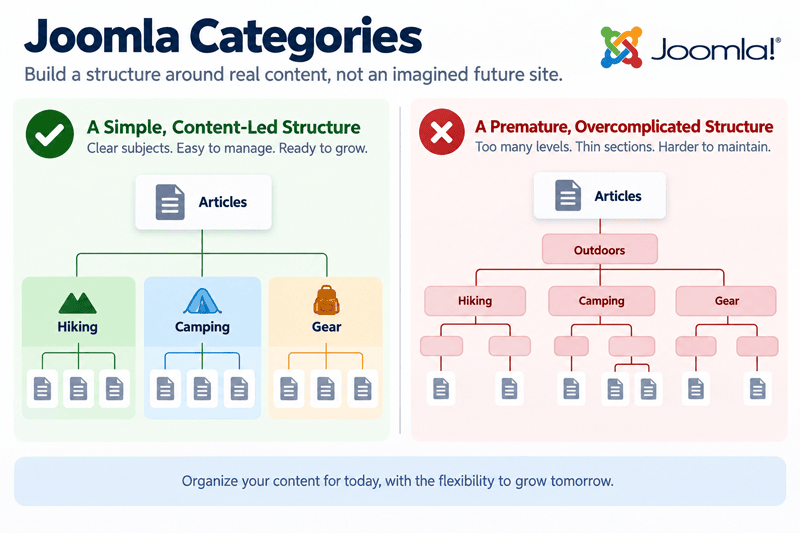
It may be tempting to plan several levels, thinking that it's quicker to do them now than later:
Outdoors
├── Hiking
│   ├── Beginner Hiking
│   ├── Day Hiking
│   └── Long-Distance Hiking
├── Camping
│   ├── Tent Camping
│   └── RV Camping
└── Gear
    ├── Hiking Gear
    └── Camping Gear
There is nothing inherently wrong with that hierarchy. The question is whether the publication has enough content for each category.
If most of those subcategories contain one article—or no articles at all—the structure is describing an imagined future site rather than the site that exists today.
Identify Durable Subject Areas
A strong category usually represents a subject that will continue to make sense after the next few articles are published. If years go by and the category continues to collect relevant content, you've probably made a good choice.
For example, Hiking is a solid editorial subject for an outdoor website. A category called Spring Hiking Tips may be much less useful if it exists only because three planned articles happen to share that angle.
Those articles may still relate to one another, but the relationship does not automatically need to become part of the site's primary taxonomy.
This is where Joomla's other publishing methods become useful. Tags, menus, modules, featured status, and internal links can establish additional relationships without forcing every relationship into the category hierarchy.
Avoid Categories for Content That Does Not Exist Yet
Planning ahead can be quite useful. Building a category structure without consideration for future growth can create avoidable restructuring later.
But planning for growth is different from creating every possible category in advance.
If you know the publication will cover several durable subjects from launch, those categories can reasonably exist before each contains a large archive. If a possible category depends on content that might be created six months from now, it can usually wait.
Joomla makes it easy to create another category when a real editorial need develops. It's often harder to clean up a large collection of categories that were created and never became useful.
How Many Joomla Categories Do You Need?
There is no universal number of categories that a Joomla site should have.
A focused blog may work well with four. A large website may legitimately require dozens, including subcategories. The useful measurement isn't the number itself but whether each category serves a distinct purpose and can house more than a few articles.
When a Subject Deserves Its Own Category
A subject is a stronger candidate for a separate category when several conditions are true.
- It has enough existing or reliably planned content to form a useful collection.
- It is meaningfully different from the surrounding subjects.
- Readers may want to browse it independently.
- Editors benefit from being able to identify it as a separate part of the publication.
Suppose the outdoor website originally places all equipment coverage in Gear. Over time, hiking equipment becomes a major editorial area with dozens of reviews, comparisons, maintenance articles, and buying guides.
At that point, separating some of the content may solve a real organizational problem.
The important difference is that the archive created the need for the structure. The structure was not created in anticipation of an archive that might never exist.
When Related Subjects Should Stay Together
Two subjects don't necessarily need separate categories simply because you can describe a difference between them.
Imagine a Joomla site with categories for:
Beginner Hiking
Intermediate Hiking
Advanced Hiking
If articles regularly overlap those skill levels, editors disagree about where an article belongs, and readers do not benefit from browsing the groups independently, the distinction may create more friction than value.
A broader Hiking category may be easier to maintain, while tags, article titles, introductory text, or other mechanisms communicate the skill level where necessary.
This is one reason category design should be based on the content that will exist inside each one and how that content is planned, rather than on how many ways it can be organized.
When a Category Is Too Broad
Keeping the category structure simple doesn't mean every article needs to be grouped into a handful of very broad containers.
A category can become too broad when it stops providing meaningful context.
If a Technology category eventually contains hundreds of articles about security, hardware, software development, artificial intelligence, networking, and consumer electronics, neither readers nor editors gain much information from knowing that an article belongs to Technology.
That's a sign the archive has matured enough to justify more specific categories.
The decision should still be based on durable publishing patterns. Splitting a broad category into ten narrow categories after one temporary burst of content may create future problems.
When Should You Use Subcategories?
Joomla supports nested categories, which can create deeper editorial hierarchies when the website genuinely needs them.
The fact that Joomla supports deeper hierarchy isn't a reason to use it automatically.
Use Hierarchy to Solve a Real Browsing or Editorial Problem
A subcategory is useful when a parent-child relationship communicates something meaningful about the content.
For example, a large publication might eventually develop:
Destinations
├── Canada
├── United States
└── Europe
If Destinations is a major publishing area and each geographic section contains a substantial archive, that hierarchy may help editors manage the content and give the site useful options for presenting it.
The hierarchy is doing real work.
Compare that with creating:
Destinations
└── Canada
    └── British Columbia
        └── Vancouver Island
to store two articles about Vancouver Island.
The second structure might be appropriate for a very large travel website, but the depth doesn't make the information better organized.
Avoid Deep Structures That Add Little Meaning
Every additional level introduces another relationship that future editors need to understand.
Deep category structures can also encourage administrators to think of Joomla as a conventional folder system, where every article must be filed into the most specific possible location.
This isn't always the most useful model for web publishing.
An article needs an appropriate editorial home. It does not necessarily need the deepest available home.
A shallow structure also gives you more freedom to use Joomla menus independently. Articles can be categorized in a way that doesn't have to match how visitors navigate the website. The Joomla Publishing Guide explores that broader separation between content organization and presentation.
Categories Are Not the Only Way to Organize Content
Category proliferation often happens because one taxonomy is being asked to represent every possible relationship between articles.
Joomla provides other mechanisms for those relationships.
Use Tags for Cross-Category Relationships
Tags can connect articles that share a secondary topic even when they belong to different primary categories.
For example, articles in Hiking, Camping, and Gear might all relate to Winter. Creating a Winter category would require deciding whether those articles should leave their existing editorial categories.
A Winter tag can provide the secondary relationship without changing their primary organization.
Tags should still be used deliberately. Creating a tag for every phrase in an article can produce another form of taxonomy clutter. The goal is to be conservative when tagging your content.
Use Featured Status for Editorial Emphasis
Featured status answers a different question from categories.
A category says where an article belongs editorially. Featured status identifies content that deserves additional prominence.
An important Hiking article does not need to move into an Important Articles category. It can remain in Hiking while Joomla's featured status can showcase that article elsewhere.
Use Menus for Reader-Facing Navigation
Menus provide paths into Joomla content, but those paths do not need to reproduce the category hierarchy exactly.
You might have a Hiking category containing dozens of articles while exposing only a few carefully selected destinations in the main navigation. Another menu item might display a Category Blog view for the broader archive.
This distinction is one of the most useful Joomla concepts to understand: content organization and navigation are related, but they perform different jobs.
That subject deserves deeper thought, particularly because menu items also provide important context for Joomla routing and presentation. It will be explored separately in the Joomla Content Structure series.
Use Modules for Promotion and Supporting Discovery
Modules can surface content without creating another category relationship.
A site might display Latest Articles, Popular Articles, a selected group of resources, or another contextual collection within a template position while the articles remain in their existing categories.
This lets the presentation layer promote useful content without requiring the underlying taxonomy to change every time the site owner wants a different published collection.
How Category Structure Affects the Front End
Categories are primarily part of Joomla's content organization, but they can also become visible to readers depending on how the site is configured.
Category Blog and List Views
Joomla can use a category as the source for views that display multiple articles together.
A Category Blog menu item, for example, can present articles from a chosen category as a blog-style collection. This makes category design more than an administrator convenience when readers are expected to browse the resulting archive.
If a category will have its own landing page, ask whether the articles form a useful destination.
A category containing a meaningful collection can support discovery. A category containing one article and no clear reason to grow may create a page that adds little value for readers.
Category Names Can Become Reader-Facing
Category names that begin as internal organizational labels can eventually appear in breadcrumbs, page headings, links, category views, metadata, or other front-end contexts depending on the site's configuration.
That is another reason to choose names that describe meaningful subjects rather than temporary administrative needs.
An internal label such as Miscellaneous Content may make sense to the person who created it, but it communicates poorly if it later appears as part of the public website.
Reviewing Categories as the Site Grows
A good Joomla category structure is not necessarily permanent.
The content itself changes over time. Subjects that once appeared important may stop receiving new articles. Other areas may grow far beyond what was expected when the site launched.
Periodic review is therefore healthier than either constantly reorganizing the taxonomy or refusing to change it at all.
Watch for Thin Categories
A category containing only one or two articles for years may indicate that the distinction was never substantial enough to require a separate section.
That doesn't mean every small category needs to be removed. A specialized but important subject might legitimately have a small archive.
The useful question is whether the category still expresses a meaningful relationship and serves a purpose for the publication.
If not, its content may belong more naturally in a broader category with secondary relationships handled through tags or internal links.
Watch for Categories That Have Become Too Broad
The opposite condition deserves attention as well. A category that becomes too broad can also become confusing.
If editors routinely struggle to find content, a category contains several clearly independent publishing areas, or its public archive has become difficult to browse, the content may have outgrown the original structure.
That is the point where splitting or introducing a meaningful subcategory structure can improve the site rather than merely make it more complicated.
Do Not Reorganize Established Categories Casually
Changing category structure on an established Joomla site can have consequences beyond the administrator interface.
Categories may already be connected to menu items, modules, permissions, templates, internal links, public archive pages, and URLs. Search engines may also have indexed pages associated with the existing architecture.
Before merging, renaming, moving, or deleting established categories, identify where the category is being used and what will happen to existing paths into its content.
The broader relationship between CMS architecture and long-term search visibility is covered in How CMS Structure Influences SEO Over Time.
Reorganization can be worthwhile when the existing structure no longer serves the site, but it still needs to be done cautiously.
Building a Category Structure That Can Last
A maintainable Joomla category structure usually begins smaller than people expect and grows only when the demand for more content requires it.
Start with strong subject areas. Give related articles a clear editorial home. Add hierarchy when it solves a real browsing or management problem, not because creating additional categories is easy.
When another Joomla method makes sense, use it. Tags can connect subjects across categories. Featured status can identify important content. Menus can create reader-facing paths. Modules can promote and redistribute content without changing where the articles belong.
Most importantly, let the archive influence the architecture. A category structure designed around real publishing patterns is easier to understand, maintain, and adapt than one based on what the website might someday need.
For the broader planning and management of articles, categories, publishing workflows, custom fields, and content presentation, continue with the Joomla Publishing Guide. For a blogging-specific approach to categories, archives, navigation, and long-term content growth, see the Joomla Blogging Guide.
Related Joomla Content Articles
Explore additional articles covering Joomla content organization, structure, and publishing.