
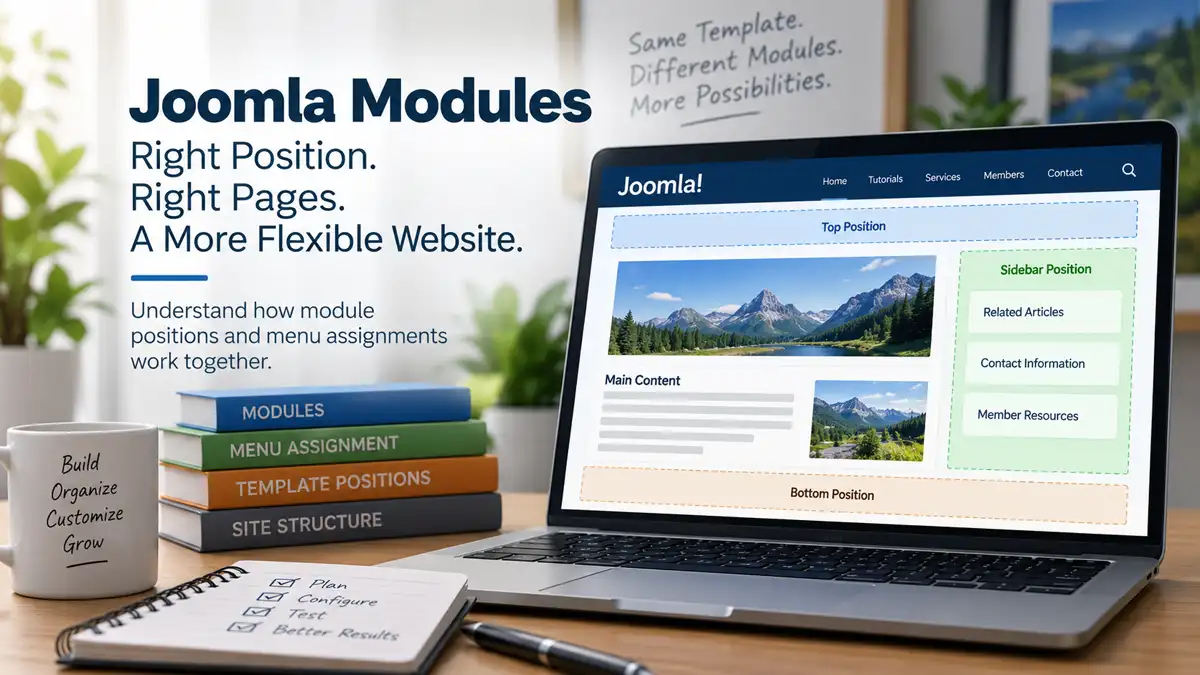
Joomla modules give you considerable control over what appears around the main content of a page, but that control depends on two different decisions: where the module can appear and where it should appear.
The first is determined by the module position provided by the site's template. The second is largely controlled through menu assignment, which lets you associate a module with particular menu items rather than displaying it everywhere.
Understanding that relationship makes Joomla's page structure much easier to work with. A sidebar module can appear on one group of pages but not another, a promotional block can be limited to a particular section, and modules assigned to the same position can be combined and ordered without creating separate page layouts for every variation.
Menu items don't necessarily have to appear in the site's visible navigation to participate in this structure. Hidden menu items can provide useful page contexts for URLs that need Joomla's menu-item behaviour without requiring another visible navigation link.
This separation between template positions, modules, and menu assignments is one of the reasons Joomla can build varied page layouts while keeping the underlying structure relatively manageable.
Module Positions Define Where Modules Can Appear
A Joomla template can define named module positions that represent locations where modules may be rendered. Depending on the template, these might correspond to areas such as a header, sidebar, footer, navigation area, or other parts of the layout.
The position name itself shouldn't be confused with a universal physical location. A position called sidebar-right, for example, has meaning because of how that particular template renders it. Another template may use different position names or arrange its available positions differently.
This becomes important when changing templates. Assigning a module to a position doesn't permanently attach it to a particular visual location independently of the template. The active template must provide and render an appropriate position for the module to appear there.
Multiple modules can also be assigned to the same position. Their ordering and the way the template renders that position then help determine how those modules appear together.
Menu Assignment Determines Where a Module Is Used
Choosing a module position answers where the module can appear in the template, but it doesn't by itself answer which pages should display it. Joomla's menu assignment controls provide the other part of that decision.
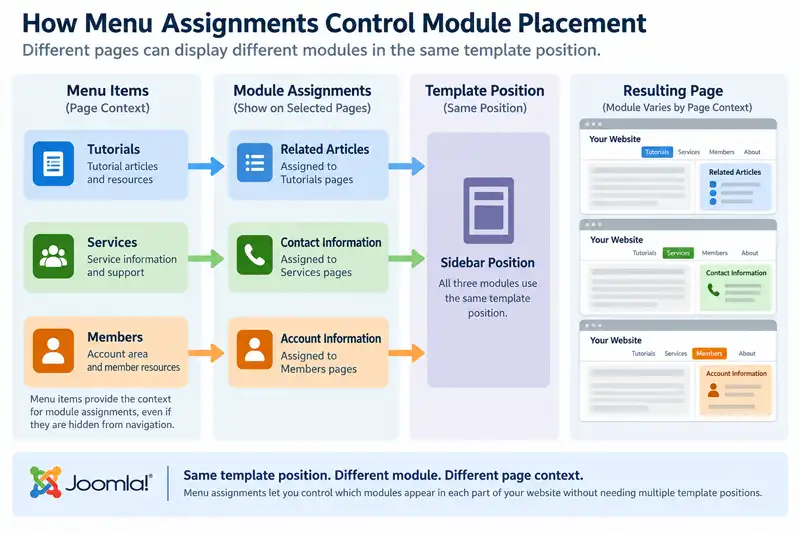
A module can be displayed across the site or associated with selected menu items, depending on how it is configured. This allows the same template position to serve different purposes in different parts of the website.
For example, a sidebar position might contain one set of modules in a tutorial section and another set in a news section. The template can provide the same sidebar position for both, while menu assignments determine which modules belong in each context.
A useful distinction: The module position determines where a module can appear. Menu assignment helps determine where on the website that module should appear.
This means that assigning a module to a position such as sidebar doesn't necessarily make it appear in that position throughout the entire website. One module assigned to the sidebar might appear across most of the site, while another module using the same position appears only on selected pages.
For example, the same sidebar position might be used for:
- related articles within a publishing section;
- contact information on service pages;
- account information within a member area; and
- a promotional module on selected landing pages.
The template doesn't need four different sidebar positions simply because the content changes. The position establishes the available layout region, while module assignments control which modules use that region in different parts of the website.
Multiple Modules Can Share the Same Position
A module position isn't limited to one module. Several published modules can use the same position, provided their other display conditions allow them to appear on the current page.
When multiple modules are displayed in the same position, their ordering determines their sequence within that position. This makes it possible to build a region of the page from several independent modules rather than placing everything into one large content block.
For example, a sidebar could contain a section introduction, a related-content module, and a call to action as three separate modules. Each can be managed independently while still appearing together in the same template position.
The modules don't necessarily need identical page assignments either. The related-content module might appear throughout a section, while the call to action appears only on selected menu items. On pages where both assignments apply, both modules can occupy the same position in their configured order.
This is one reason it is useful to keep the concepts of position, ordering, and assignment separate. They work together, but each controls a different aspect of the resulting page.
Hidden Menu Items Can Provide Useful Page Context
Module assignment in Joomla is closely connected to menu items. That can initially seem limiting when a page needs a particular module arrangement but doesn't need another link added to the site's visible navigation.
This is where hidden menu items can become useful. A menu item can provide Joomla with a defined page context without necessarily becoming part of the navigation visitors see.
One approach is to create menu items within a menu that isn't displayed through a Menu module on the front end. Another option, where appropriate, is to configure an individual menu item so that it isn't displayed in its menu. In either case, the important principle is that the menu item can still serve an architectural purpose even though it isn't intended as a visible navigation choice.
That menu-item context can then participate in decisions such as module assignment and other menu-item-specific configuration. This makes hidden menu items useful when a page needs more deliberate behaviour than it would receive without an appropriate menu item.
A hidden menu item isn't simply a navigation link that nobody sees. It can provide Joomla with useful page context while allowing the site's visible navigation to remain focused on links that actually belong in the menu.
Pages Without the Right Menu-Item Context Can Behave Differently
Because Joomla uses menu items for more than visible navigation, the menu-item context associated with a page can affect which modules appear around its main content.
This can become noticeable when content is reachable through more than one route or when a page doesn't have the menu-item context expected by the site's structure. The main article or component output may still be accessible, but the surrounding page can differ because module assignments are being evaluated within a different context.
For a site owner, the visible symptom may be surprisingly simple: a module appears when the page is reached one way but not another, or a page doesn't have the same surrounding modules as other content in the same section.
That doesn't necessarily mean the module position or the module itself is broken. The first questions to investigate are whether the page has an appropriate menu-item context and whether the module is assigned to that menu item.
This is also why adding menu items purely as an architectural tool can sometimes solve a problem more cleanly than trying to reproduce the same layout through additional modules, template changes, or other workarounds.
Module Positions Belong to the Template
A module's page assignments can remain useful when a site's design changes, but the position that module uses depends on the template that provides it. This distinction becomes particularly important when changing templates or substantially restructuring an existing one.
Different Joomla templates don't have to provide the same module positions, use the same position names, or arrange positions in the same way. A module assigned to a position in one template therefore can't be assumed to appear in an equivalent location after another template becomes active.
For example, an existing template might provide positions named sidebar-right, footer, and top. A replacement template may use a different position structure entirely. The modules themselves can still exist, along with their menu assignments, but their position settings need to make sense within the new template.
This is one reason a template change should include a review of the site's modules rather than being treated as a purely visual replacement. Modules are part of the assembled page structure, and that structure depends partly on the positions the template makes available.
The Joomla Template Guide goes further into how the template fits into Joomla's overall presentation layer and how to approach template decisions more systematically.
An Available Module Position Doesn't Have to Be Filled
A template can provide a module position without requiring a module to appear there on every page. The position represents an available location in the template rather than content that must always be present.
Whether an unused position leaves any visible effect depends on how the template has been built. Well-designed template layouts can often respond to the modules that are actually present, allowing surrounding content to use the available space when a particular position has nothing to display.
This makes conditional module assignment much more useful. A sidebar can be populated in one part of the website and unused elsewhere without necessarily requiring two completely separate page templates.
It also means that seeing a position listed in Joomla shouldn't be interpreted as a requirement to fill it. Positions are structural options. The modules and their assignments determine which of those options the site actually uses.
Module Assignments and Template Styles Can Work Together
Module assignment isn't the only Joomla feature that can vary presentation according to menu-item context. Template Styles can also be assigned to menu items, allowing different template configurations to be used across different parts of the same website.
The two systems solve different problems. A Template Style can control a broader template configuration for a group of pages, while module assignments determine which individual modules should appear within the positions available to those pages.
Used together, they can create substantial layout variation without requiring every page to become a separately constructed layout.
For example, one section of a website could use a Template Style configured for a particular layout while also displaying a section-specific set of modules. Another section could use a different style and different module assignments, even though both remain part of the same Joomla site.
This is one of the places where Joomla's menu system becomes much more than navigation. Menu items can provide the context through which several parts of the site's presentation and structure are coordinated.
For a closer look at the template side of this relationship, see Using Joomla Template Styles Across Your Website.
Plan Module Placement From the Page Context Outward
When deciding where a module belongs, it can be tempting to start by looking through the template's available positions. A more useful approach is often to start with the pages that need the module and work outward from there.
Consider what the module is meant to accomplish, which part of the website needs it, and whether those pages already share an appropriate menu-item structure. Once that context is clear, the template position becomes a layout decision rather than the starting point for the entire configuration.
A practical planning process might look like this:
- Identify the module's purpose. Decide what information or function it provides and why visitors need it.
- Identify the pages that need it. Determine whether it belongs throughout the site, within a section, or only on particular pages.
- Review the relevant menu-item context. Make sure the pages have menu items that support the intended assignment structure, including hidden menu items where they provide useful context.
- Choose an appropriate template position. Select a position based on where the module belongs within the page layout.
- Set the menu assignment. Configure the module so that it appears in the intended menu-item contexts rather than simply publishing it everywhere by default.
- Review other modules in the same position. Check their ordering and assignments so that the combined result makes sense.
- Test representative pages. Check pages where the module should appear as well as pages where it shouldn't.
This approach keeps the page architecture tied to the purpose of the module. It also reduces the likelihood of accumulating modules that are broadly published simply because their intended page context was never clearly defined.
When a Module Appears in the Wrong Place, Check Each Layer
Unexpected module behaviour is easier to troubleshoot when position, publication, ordering, and menu assignment are treated as separate parts of the configuration.
If a module doesn't appear where expected, useful questions include:
- Is the module published?
- Is it assigned to a position that the active template actually renders?
- Is it assigned to a position that the active template renders in the relevant layout?
- Does the module's menu assignment include the menu-item context for the page being viewed?
- Are other module conditions or configuration settings affecting whether it produces output?
- If several modules share the position, is their ordering producing the expected result?
- Is the page being reached through the menu-item context you expected?
If a module appears on too many pages, the same layers can be checked in reverse. The position may be correct while the menu assignment is broader than intended.
Working through these questions individually is usually more informative than assuming that an unexpected module is a template problem. The template, module configuration, menu assignment, and current page context all contribute to the final result.
Good Module Structure Keeps Page Variations Manageable
Joomla's module system becomes particularly useful when a website needs meaningful variation between sections without turning every page into a separately managed layout.
A relatively small set of well-planned template positions can support many combinations of content. Modules can be reused, ordered, and assigned according to the parts of the website that need them, while menu items provide much of the context that connects those decisions to individual pages.
This doesn't mean every possible variation needs to be created. Adding positions, modules, menu items, and assignments without a clear reason can make the site harder to understand later. The advantage comes from using these features deliberately rather than maximizing the number of configurations.
For content-focused websites in particular, this can provide a useful middle ground between one rigid layout for everything and constructing every page independently. Common structure stays reusable while individual sections can receive the modules they actually need.
Use Positions and Assignments as Parts of the Same Structure
Joomla module positions and page assignments make more sense when they are treated as related but separate parts of the page structure. The template determines which module positions are available, while module configuration and menu assignment determine how those positions are actually used throughout the website.
Menu items provide an important part of that context. They can support module assignments even when they aren't intended to become visible navigation links, which is why hidden menu items can be useful architectural tools rather than merely a way to conceal links.
Once those relationships are understood, module placement becomes less about filling positions and more about designing reusable page regions that respond to the needs of different parts of the site.
Why Joomla Menu Items Matter Beyond Navigation takes the menu-item side of Joomla's page structure further, including the broader role menu items can play beyond the links visitors see in a site's navigation.
Related Joomla Template Articles
Explore additional articles covering Joomla templates, customization, and layout structure.