
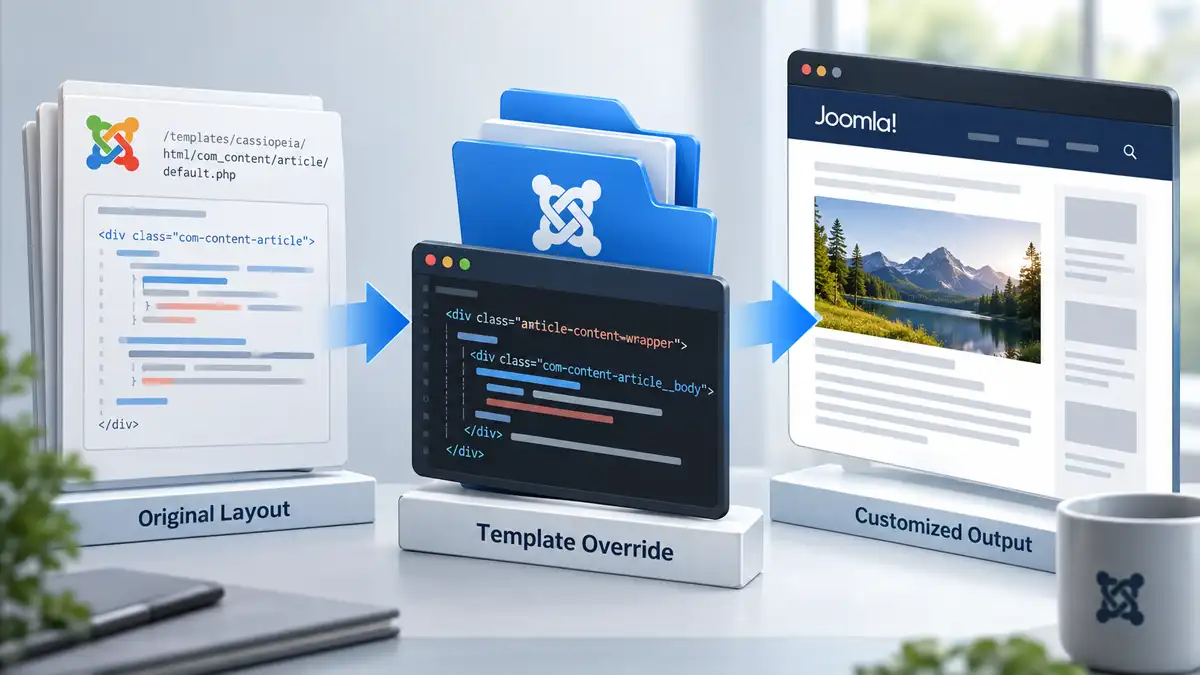
Joomla template overrides give you a way to change the HTML output produced by Joomla or an extension without editing the original files that provide that output. They are one of Joomla's most useful customization mechanisms, but they are also easy to use when a simpler change would have been enough.
The important question is not simply how to create an override. It is whether the change you are making actually requires one.
If a template setting, Joomla option, or a small amount of CSS can produce the result you need, creating an override may introduce unnecessary maintenance. When the markup itself needs to change, however, an override can provide a clean way to take control of that output while keeping the customization inside the template.
This article looks at how Joomla template overrides work, when they are appropriate, how to create one in Joomla 6.1, and what needs to happen after an override has been created so that it remains maintainable over time.
What Is a Joomla Template Override?
A Joomla template override is a template-level replacement for layout output that would otherwise be produced by Joomla or an installed extension.
When Joomla prepares a page, a component, module, or other extension may provide layout files responsible for generating part of the HTML sent to the browser. If the active site template contains an override for that output, Joomla can use the version stored in the template instead of the original layout.
This allows the template to change how the output is structured without modifying the extension's original files.
That separation is important. Editing a Joomla core or extension file directly can create a customization that disappears when the original file is replaced during an update. An override keeps the customized version in the template instead.
That does not make an override maintenance-free. It changes how the customization is maintained.
When Do You Actually Need a Template Override?
Overrides are powerful enough that it can be tempting to reach for one whenever Joomla's default output does not look exactly the way you want. Before doing that, identify what actually needs to change.
A useful progression is:
- Check the relevant Joomla, menu item, module, or template settings.
- Use CSS if the existing HTML structure already supports the presentation you need.
- Check whether an existing layout or alternative layout provides the required output.
- Create a template override when the markup or layout itself needs to change.
- Move into more extensive custom development only when the requirement cannot reasonably be handled by the mechanisms above.
This is not an absolute technical hierarchy. A particular requirement may justify moving directly to an override. The purpose of the progression is to avoid creating a structural customization for a problem that could have been solved more simply.
Start With Configuration
Joomla exposes many presentation choices through component options, menu items, modules, template styles, and individual content settings. If the output you need can be produced through those controls, there may be no reason to maintain a separate copy of a layout.
This is especially worth checking when the requirement involves whether something is displayed rather than how its underlying HTML is structured.
Use CSS When the Structure Is Already Right
If the existing markup contains the elements and structure you need, CSS may be enough to change spacing, typography, alignment, visibility, responsive behaviour, or other presentation details.
An override becomes more appropriate when CSS would be compensating for markup that is fundamentally wrong for the requirement.
For example, if you need to add, remove, reorder, or restructure elements in the output, changing the layout itself can be cleaner than trying to force a different structure through increasingly complicated CSS.
Use an Override When the Output Needs to Change
An override makes sense when the template needs control over markup that Joomla or an extension normally generates.
That might involve changing the structure of an article view, altering the markup generated by a module, moving information to a different location in the layout, or adapting extension output to fit the presentation architecture of a custom template.
The distinction is useful: CSS changes how existing markup is presented; an override can change the markup Joomla produces.
How Joomla Template Overrides Work
The basic mechanism is straightforward. Joomla or an extension contains the original layout files. The active template can contain corresponding files inside its html directory. When Joomla finds an applicable override there, that template-level version can be used for the rendered output.
For example, an Article view override created for Joomla's Cassiopeia template in Joomla 6.1.3 is stored in:
/templates/cassiopeia/html/com_content/article/On a clean Joomla 6.1.3 installation, creating this Article override generates two layout files in that directory:
default.php
default_links.php
These files become part of the template's presentation layer. The original files remain where Joomla provides them; the customized versions live separately in the template.
This is why overrides are fundamentally different from editing Joomla core files. The original implementation remains intact while the template supplies its own version of the relevant output.
Creating a Template Override in Joomla 6.1
Joomla provides an administrator interface for generating overrides, so you do not normally need to begin by manually locating and copying the original files.
In Joomla 6.1.3, go to:
System → Site Templates → Cassiopeia → Create Template Overrides
If you are working with another template, select that site template instead of Cassiopeia.
The Create Template Overrides screen groups the available override targets according to the components, modules, plugins, and layouts available on the site. The exact choices therefore depend on the Joomla installation and its installed extensions.

Creating an Article Override
For a standard Joomla Article view, select:
com_content → Article
On a clean Joomla 6.1.3 installation using Cassiopeia, Joomla creates:
/templates/cassiopeia/html/com_content/article/default.php
/templates/cassiopeia/html/com_content/article/default_links.php
At this point, the override exists, but you have not necessarily improved anything. Joomla has provided the template-level files that you can customize. The next task is understanding what those files do and changing only what the site actually requires.
Customizing the Override
The safest way to work with an override is to begin with the existing layout rather than treating the generated PHP file as an empty template.
Look at the markup, identify the part responsible for the output you need to change, and understand how the existing variables and layout calls are being used before removing or rearranging them.
This matters because an override is still participating in Joomla's output system. A change that appears to solve one visual requirement can also affect article information, links, custom fields, accessibility, structured markup, responsive behaviour, or functionality that was already being produced correctly.
Change Only What the Requirement Needs
An override does not need to be extensively rewritten simply because you now control the file.
Keeping the customized version reasonably close to the original can make its purpose easier to understand and can make later comparisons with updated Joomla or extension layouts more manageable.
If the requirement is to move one piece of output, change one wrapper, or add a class around a particular part of the layout, limit the override to that requirement where practical.
This also makes the reason for the override easier for another developer—or for you months later—to identify.
A Simple Article Override Example
A small structural change is enough to demonstrate why an override can be useful. In the Article view generated by Joomla 6.1.3, the main article content is output inside the following markup:
<div class="com-content-article__body">
    <?php echo $this->item->text; ?>
</div>
Suppose the template needs an additional wrapper around the article body as part of its layout structure. Because the required element does not exist in the original markup, this is a structural change rather than simply a styling change.
The corresponding section of the override could be changed to:
<div class="article-content-wrapper">
    <div class="com-content-article__body">
        <?php echo $this->item->text; ?>
    </div>
</div>
Joomla continues to provide the article content through $this->item->text. The override changes only the surrounding HTML structure required by the template.
The class name in this example is not important, and adding a wrapper should not become a reason to create overrides unnecessarily. The point is that the requirement involves markup that is not present in the original layout. If the existing structure already provided everything needed and only its appearance had to change, CSS would normally remain the simpler solution.
Test With Real Content
Do not test an override against only one ideal article or module.
If the layout can display images, article information, custom fields, links, different heading lengths, or optional content, test enough variations to expose assumptions in the customized markup. Also check the result at different viewport sizes and with the relevant Joomla display options enabled and disabled.
An override that works with one carefully prepared page but breaks when an optional element disappears is not a finished customization.
Template Overrides and Joomla Updates
Keeping the override outside the original extension solves one important update problem: an update does not normally replace the customized file in the template with a new copy of the extension's original layout.
That protection can also create a different problem.
If Joomla or an extension changes its original layout, your template may continue using an older customized version. The override can therefore survive the update while gradually diverging from the code it originally replaced.
This is why “the update did not overwrite my override” and “my override is current” are not the same thing.
Joomla Can Flag Overrides That Need Attention
Joomla includes override checking to help identify situations where an original file associated with an override has changed.
In Joomla 6.1.3, the Administrator dashboard Notifications module can report the status of template overrides. A site with no outstanding override changes can show Overrides are up to date. When relevant extension changes require attention, Joomla can instead report overrides that need to be checked.

This notification should be treated as a maintenance prompt rather than an instruction to replace the customized file with the latest original version.
The override exists because it contains intentional differences. The job is to determine what changed upstream, compare those changes with the customized version, and decide whether any of them need to be incorporated into the override.
Review the Difference, Not Just the Date
An older override is not automatically broken simply because the source layout has changed. Likewise, an override that still appears correct visually is not automatically safe to ignore.
The meaningful question is what changed in the original file.
A change may be irrelevant to the customization, or it may include markup, functionality, accessibility improvements, security-related handling, or other changes that should be reflected in the override.
That is why override maintenance requires comparison and judgment rather than automatically copying files again after every update.
Keeping Joomla Template Overrides Maintainable
The long-term quality of an override depends as much on restraint and documentation as it does on the code itself.
Keep overrides limited to requirements that genuinely need structural customization. Avoid changing unrelated parts of the layout merely because the file is already open. Where useful, document why an unusual change exists so that its purpose is clear during a future review.
It is also worth maintaining an awareness of which templates and extensions contain overrides. A site with one deliberate Article override has a very different maintenance profile from a site whose template replaces large portions of the output from Joomla and several third-party extensions.
The number of overrides is not automatically a problem. The important issue is whether those overrides have clear purposes and whether someone understands that they are part of the site's update responsibilities.
When an Override Is the Wrong Solution
Not every presentation problem should be solved by changing extension output.
If a Joomla option already controls the result, use that option. If the markup is appropriate and only its appearance needs to change, CSS is usually the simpler layer. If the requirement can be handled by an existing layout choice, there may be no benefit in maintaining another copy.
An override can also be the wrong approach when the requested change is really a content-architecture problem. Moving information around in a layout will not fix content that belongs in a different article, module, field, or component.
The goal is not to avoid overrides. It is to use them for the kind of problem they are designed to solve.
Using Overrides Without Making Joomla Harder to Maintain
Template overrides are one of the reasons Joomla can support substantial presentation customization while keeping content and core extension files separate. They let a template take responsibility for output that genuinely needs to differ from the default implementation.
That flexibility works best when an override is a deliberate architectural choice rather than the first response to every presentation request.
Start with the simplest appropriate customization layer. When the markup itself needs to change, create the override in the template, understand the original layout before modifying it, keep the customization focused, and treat future override notifications as part of normal site maintenance.
For the broader relationship between templates, template styles, module positions, overrides, child templates, and Joomla content, continue with the Joomla Template Guide.
Related Joomla Template Articles
Explore additional articles covering Joomla templates, customization, and layout structure.