
A Joomla template does much more than give a website its colours, fonts, and overall visual style. It provides much of the presentation structure that turns Joomla content into the pages visitors actually see, including where the main content appears, how supporting modules fit around it, how navigation is presented, and how the site adapts across different screen sizes.
That makes template choice an architectural decision as well as a design decision. A template that looks impressive in a demonstration may not necessarily suit the way your own site publishes articles, organizes categories, uses modules, or needs to be maintained over time.
This Guide explains how Joomla templates fit into that larger system. It covers what templates control, how template styles and module positions work, how templates shape content presentation, what to consider when choosing and customizing a template, and how decisions about overrides, dependencies, performance, accessibility, and maintenance affect the site over time.
The goal is not to turn you into a template developer. It is to help you understand Joomla's presentation layer well enough to choose, configure, customize, and eventually replace a template without confusing the design of the site with the content the site is built around.
What a Joomla Template Actually Controls
It is easy to think of a template as the Joomla equivalent of a visual skin. Appearance is certainly part of its job, but the template also helps define the framework within which Joomla presents the site. It establishes important parts of the page structure, provides styles for Joomla's output, defines locations where modules can appear, and determines how the surrounding interface is assembled around the main content.
Joomla itself continues to manage the underlying content. An article remains an article regardless of the template displaying it. Categories organize content, tags describe relationships, custom fields store structured information, and menu items help determine how visitors reach different views of that content. The Joomla Publishing Guide explores that broader publishing system and the relationship between content, organization, and presentation.
The template sits on top of those systems as part of the presentation layer. It influences how the resulting page looks and how its pieces are arranged, but it does not normally become the owner of the article text, category structure, or other core Joomla content.
Presentation Is Separate From Content
Consider a category containing twenty published articles. Joomla can store those articles, their authors, dates, tags, custom-field values, and category relationships independently of the template. A menu item can request a category blog view, and the template provides the surrounding structure and styling through which that output is presented.
Changing the template therefore does not ordinarily delete those articles or remove their category assignments. What can change considerably is their presentation. Typography, content widths, navigation treatment, module positions, spacing, responsive behaviour, layouts, and other template-specific configuration may all need to be reconsidered.
This is why content portability and presentation portability are not the same thing. Joomla can keep the underlying content intact while a change in presentation still requires work.
The Template as the Page Framework
On a typical Joomla page, the main component produces the primary content for the current request. That might be a single article, a category blog, a contact form, a search view, or output from another component. Modules can provide navigation, breadcrumbs, related information, banners, and other supporting elements around that main output.
The template provides the page framework into which these parts are placed. Its module positions provide locations where modules can be assigned, while its stylesheets and layouts help determine how the completed page is presented.
For a content-driven website, that makes article readability, category presentation, navigation, module placement, responsive behaviour, and maintainability at least as important as an impressive homepage.
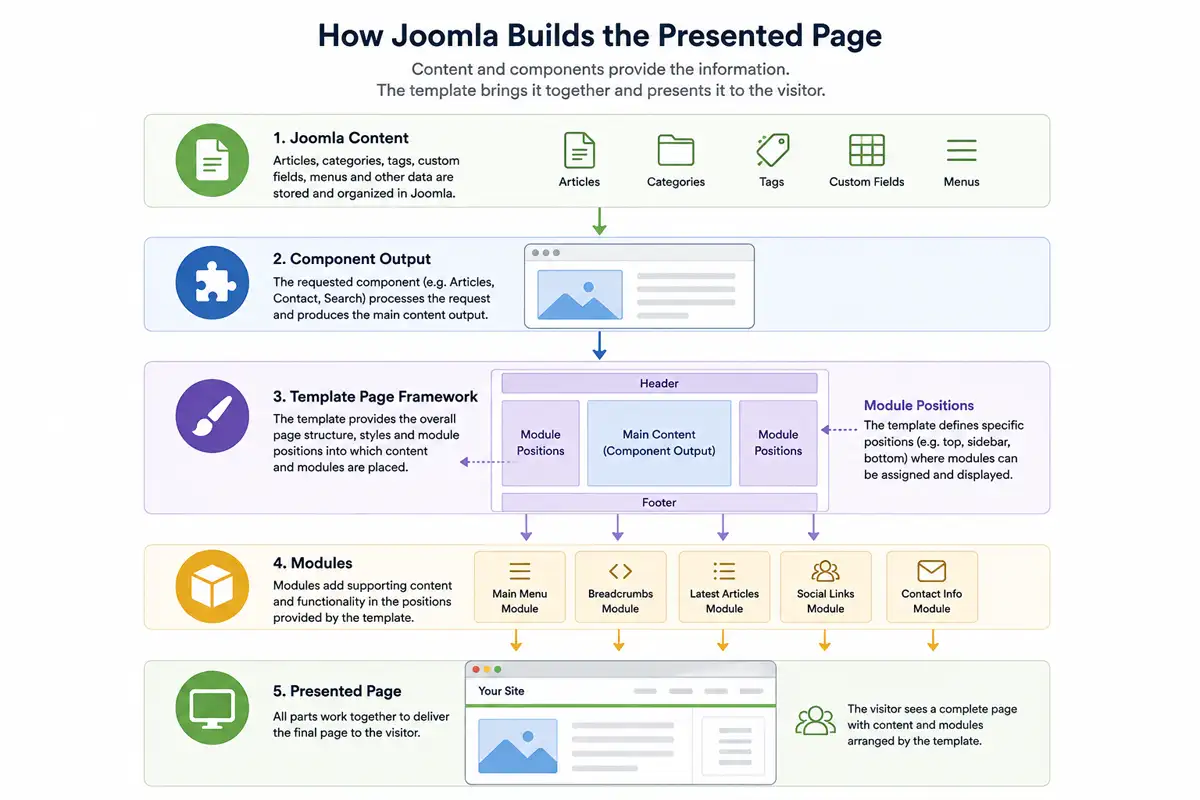
A useful way to think about it: Joomla manages the content and much of the site's underlying organization. The template provides much of the framework through which that content is presented.
How Templates, Styles and Module Positions Work Together
Installing a Joomla template does not mean that every page must use the same configuration. Joomla separates the template itself from template styles, while modules can be assigned to positions provided by the template. Together, these systems allow one template to support different page arrangements without requiring a separate design for every part of the site.
The Installed Template and Its Styles
A template is the collection of files and functionality that provides the underlying design and presentation system. A template style is a saved set of configuration options for that template.
This allows the same installed template to be configured differently for different parts of a website. For example, a publisher might use one style for the general site and another based on the same template for a special section. Both continue to rely on the same underlying template.
One style acts as the default unless Joomla has been instructed to use another assigned style for the current page. When the template provides the necessary options, multiple styles can therefore create controlled visual differences without requiring another template.
Menu Assignments and Different Page Treatments
A template style can be assigned to particular menu items, allowing Joomla to use that configuration when visitors reach those parts of the site.
For example, a publication could configure a separate style for its long-form journal section and assign it to the relevant menu item while the rest of the site continues using the default style. The content itself is not duplicated; the menu context determines which template style is used to present it.
Additional styles are most useful when each has a clear purpose. A large collection of nearly identical styles can make the site's presentation harder to understand and maintain.
Module Positions and Page Structure
A template defines named positions where modules can be displayed. Depending on the template, these might correspond to areas such as the header, navigation region, sidebar, footer, or locations before and after the main content.
The position name itself does not contain the content. It is a location made available by the template. Joomla modules are assigned to those positions and can then be controlled through Joomla's module settings and menu assignments.
If you are coming from WordPress, some of this may feel familiar. Joomla modules and WordPress widgets can both place supporting content around a page, although the two systems are organized differently and should not be treated as direct equivalents. The supporting Article WordPress Widgets vs Joomla Modules for Page Structure looks more closely at that relationship. For template purposes, the important point is that Joomla keeps the module itself separate from the template position where it is displayed.
This creates a flexible division of responsibility. The template determines which positions exist and how they are presented. Joomla determines which modules are assigned to those positions and under which conditions they appear.
A template might provide a sidebar position without requiring anything to be displayed there. A site owner could use it for navigation on one group of pages, related content on another, or leave it unused where a wider content area is preferable. Exactly how the page responds to an empty position depends on the template's implementation.
The number of positions is therefore less important than how well they are planned. A template may legitimately provide many positions when they support its intended layouts and remain predictable to use. Another may need only a few. What matters is whether the structure provides useful flexibility without making the site unnecessarily difficult to configure or maintain.
How Templates Shape Joomla Content Presentation
A template's architecture becomes most meaningful when it is applied to the content people actually visit. Articles may appear individually, within category views, on featured-content pages, and alongside different combinations of modules. A content-driven template needs to support those uses while maintaining readable typography, sensible proportions, and a consistent visitor experience.
Articles and Article Views
When an article is displayed on the front end, the template influences the width and spacing of the content area, typography, surrounding navigation, module placement, and the broader visual context in which Joomla's article output appears. Layouts and template overrides can take that relationship further by changing how particular output is structured.
Article presentation deserves particular attention because it is where readers may spend most of their time. A striking homepage has limited value if individual articles are uncomfortable to read. Line length, heading hierarchy, image treatment, metadata presentation, spacing, and the relationship between the article and surrounding elements all contribute to the reading experience.
Templates should therefore be evaluated with realistic content. Long and short articles, images, lists, tables, custom fields, and other common elements can reveal strengths or weaknesses that are not obvious from a carefully prepared demonstration.
Category and Blog Presentation
Joomla can present groups of articles through views such as a category blog. A category view may need to accommodate article titles, introductory text, images, publishing information, links to complete articles, and pagination while remaining easy to scan as the archive grows.
The appropriate presentation depends on the publication. A personal blog may benefit from a restrained single-column flow, while a larger publication may need layouts capable of presenting more content without making the page difficult to scan. The useful layout is the one that supports the volume, hierarchy, and type of content being published.
Modules Around the Main Content
Articles and category views rarely exist in complete isolation. Modules can provide navigation, breadcrumbs, related material, calls to action, newsletter signup forms, banners, or other supporting information around the primary component output.
Thoughtful template planning considers how those elements support rather than compete with the main content. A content-heavy site might need a sidebar on some pages, supporting modules below an article, prominent navigation above the main content, or several useful footer areas. Another site may require very few positions.
Well-planned positions can provide substantial flexibility while allowing unused areas to disappear cleanly when no modules are assigned. This lets the same template accommodate different page requirements without forcing every page into an identical arrangement.
Structured Content and Custom Fields
Joomla custom fields make the separation between stored content and presentation particularly useful. Information can be stored as structured content rather than embedded manually into an article's prose or recreated as part of the page design.
A publication might, for example, use fields for information that appears consistently across a particular type of article. Joomla retains those values as part of the content, while the presentation layer determines where and how they appear to readers.
The supporting Article Joomla Custom Fields: Structured Content Without Extra Extensions examines the content-structuring side of this relationship in greater depth. For template purposes, the important principle is that structured Joomla content can be presented in different ways without requiring the template to become the place where that information is stored.
With those relationships established, template selection becomes less about finding a design that looks attractive in isolation and more about finding a presentation system that fits the website you actually intend to build and maintain.
Choosing a Template for a Content-Driven Joomla Site
Choosing a Joomla template often begins with appearance. That is understandable: typography, colour, imagery, spacing, and page composition are immediately visible, while structural and maintenance characteristics take longer to discover. For a content-driven website, however, appearance is only one part of the decision.
A template becomes part of the site's working environment. It needs to accommodate the content being published, the layouts the site requires, the modules and navigation used around that content, and the people who will maintain the site after the initial design work is finished.
The more useful question is therefore not simply, "Does this template look good?" It is, "Does this template provide an appropriate presentation system for this website?"
Start With the Site, Not the Demo
Template demonstrations are designed to show a product at its best. They may use carefully selected photography, concise sample text, ideal content lengths, and a page structure chosen specifically for the design. Your own website will have different content and requirements.
Before comparing templates, identify the structure the site actually needs. Consider the kinds of content being published, the importance of individual articles compared with category or archive pages, navigation depth, module requirements, image use, and whether different sections need different presentation treatments.
A magazine with several active content sections has different structural needs from a writer publishing long-form essays. A photography journal may give images considerably more prominence than a technical publication. A personal blog may need only a small number of carefully planned module positions, while a larger editorial site may legitimately require a more flexible position structure and several ways of presenting collections of content.
For sites built primarily around blogging, the Joomla Blogging Guide examines the broader content structure, publishing workflow, and site-planning decisions that the template ultimately needs to support.
The template architecture should be appropriate to the job. Useful functionality can increase flexibility when it is deliberately planned into the template. Complexity becomes a concern when additional architecture provides little benefit, is difficult to understand, or creates maintenance obligations disproportionate to what the site needs.
Evaluate Publishing Layouts and Typography
For a content-driven site, individual articles and content indexes deserve at least as much attention as the homepage. These are often the pages visitors reach through search engines, internal links, newsletters, or social referrals, and they may account for most of the time readers spend on the site.
Examine how the template handles realistic article content. Long-form text should remain comfortable to read. Headings should create a clear hierarchy. Lists, tables, images, captions, metadata, and other common content elements should fit naturally into the design. The content area should have sensible proportions rather than merely filling whatever space remains after decorative page elements have been added.
Category and blog layouts deserve similar scrutiny. Look at how easily visitors can distinguish articles, scan titles and introductory text, understand supporting metadata, and move deeper into the archive. A layout intended for a publication should continue to work when the site contains dozens or hundreds of articles rather than only the small collection shown in a demonstration.
Typography is particularly important because it affects nearly every content page. Font choice matters, but so do line length, line height, heading proportions, spacing between content elements, contrast, and behaviour across screen sizes. Attractive typography in a promotional screenshot still needs to work when used for a 2,000-word article.
Look Beyond the Homepage
Homepages tend to receive disproportionate attention during template selection. Explore the template's article views, category layouts, search results, navigation, pagination, forms, module treatments, and other pages relevant to the project. Resize the browser or inspect the demonstration on different devices. Consider what happens when titles are longer, images have different proportions, a module is absent, or a page contains substantially more content than the demonstration.
This helps reveal whether the design is a coherent system or primarily an attractive front page supported by less-developed internal views.
It is also useful to determine how much of the demonstration comes from the template itself and how much depends on additional extensions, custom content, a page builder, or other functionality. A feature shown in a demo is not necessarily part of the template, and reproducing it may require more than installing the template package.
Understand Flexibility in Context
Flexibility is valuable when it corresponds to realistic ways the template may be used. Module positions, template settings, layout choices, style variations, and other options can allow one template to support different presentation requirements.
The number of options alone does not indicate how flexible a template will feel in practice. A smaller set of carefully chosen controls may cover the important decisions efficiently, while a larger configuration system can also work well when its options are logically organized and serve genuine purposes.
What matters is the balance between functionality and efficiency. Site owners should be able to understand how the template is structured, make common changes without unnecessary difficulty, and identify where more advanced customization belongs. Module positions provide a good example: many well-planned positions may suit a complex publication, while another template may accomplish its purpose with far fewer. Their usefulness depends on how they support the intended layouts and behave in practice.
Understand Dependencies Before Committing
A Joomla template may operate largely through Joomla's existing template, menu, module, and content systems, or it may depend on additional frameworks, extensions, libraries, or page-building tools. Those approaches can provide useful capabilities, but the dependencies should be understood before the site is built around them.
Look at what additional software is required, where important presentation configuration will live, what needs to be updated, and whether changing that system later would affect content or page layouts. A dependency may be entirely justified when its benefits are important to the project. The decision is stronger when that trade-off is deliberate rather than discovered after the website has already been built.
Consider Maintenance Before the Site Is Built
A template is software as well as design. Before committing to one, consider whether it is actively maintained for current Joomla releases, how updates are distributed, how customizations are intended to be handled, and whether useful documentation is available.
It is also worth considering how easily another knowledgeable Joomla user could understand the site later. Good maintainability does not require eliminating customization or advanced functionality. It comes from making those decisions deliberately and keeping the resulting architecture understandable.
| Question to ask | What you are evaluating |
|---|---|
| Does the template suit the content I actually publish? | Fit with articles, categories, archives, imagery, and the site's publishing model. |
| Are individual articles comfortable to read? | Typography, content width, spacing, metadata, images, and long-form readability. |
| Do category and blog views remain useful as the archive grows? | Scanning, content hierarchy, navigation, pagination, and long-term publishing use. |
| Are the module positions appropriate for the site? | Whether supporting content can be placed where it is genuinely needed. |
| Does the design work beyond the homepage? | Consistency across internal views, different content lengths, and different devices. |
| Can I customize it without fighting its architecture? | Quality of settings, structure, CSS, layout options, and supported customization methods. |
| What additional software does the design depend on? | Frameworks, builders, extensions, libraries, update relationships, and possible lock-in. |
| Is it actively maintained and documented? | Compatibility with current Joomla releases and the practical cost of owning the template over time. |
| How does it perform with realistic content? | Front-end efficiency rather than assumptions based on appearance or feature count. |
| Can visitors use it comfortably across devices? | Responsive behaviour, readability, navigation, interaction, and accessibility considerations. |
No single criterion should decide the selection by itself. Template choice involves trade-offs, and the objective is to understand them before they become part of the site's foundation.
Customizing a Joomla Template Without Creating Unnecessary Complexity
Few websites use a template exactly as it was supplied. Colours, typography, spacing, module arrangements, branding, and other presentation details commonly need adjustment. More substantial projects may also require changes to layouts or Joomla's rendered output.
The question is not whether a template should be customized, but how to make those changes at the appropriate level. A useful approach is to begin with the least invasive method that can satisfy the requirement and move deeper into the template architecture only when there is a reason to do so.
Use the Simplest Appropriate Customization
The first place to look is normally the configuration already provided by the template and Joomla. Template settings may cover typography, colours, layout behaviour, branding, container widths, or other aspects of the design. Template styles, module assignments, and menu-item settings can also solve page-specific requirements without modifying the template itself.
CSS is another common customization layer. When the underlying structure already does what the site needs, CSS can often change presentation without replacing layouts or altering template files.
Deeper customization becomes appropriate when the requirement is structural rather than primarily visual. A site may need Joomla output arranged differently, additional information placed in a particular part of a layout, or a template-level change that cannot be achieved cleanly through configuration and CSS alone. Joomla provides mechanisms such as layouts, template overrides, and child templates for these situations.
Using a more advanced technique does not automatically produce a better customization. If a setting or a small amount of CSS solves the requirement cleanly, creating an override may simply introduce code that needs to be maintained. Conversely, when a structural change is genuinely required, an appropriate Joomla mechanism can be cleaner than forcing the result through increasingly complicated CSS or workarounds.
Know When a Small Change Becomes Architecture
Customization becomes more significant when it changes how the site is assembled rather than only how it looks. Changing a colour or adjusting spacing is usually a presentation detail. Replacing a Joomla layout, changing how article information is structured, or adding new template behaviour affects more of the site's architecture.
At that point, consider where the customization will live, what it depends on, and whether someone maintaining the site later will be able to identify why it exists. Significant overrides, child-template changes, custom CSS, and other site-specific presentation decisions are easier to maintain when their purpose is documented.
Customization should match the problem: use template and Joomla settings when configuration is enough, CSS when the structure is already appropriate, and deeper template mechanisms when the required change is genuinely structural.
Once customization reaches that structural level, layouts, template overrides, and child templates provide Joomla-specific ways to change presentation without unnecessarily changing the underlying content or extension logic.
Layouts, Overrides and Child Templates
Template settings and CSS can handle many presentation changes, but they do not cover every requirement. Sometimes the structure of Joomla's output needs to change, or a site needs template-level customizations that should remain separate from the original template files. Joomla provides several mechanisms for working at this deeper level without requiring the underlying content or extension logic to be rewritten.
Layouts, template overrides, and child templates solve different customization problems. Understanding their roles is more important for most site owners than knowing how to create them by hand.
Layouts and Alternative Presentation
Joomla components and modules commonly use layout files as part of the process that turns prepared data into the HTML presented on the page.
This approach allows presentation to change without changing the component's core purpose. The same article data, for example, can be presented differently depending on the layout being used while remaining the same Joomla article underneath.
Some extensions and Joomla views provide alternative layouts that can be selected through configuration. A template can also supply layouts designed to work with its own presentation system. For a site owner, the important principle is that a layout changes how information is presented rather than creating another copy of the content.
What Template Overrides Change
A template override allows a template to provide its own version of output that Joomla would otherwise render using an extension's standard layout. Joomla looks for the appropriate override in the template and uses it when one is available.
This is useful when the standard output is functionally correct but does not match the structure required by the design. An override can rearrange information, change surrounding markup, introduce a different presentation for particular data, or otherwise adapt output without directly editing the original component or module files.
Editing files inside Joomla core or an extension directly can cause customizations to be overwritten during an update and makes the modification harder to separate from the software being customized. Overrides provide a Joomla-supported way to place those presentation changes within the template instead.
Overrides are powerful, but they are an advanced customization mechanism rather than a routine requirement. They can apply to Joomla's own output as well as compatible third-party extension output, and their implementation can become considerably more technical than the concepts needed for template selection and site ownership.
An override may also need review when the extension or layout it replaces changes over time. For that reason, detailed override creation, implementation, and update management are better treated as specialist topics rather than expanded into a development tutorial here.
Where Child Templates Fit
A child template addresses a different customization problem. Rather than modifying the original template directly, a child template can inherit from a parent template while providing its own files where changes are required.
This can be useful when site-specific template customizations should remain distinct from the parent. The parent continues to provide the underlying template, while the child contains the files or changes required by the site's presentation.
The practical advantage is separation. Custom work does not have to be mixed indiscriminately into the original template files, making it easier to identify what belongs to the base template and what was changed for the site.
Not every site needs a child template. If the required changes are already supported through template settings, styles, CSS, or other appropriate mechanisms, introducing one may provide little benefit. Its value becomes clearer when site-specific template customization is substantial enough that separating it from the parent improves organization and maintainability.
Layouts, overrides, and child templates give Joomla several ways to accommodate presentation requirements beyond ordinary configuration. The appropriate mechanism depends on what needs to change and how deeply that change reaches into the site's presentation architecture.
Understanding Framework and Page-Builder Dependencies
Joomla's template system can be used in different ways. Some templates stay relatively close to Joomla's native template, menu, module, layout, and content systems. Others introduce a template framework, page builder, or additional tools that provide their own configuration and presentation capabilities.
The important distinction is not whether an additional layer exists, but what role it plays in the site and what becomes dependent on it.
Different Ways to Build on Joomla
A template framework can provide features such as layout controls, styling systems, reusable configuration, and additional template functionality. A page builder can provide a visual interface for assembling pages from rows, sections, elements, or other building blocks. Depending on the product, a template and builder may also be designed to work together as part of a larger system.
These tools can make certain layouts faster to create, provide design controls that would otherwise require custom development, or establish a familiar workflow for people who regularly build sites with them.
A Joomla site does not necessarily require these additional layers. Core Joomla already provides articles, categories, custom fields, menus, modules, template styles, layouts, overrides, and other capabilities that can form the foundation of a content-driven website. Whether another presentation system is useful depends on what the project needs beyond that foundation.
Dependencies Are an Architectural Choice
Adding a framework or builder can change where presentation configuration is stored, how layouts are created, what software needs to remain installed and updated, and how easily parts of the design can be moved to another presentation system later.
That does not make a dependency inherently undesirable. Joomla itself is a dependency, as are the extensions and template required by the site. The practical question is whether each additional dependency provides enough value to justify the role it takes on.
The distinction becomes particularly important when content and presentation overlap. If an article remains primarily Joomla content and the template controls its presentation, much of that content can remain intact when the template changes. If important page content or layout structure is stored through a template-specific or builder-specific system, changing that system may require more reconstruction.
The amount of work varies considerably between products and implementations, so understanding where content and presentation information live is more useful than assuming every framework or builder creates the same kind of dependency.
Keep the Decision Tied to the Site's Requirements
For a content-driven Joomla site, begin with the publishing requirements and determine what is actually missing before adding another presentation layer. If Joomla and the selected template already provide the necessary article layouts, category presentation, module structure, navigation, and customization options, another system may provide little practical benefit.
If the project genuinely requires capabilities that a framework or builder provides effectively, using one can be a reasonable architectural decision. The important part is knowing what the site gains, what becomes dependent on the additional software, and what maintaining or replacing that software could involve later.
Dependencies should be deliberate: choose a framework, builder, extension, or other presentation tool because it solves a requirement that matters to the site. A simpler architecture and a more elaborate one can both be appropriate when their complexity is proportional to the job they need to do.
Performance, Accessibility and Responsive Presentation
A template has a direct influence on the front end visitors receive, so performance, accessibility, and responsive behaviour belong in any serious template evaluation. They should not, however, be judged from the template in isolation. Hosting, extensions, images, content, configuration, third-party services, and other parts of the site can all affect the finished result.
The useful question is whether the template provides a sound foundation rather than creating unnecessary obstacles that the rest of the site must compensate for.
Performance Is More Than the Template
A lightweight template can help keep the front end efficient, but template choice alone cannot guarantee a fast website. CSS and JavaScript, fonts, images, extensions, external services, caching, hosting, and the way pages are assembled all contribute to performance.
When evaluating a template, look for proportionality. Features that serve a genuine purpose may justify the resources they require, while functionality loaded throughout the site but rarely used can add cost without improving the visitor experience.
The existing Article Website Performance Is a System, Not a Single Fix examines the broader performance relationship in more detail. For template selection, the main principle is to begin with an efficient presentation foundation and evaluate the completed website rather than assuming any one template characteristic determines performance by itself.
Responsive and Accessible Presentation
A content-driven site needs to remain usable across different screen sizes and methods of interaction. Responsive design involves more than fitting the page into a narrower viewport. Navigation, typography, images, tables, modules, forms, spacing, and interactive controls all need to remain practical as the available space changes.
Accessibility similarly reaches beyond any single template feature. Semantic page structure, sufficient contrast, understandable navigation, keyboard interaction, visible focus states, meaningful form behaviour, and appropriate treatment of interactive elements all contribute to whether visitors can use the site effectively.
A template can provide a strong baseline for these qualities, but later customization, content choices, extensions, and other additions also affect the result. Accessibility and responsive behaviour should therefore be evaluated as characteristics of the finished site rather than assumed from the template alone.
Evaluate the Front End as a Reader
Technical measurements are useful, but a template should also be experienced as a visitor would experience it. Read a complete article on a phone. Navigate through several levels of the site. Open a category containing realistic content. Use forms and menus with a keyboard where practical. Increase the browser's text size. Look for elements that become crowded, difficult to distinguish, or unnecessarily distracting.
This kind of testing can expose problems that are easy to overlook while concentrating on design settings. A template ultimately succeeds on the front end, where visitors encounter the combined result of its structure, the site's content, Joomla's output, and any additional functionality.
Updates and Long-Term Template Maintainability
A Joomla template is not a design that can simply be installed and forgotten. Joomla continues to evolve, browsers change, accessibility expectations improve, and extensions used alongside the template receive their own updates. A template needs to remain compatible with that changing environment.
Templates Are Software as Well as Design
An actively maintained template should keep pace with supported Joomla releases and address compatibility or technical issues as they arise. Before adopting a template, it is worth understanding how updates are distributed, what support period is provided, and whether the developer communicates important compatibility information.
Compatibility is not limited to whether a page still loads after an update. Changes in Joomla, PHP, browsers, or related extensions can expose less obvious problems, which is why template updates belong within normal site maintenance and testing.
Protect Customizations From Updates
How a template is customized has a major effect on how easily it can be updated. Direct changes to files replaced by a template update can be lost, while custom CSS, overrides, child-template files, and other supported customization mechanisms can provide clearer separation between the distributed template and site-specific work.
That separation does not make customizations immune to change. An override may need attention when the output it replaces evolves, and a child template can still be affected by changes in its parent. The advantage is that intentional site-specific work is easier to identify and evaluate instead of being mixed unpredictably into files supplied by the template developer.
The more extensive the customization, the more useful it becomes to document significant structural changes, overrides, dependencies, and unusual configuration decisions. Future maintenance should not depend on one person remembering how the site was assembled.
Maintainability Includes the Whole Presentation System
If the site's presentation depends on a framework, builder, supporting extension, external library, or other tool, those components become part of the update and compatibility picture as well.
A maintainable site is not necessarily one with the fewest components. It is one where components and customizations have clear purposes, their relationships are understood, and the effort required to keep them working remains reasonable for the value they provide.
This is particularly important for a site expected to publish for years. A presentation system that remains understandable is easier to test, troubleshoot, hand over, and improve as the website evolves.
The existing Articles Why Website Maintenance Gets Harder as Sites Grow and Why CMS Updates Sometimes Break Websites examine those broader maintenance issues beyond the template layer. Here, the important point is that maintainability should influence template decisions from the beginning rather than being treated as a problem for a future version of the site.
Changing Templates Without Rebuilding Your Content
One of the advantages of separating content from presentation is that changing a Joomla template does not normally mean starting the website again. Articles, categories, tags, custom fields, menus, and modules are managed by Joomla rather than being inherently stored inside the template.
That does not mean changing templates is a one-click design swap with no further work. The content may remain intact while parts of its presentation need to be reassigned, reconfigured, or redesigned for the new template. How much work is involved depends heavily on how the original site was built.
What Usually Remains in Joomla
Consider an established publication containing hundreds of articles organized into categories and enriched with tags and custom fields. Replacing the template does not ordinarily require those articles to be recreated. Their content and Joomla relationships remain in the content system.
The same general principle applies to menus and modules. They are Joomla records rather than files belonging to a particular template. Installing or selecting another template does not inherently erase them.
This separation matters because content is usually one of the site's most valuable long-term assets. A publication may redesign several times during its life while retaining years of articles and structured information. Custom fields provide a good example: stored field values can remain available even when a new design presents that information differently.
What Needs to Be Reconfigured
Presentation-specific configuration is where a template change requires more attention. Different templates can define different module positions, provide different settings and style options, and implement their layouts in different ways.
A module assigned to a position in the old template may still exist after the change, but the new template may not provide that position. The module then needs to be assigned to an appropriate location in the new structure. Similar review may be needed for template-style assignments, navigation presentation, content widths, typography, image treatment, and other design decisions.
Custom CSS also needs to be evaluated. Rules written for the old template may refer to its particular HTML structure or classes and may no longer apply to the new one. Overrides and child-template customizations are likewise tied to the presentation architecture in which they were created and should be reviewed rather than assumed to transfer unchanged.
Ordinary content deserves visual testing after the change as well. Tables, images, forms, headings, lists, embedded media, and long articles may behave differently when the surrounding CSS and available content width change.
| Usually remains as Joomla-managed content or configuration | Commonly needs presentation review |
|---|---|
| Articles and article content | Typography, spacing, and article presentation |
| Categories and content organization | Category and blog layouts |
| Tags and custom-field values | How structured information is displayed |
| Menu items | Navigation styling and template-style assignments |
| Modules and their content | Module positions and surrounding presentation |
| Core Joomla content relationships | Custom CSS, overrides, and template-specific customizations |
The distinction is not absolute in every implementation, but it provides a useful way to plan a template change: preserve the Joomla-managed information and systematically review the presentation decisions built around the previous template.
Avoiding Unnecessary Presentation Lock-In
The amount of reconstruction required during a template change is influenced by where the original site placed its content and layout information.
When articles remain primarily Joomla articles, structured information remains in Joomla fields, modules remain Joomla modules, and the template is primarily responsible for presenting those systems, much of the site's underlying content architecture can remain useful when the design changes.
If important content or page structure depends on template-specific functionality, a framework, a builder, or another presentation tool, replacing that system may involve additional work. The extent varies by implementation: some tools make migration relatively straightforward, while others may require layouts or portions of pages to be reconstructed.
Portability is therefore better understood as a spectrum than as a promise that changing templates will require no work. A Joomla-native content architecture can reduce the amount of information tied to one presentation system, but every real redesign still requires testing and adjustment.
Planning for portability does not mean designing a site around a hypothetical future migration. It means avoiding unnecessary coupling when there is no corresponding benefit. If a template-specific feature solves an important requirement, using it may be entirely reasonable. If the same result can be achieved cleanly while keeping reusable content in Joomla, doing so can preserve more options later.
A template change provides a useful test of the architecture described throughout this Guide. The strongest separation is not one where the presentation never changes. It is one where the presentation can change without forcing the site's accumulated content to be rebuilt along with it.
Building a Presentation Layer That Can Last
A Joomla template sits at the point where content, navigation, modules, layouts, and other parts of Joomla become the experience presented to visitors. Choosing one well therefore requires looking beyond appearance to the structure and responsibilities that come with it.
For a content-driven site, the strongest template is not necessarily the one with the fewest features or the greatest number of options. It is one whose architecture fits the site's publishing requirements, provides useful flexibility without unnecessary complexity, and can be customized and maintained in ways that remain understandable over time.
Keeping reusable content in Joomla also gives the presentation room to evolve. Templates, overrides, styles, modules, and additional tools can then be chosen according to what the site needs without unnecessarily tying its accumulated content to one design.
A good template decision should help the site publish effectively today while leaving enough clarity, maintainability, and portability for the presentation to change as the website grows.