

Installing an extension can sound like a relatively small change to a website. You need a particular feature, find an extension that provides it, install it, configure a few options, and continue building the site.
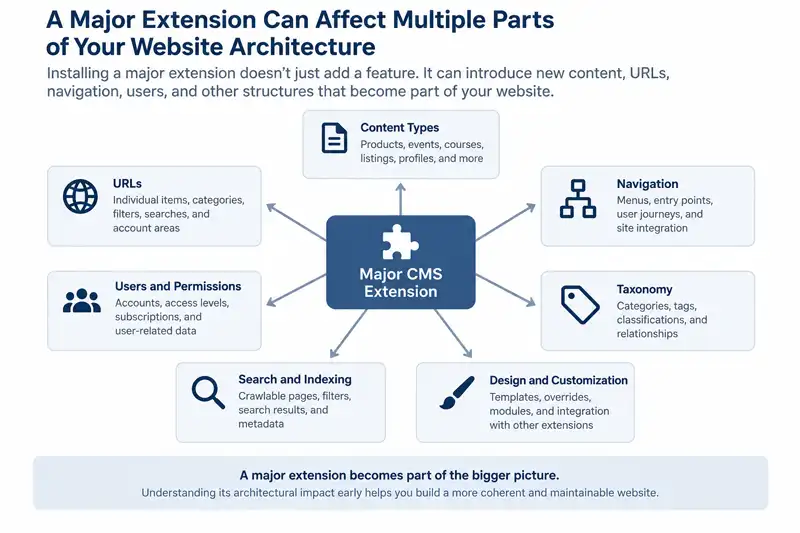
That may be true for a small extension with a narrowly defined purpose. Major CMS extensions can be different. An e-commerce system, directory, membership system, learning platform, booking system, forum, or event manager can introduce its own content types, categories, URLs, navigation requirements, user accounts, permissions, and templates.
At that point, the extension isn't simply adding a feature to the website. It is becoming part of the website's architecture.
This is why major functionality should be considered while planning the site's structure rather than added as an afterthought. Understanding what an extension will introduce can help you build the rest of the website around it deliberately and avoid structural problems that become difficult to change later.
Not Every Extension Has the Same Architectural Impact
CMS extensions range from small additions to systems that introduce substantial new areas of a website. Treating all of them as equivalent can make it easy to underestimate what a larger extension will require.
A relatively small extension might add a focused feature without significantly changing how the site's content is organized. A larger extension can introduce an entire content system of its own. Depending on its purpose, that might include:
- products, product categories, customer accounts, and checkout functionality;
- directory listings, profiles, locations, and submission workflows;
- courses, lessons, enrolment, and restricted learning content;
- events, venues, registrations, and schedules; or
- memberships, user profiles, access levels, and account areas.
The distinction matters because these systems have consequences beyond the feature they provide. Their content and functionality need to fit into the site's hierarchy, navigation, URLs, permissions, design, and long-term maintenance.
Before choosing a major extension, it is therefore useful to ask a broader question than whether it provides the features you need: What will this extension add to the structure of the website?
Major Extensions Can Introduce Their Own Content Types
One of the first things to examine is what kinds of content the extension will introduce. A CMS may already have its own articles, pages, categories, tags, or other native content structures, while a major extension can add separate content types designed around its particular purpose.
These aren't necessarily variations of the CMS's normal articles or pages. Products, events, courses, listings, profiles, and similar items can be distinct types of content with their own fields, relationships, display options, and management workflows. A purpose-built content model is often more appropriate than trying to force specialized information into a general-purpose article system.
Before implementation, decide which information will remain in the CMS's native content system, which will belong to the extension, and where the two need to connect. Making that distinction early can prevent similar information from being maintained in several places simply because responsibility for the content was never clearly defined.
The Extension Can Affect Your URL Structure
New content types usually need URLs. Once a major extension begins generating products, listings, events, courses, profiles, or other content, it can also become responsible for a significant portion of the website's URL structure.
The details vary considerably between CMSs and extensions. Some give you substantial control over routing and aliases, while others make more decisions for you. Before building around an extension, investigate how it handles:
- individual content-item URLs;
- categories and other collection views;
- filters, searches, and pagination;
- account or user-related areas;
- aliases, routing, and other URL controls; and
- changes to URLs if the site's structure is reorganized later.
This matters particularly when an extension will be responsible for hundreds or thousands of important pages. Changing the system later may affect URLs that search engines have indexed, visitors have bookmarked, other websites have linked to, or the site itself uses internally.
You don't necessarily need to determine every final URL before choosing an extension. You should, however, understand the general structure it creates and whether that structure gives you enough control for the website you are planning.
Navigation Needs to Accommodate the New System
A major extension also has to become part of the way visitors move through the website. Installing the functionality doesn't automatically determine where it belongs in the site's navigation or how visitors should reach the content it provides.
A store might need entry points for major product areas, while a learning system might need separate paths for browsing courses and accessing enrolled content. Membership systems can introduce account areas, while directories may require visitors to move between categories, search results, listings, and submission forms.
These paths should be considered as part of the overall website rather than as navigation that belongs only to the extension. Visitors generally don't care which part of the CMS produced a page; they need the transition between ordinary website content and extension-generated content to make sense.
Planning major functionality early allows navigation to reflect the complete visitor journey instead of being established first and rearranged later to make room for a substantial new system.
Extensions Can Introduce Their Own Taxonomy
Content types often come with their own ways of organizing content. A major extension may provide categories, tags, attributes, locations, topics, product types, or other classifications that are separate from the CMS's native organizational system.
That separation can be useful. Product categories may need to behave differently from categories used for editorial content, while a directory may need classifications and locations that would make little sense in the site's normal article structure. Problems arise when several organizational systems overlap without each having a clear purpose.
Before creating an extension's taxonomy, consider questions such as:
- What does this classification help visitors or administrators accomplish?
- Does similar organization already exist elsewhere in the CMS?
- Will it be used for navigation, filtering, display, or content management?
- Does extension content need to relate to editorial content covering the same subjects?
- Will maintaining separate organizational systems create unnecessary duplication?
Two structures can use the same terminology without actually being connected. An editorial category and a product category with the same name, for example, may still be completely separate behind the scenes. Recognizing that distinction early can prevent the site's organization from becoming more complicated than visitors or administrators need.
User Accounts and Permissions Can Become Part of the Architecture
Some extensions don't just introduce new content. They also introduce new relationships between the website and its users. Membership systems, online stores, learning platforms, directories, forums, and booking systems may need registration, account pages, user profiles, restricted content, submissions, or different levels of access.
Depending on the extension, these features may work with the CMS's existing user system, introduce additional permission rules and user-related data, or combine several approaches. That can require decisions about:
- who can view restricted content;
- who can create, submit, or edit information;
- what different types of users can manage;
- where visitors go after registering or logging in; and
- where account-related pages fit into the rest of the website.
Permissions can also affect administrative workflows. A directory that accepts public submissions has different requirements from one maintained entirely by administrators. A learning system may need instructors to manage course material without giving them broader control over the website, while store staff may need access to products or orders without access to unrelated configuration.
If user accounts, access control, or front-end submissions are central to the site's purpose, they aren't merely settings to deal with after installation. They are part of the architecture that should be considered during planning.
Consider Which Extension-Generated Pages Should Be Indexed
Once an extension introduces content types, classifications, filters, search tools, and other views, it may also create pages that search engines can discover. Some may be valuable destinations, while others exist primarily to help visitors interact with the website.
A product page, event, course, or directory listing may contain substantial content that you want search engines to find. Filtered views, internal search results, account pages, or multiple ways of displaying substantially the same information may not have the same search value. These kinds of structural issues can also contribute to duplicate URLs and indexing problems when a CMS or extension exposes multiple paths to similar content.
The exact behaviour depends on the CMS, extension, configuration, and search-engine directives involved, so don't assume that every page an extension can display will be indexed. Instead, examine which URLs and views the system can expose and decide which ones you want search engines to treat as useful search destinations.
This becomes particularly important when an extension can generate many combinations of views or parameters. Understanding that behaviour before launch gives you an opportunity to configure the system deliberately rather than discovering later that search engines have found parts of it you never intended to treat as important landing pages.
A Major Extension Can Become a Long-Term Dependency
A useful distinction: When an extension introduces substantial content, URLs, navigation, users, permissions, or other structures, it isn't simply adding a feature to the website. It is becoming part of the website's architecture.
The deeper the extension becomes integrated into the website, the more areas may need to be considered if it is eventually changed or removed. Depending on the system, these can include:
- content and data stored in extension-specific structures;
- URLs that need to remain available or be redirected;
- categories, fields, attributes, or other organizational data;
- user accounts, permissions, subscriptions, or transaction records;
- connections with payment systems, email services, analytics, or other extensions;
- modules, widgets, plugins, or other features that depend on the extension; and
- custom presentation or template work created specifically for its output.
That last point can be easy to overlook. In Joomla, many third-party extensions provide output that can be customized through template overrides. When an extension supports Joomla's override system, this can be extremely useful because its presentation can be customized without directly modifying the extension's original files.
Those Joomla template overrides still become part of the site's maintenance responsibilities. If a later extension update changes the markup, functionality, or assumptions of the original template files, existing overrides may need to be reviewed and updated. The extension can therefore become connected not only to the site's content architecture but also to its customization and maintenance layers.
None of this means that a major extension should be avoided. It means that the cost of adopting one should be considered in terms of the role it will occupy in the website, not merely the effort required to install it.
Replacing an Extension May Become a Migration Project
A small extension can sometimes be removed with relatively little effect on the rest of the site. Replacing a system that manages hundreds of products, events, directory listings, courses, memberships, or other important records is a different problem.
The question isn't simply whether another extension can provide equivalent features. You may also need to determine whether existing data can be exported, how it maps to the replacement system, whether URLs can be preserved, what happens to metadata and media, and which integrations or customizations have to be rebuilt.
This makes data portability worth investigating before an extension becomes deeply established. Useful questions include whether the system provides practical export options, whether important information is stored in accessible formats, and whether documentation exists for moving data into or out of the system.
A migration will rarely be completely effortless, and portability shouldn't be treated as the only criterion for choosing software. But understanding how difficult it would be to leave a system gives you a better picture of the long-term commitment you are making when you adopt it.
Evaluate the Architecture Before Building Around the Extension
You don't need to predict every future requirement before installing a major extension. You should understand enough about the system to know what kind of website you will be building around it.
Examine the Content Model
Look at the content types the extension creates and the information each one stores. Determine whether those structures match the content the website actually needs and where they will overlap with native CMS content.
Explore the Front End
Don't evaluate the extension only from its administration interface or feature list. Look at the pages it produces for visitors, how people move between them, what URLs are created, and how the output fits with the rest of the website.
Understand Accounts and Workflows
If the extension involves registration, submissions, purchases, bookings, memberships, or restricted content, follow those processes from beginning to end. Consider both the visitor experience and what administrators or other site managers need to do afterward.
Investigate Customization and Integration
Find out how the extension works with the site's template, other extensions, external services, and any custom functionality you expect to add. A system that meets the immediate feature requirements may still be a poor architectural fit if integrating it requires extensive workarounds.
Consider What Happens If You Leave
Finally, understand what the extension will own and what would be involved in moving that information elsewhere. You don't need an exit plan for every small plugin, but it is reasonable to understand the portability of a system that could eventually contain a substantial part of the website.
Choose Major Extensions With the Website Structure in Mind
A major CMS extension can solve problems that would be impractical to build with the CMS's basic content tools alone. The goal isn't to avoid these systems or minimize their importance. It is to recognize their importance early enough to plan for them properly.
When an extension introduces its own content types, URLs, taxonomy, navigation, user workflows, permissions, templates, and data, it is no longer just another feature installed on the site. It has become part of the architecture that other decisions need to accommodate.
This is why major functionality belongs in the planning process. Evaluate what the extension will add, how it will interact with the rest of the CMS, and what responsibilities it creates before the surrounding website becomes dependent on those decisions.
If you are still planning the broader structure of a new website, How to Plan a Website Content Structure Before You Start Building provides the earlier planning step for deciding what content, functionality, and relationships the site will need.
Related Website Structure Articles
Explore additional articles covering website structure, content organization, navigation, internal linking, and how site architecture affects long-term growth.