

It is tempting to start building a website by opening the CMS and creating pages, categories, menus, and other content as you need them. That can work for a very small site, but it can also leave you making structural decisions one page at a time without knowing where the website is ultimately going.
A better approach is to plan the content structure before implementing it.
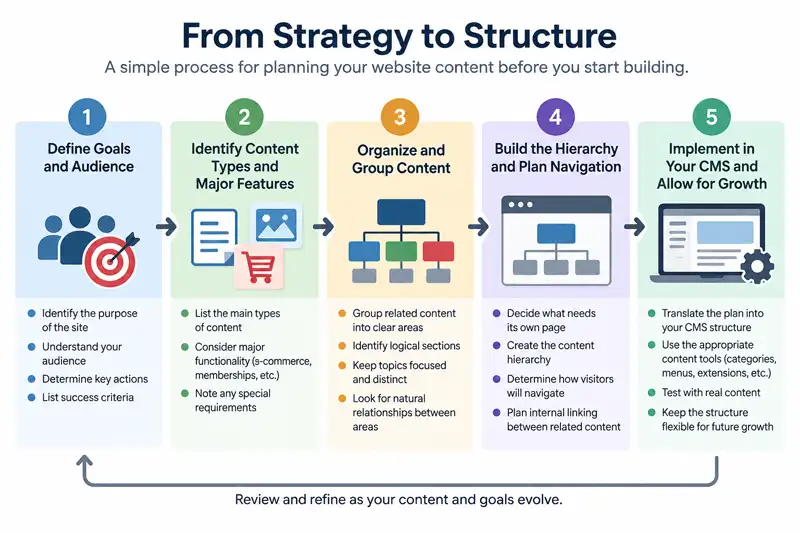
This doesn't require designing every page in advance or predicting everything the website might contain years from now. The goal is to understand the main types of content the site needs, how they relate to one another, and whether major features such as e-commerce or memberships will introduce structures of their own. With those decisions reasonably clear, the CMS becomes a tool for implementing the structure rather than the place where the structure is invented.
Start With What the Website Needs to Accomplish
Before deciding how many sections the site needs, identify what the website is actually supposed to do.
A small business site might need to explain services, establish credibility, answer common questions, and turn interested visitors into enquiries. A publication might focus on organizing articles around subjects readers regularly explore. An e-commerce site needs to help visitors discover and evaluate products before moving through a purchasing process.
Many websites combine several purposes.
This is why beginning with a generic list such as Home, About, Services, Blog, and Contact doesn't tell you very much about the site's actual content requirements. Those pages may eventually belong in the website, but they aren't a substitute for understanding what visitors need from it.
Start by asking:
- Who is the website intended to serve?
- What information will those visitors be looking for?
- What should they be able to accomplish?
- What content does the organization need to publish regularly?
- What content needs to remain useful over a longer period?
- What products, services, resources, or other important material need to be discoverable?
The answers give you something more useful than a list of pages. They begin defining the jobs the website's content structure needs to perform.
Identify the Main Types of Content the Site Needs
Once the purpose is clear, identify the major kinds of content required to support it.
Don't worry yet about exactly where each item belongs in a menu. Think in terms of the content itself.
A professional services website, for example, might need individual service information, case studies, educational articles, company information, frequently asked questions, and contact or enquiry content. A publisher might need ongoing articles alongside more permanent guides, reference material, author information, and topic archives.
The distinction between content types can matter because not everything should necessarily be managed or presented in the same way.
A long-lived guide and a time-sensitive blog post may both contain written content, but they perform different jobs. A product description may contain text and images just like an ordinary page, but it also belongs to a commercial system with prices, purchasing behaviour, inventory, or other product-specific information.
Recognizing these differences early can prevent the site from becoming one large collection of loosely related pages.
Account for Major Website Features Early
Content isn't the only thing that can shape website architecture. Major functionality can introduce structures and requirements of its own.
An e-commerce system may introduce products, product categories, customer accounts, carts, checkout pages, and other commercial views. A membership system may introduce registration, account management, restricted content, and different experiences for public and authenticated users.
The same principle can apply to directories, learning systems, booking systems, forums, support systems, event management, and other substantial website features.
You don't need to know every technical detail before planning the site, but you should identify major functionality that is already known or reasonably likely to be added.
Otherwise, you can spend considerable effort designing an elegant structure for the site's current content only to discover that a major extension introduces requirements the original structure didn't account for.
Consider questions such as:
- Will the feature introduce its own content types?
- Will it need a major section of the site's navigation?
- Will visitors need accounts or restricted areas?
- Will it introduce categories, collections, or another organizational system?
- Will editorial content need to link regularly to this functional area?
- Does it represent a major part of what the website will eventually offer?
The goal isn't to design around every extension you might someday install. That can create just as much unnecessary complexity as failing to plan at all.
Instead, account for the major functionality you know is important while leaving enough flexibility for the website to evolve.
Group Related Content Into Clear Areas
After identifying the content and major functionality, begin grouping related material.
This is where the site's major content areas start to emerge.
A company that sells products and publishes extensive educational material, for example, might identify Products and Resources as two major areas. Individual articles can support particular products without requiring the editorial library and product catalogue to become one content structure.
If a business provides several closely related services, those services may belong within a common section. If a publication covers several substantial subjects, those subjects may form the basis of its primary content organization. Products may form another area, while support or documentation may have a structure of its own.
Don't create a separate section merely because two pieces of content aren't identical. Look for meaningful relationships that will make sense to visitors and remain useful as more content is added.
A useful test is whether you can describe the purpose of a proposed section in one clear sentence. If the explanation becomes vague or consists mostly of unrelated material that had nowhere else to go, the grouping probably needs more thought.
At the same time, avoid forcing content together solely to keep the number of sections small. A website selling products and publishing educational material may legitimately need separate commercial and editorial areas even when both support the same overall business.
Decide What Deserves Its Own Page
Once the broad areas are visible, start deciding which subjects deserve individual pages.
There are two common extremes to avoid.
The first is putting too much onto a single page because creating fewer pages feels simpler. A large page can work when its sections all support one clear purpose, but it becomes less useful when several substantial subjects are competing for attention.
The other extreme is creating a separate page for every small variation of a subject. This can produce thin pages with little independent value and a structure that becomes unnecessarily fragmented.
A useful page should normally have a distinct reason to exist.
Ask whether someone could reasonably arrive at the page looking specifically for what it provides. Consider whether the subject needs enough explanation to stand on its own and whether separating it makes the overall structure easier to understand.
Search visibility may be one consideration, but it shouldn't be the only one. Creating pages simply to target slight variations of keywords can produce a poor content structure for both visitors and search engines.
Plan around meaningful subjects first. Search optimization can then help refine how those subjects are presented.
Build the Content Hierarchy Before the Navigation
Content structure and navigation are closely related, but they aren't the same thing.
Before deciding exactly what belongs in the header menu, sketch the relationship between the site's major areas and the content within them.
You might have a broad section containing several important pages, with some of those pages leading to more specialized resources. Another section might contain a large collection of articles organized around topics. A commercial area could have its own product hierarchy.
This is the underlying content structure.
Navigation is one way visitors interact with that structure. It doesn't need to expose every level or every page at once.
This distinction matters because trying to make the navigation represent the entire website can lead to oversized menus, unnecessary dropdown levels, and competing links. Some pages are better discovered through contextual links, category views, search, related-content features, or links from other relevant pages.
Plan the relationships first. Then decide which of those relationships need to become persistent navigation.
Look for Relationships Between Different Sections
A hierarchy is useful for establishing where content belongs, but websites aren't strictly hierarchical.
A guide in one section may be highly relevant to a service in another. An educational article may answer a question that arises while someone is evaluating a product. A support page may need to reference both documentation and account-related information.
Those relationships shouldn't necessarily cause the content to be moved into the same section.
Instead, contextual internal links can connect related material while allowing each page to remain in the part of the site where it makes the most structural sense.
This is one reason internal linking should be considered during content planning rather than treated only as an SEO task performed after publication. A strong internal-link structure helps visitors move between related subjects that don't fit neatly into a parent-and-child hierarchy.
For a closer look at that relationship, see Why Internal Linking Structure Matters for CMS SEO.
Keep the Structure Shallower Than You Think You Need
Most content management systems make it possible to create deep hierarchies. That doesn't mean a website benefits from using all of that depth.
Every additional level creates another distinction that has to remain meaningful as the site grows.
A structure such as Section → Topic → Subtopic → Type → Individual Item may look organized on paper, but it can become cumbersome if some of those levels exist primarily because the CMS makes nesting easy.
Start with the shallowest structure that accurately represents the content.
Add another level when there is enough material to justify a meaningful subdivision, not simply because you might need it eventually.
This doesn't mean every page needs to sit close to the home page or that deep structures are inherently wrong. Large documentation systems, product catalogues, educational resources, and other substantial sites may genuinely require multiple levels.
The important question is whether each level helps explain the content rather than merely adding another container.
Test the Structure With Real Content
A structure can look perfectly logical while it contains only labels on a planning document.
Real content is a better test.
Take a selection of pages, articles, products, resources, or other material you expect the website to contain and try placing them into the proposed structure.
For a larger or more complex site, you can also test whether other people can find representative content within the proposed hierarchy before the website itself is built.
Some should be obvious. Pay closer attention to the ones that aren't.
If the same type of content repeatedly seems to fit equally well in two sections, the distinction between those sections may not be clear enough. If important content doesn't fit anywhere, a major area may be missing. If one section contains almost everything while several others contain very little, the hierarchy may be unbalanced.
Also test content you expect to create later rather than only what exists today. You don't need to invent an entire future publishing schedule, but a few realistic examples can reveal whether the structure has room to grow.
This exercise is considerably easier before hundreds of pages have been created inside the CMS.
Translate the Plan Into Your CMS
Only after the content relationships are reasonably clear do you need to decide how the CMS should implement them.
Different systems provide different tools. Depending on the CMS and the type of site, implementation might involve categories, menu items, hierarchical pages, taxonomies, collections, custom content types, or structures provided by extensions
Those tools matter, but they should support the architecture rather than define it prematurely.
If you begin with the CMS, there is a tendency to structure the website around whichever features are easiest to find in the administrator interface. Planning first allows you to ask a better question: Which CMS features best represent the structure this website actually needs?
The implementation also doesn't need to reproduce your planning diagram literally. A conceptual content area may be represented by a category, a page hierarchy, a component, an extension, or a combination of several mechanisms depending on the system.
This is where earlier planning around major functionality becomes particularly valuable. A product catalogue or membership area may already have an appropriate content model supplied by its extension. There is little benefit in recreating that structure unnecessarily with ordinary CMS pages.
Give the Structure Room to Grow
Planning before building doesn't mean trying to predict the website's entire future.
Websites change. New services are introduced, products are added, editorial topics expand, extensions become necessary, and some sections turn out to be more important than expected.
A good content structure should accommodate reasonable growth without requiring every future possibility to be designed on day one.
That usually means keeping major areas clear, avoiding unnecessary hierarchy, using content types consistently, and resisting structural decisions that only work for the exact content available today.
When a new requirement appears, ask whether it fits naturally into the existing architecture. If it doesn't, that doesn't automatically mean the original plan failed. The website may simply have developed a genuinely new area that deserves its own structure.
What matters is that those decisions remain deliberate.
Plan the Content Before Building the Containers
A CMS can make it very easy to create another page, category, menu item, collection, or section. The harder question is whether that container should exist in the first place.
Planning the content structure first changes the order of those decisions. Start with what the website needs to accomplish, identify the content and major functionality required to support it, establish meaningful relationships, and then choose the CMS features that best implement that structure.
The structure will still evolve as the website grows. The difference is that new content and functionality have an architecture to work from rather than a collection of decisions made one page at a time.
Related Website Structure Articles
Explore additional articles covering website structure, content organization, navigation, internal linking, and how site architecture affects long-term growth.