
Before creating articles, menus, or media in bulk, it’s worth pausing to review a few structural and configuration decisions. Spending time here reduces rework, avoids content spread, and keeps Joomla organized as the site grows.
Before You Start
- Joomla should be fully installed and configured.
- You should have chosen a template for the site, whether it's the default Cassiopeia or your own.
- No content needs to exist yet.
- Try to avoid installing the sample demo content to keep everything fresh and clean.
Step 1: Review and Finalize Category Structure
Categories form the backbone of content organization in Joomla.
Questions to Ask
- Do categories reflect long-term topics, not short-term campaigns?
- Is the hierarchy small enough to manage easily?
- Are category names unambiguous?
Reorganizing categories later is possible, but it often affects menus, modules, and URLs. You want to limit this if your website has already been indexed on Google; this would require setting up 301 Redirects.
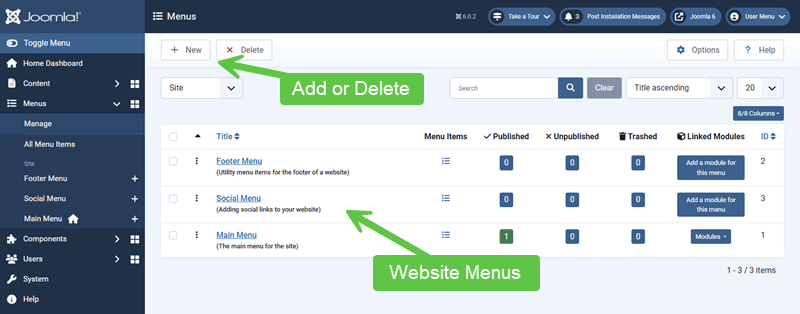
Step 2: Plan Menus Before Publishing Content
Menus define page context, layout, and navigation.
Menu Planning Checklist
- Identify primary navigation menus
- Decide which menu items will control key layouts
- Determine whether hidden or structural menu items are needed (I will talk about hidden menus in another tutorial).
Menus are easier to design before the content volume increases.
Step 3: Confirm Template and Layout Assumptions
Templates influence how content and modules are displayed. They will vary greatly depending on what template you decide to install and use. If you're new to Joomla, I recommend starting with the default Cassiopeia template.
Areas to Confirm
- Available module positions
- Default content widths and spacing
- Typography and readability
Changing templates later may require adjusting modules, menus, and overrides.
If you're curious about "module positions", think of them like a TV dinner tray where you have predefined areas where module positions are available:

The cool thing about module positions is that they won't show in your web pages until a module is published to one.
Step 4: Review Module Strategy
Modules are often added reactively. A basic strategy helps keep them under control. For example, this website you are on has a lot of module positions and modules. When you first come to this website, you will see how they were planned and positioned on the front page. Every section is a module.
Consider:
- Which modules should appear site-wide
- Which modules should be page- or section-specific
- Whether duplicate modules can be avoided through assignment rules
A small number of well-assigned modules is easier to maintain than many similar ones.
Step 5: Confirm Access Levels and User Roles
If multiple people will work on the site, access decisions should be made early. Access is where Joomla shines bright because of the advanced ACL (Access Control List) system. You can set permissions for a specific group of users:
- Public: All visitors, including users who are not logged in.
- Registered: Users who can log in to the site but have limited access beyond basic interaction.
- Author: Users who can create their own content but cannot publish or edit content created by others.
- Editor: Users who can edit existing content, including content created by other users, but cannot publish it.
- Manager: Users who can manage site content and some administrative tasks without full system control.
- Super User: Users with full administrative access to all areas of the site.
Items to Review
- Who can create or edit content
- Who can publish content
- Which content should be public vs restricted
Retroactively changing access rules after content is published can be error-prone.
Step 6: Decide What Not to Build Yet
Restraint is part of stability.
Often Safe to Delay
- Advanced layouts or overrides
- Non-essential extensions
- Complex workflows
Building only what is needed keeps the early structure clean.
Verify Your Results
- Categories reflect long-term content structure.
- Menus are planned before content creation.
- The template supports your layout needs.
- User roles and access levels are intentional.
Common Issues
- Frequent restructuring: Often caused by skipping planning.
- Navigation confusion: Menu decisions made too late.
- Content sprawl: Categories created reactively.
Related Tutorials / Next Steps
A short pause before content creation often saves the most time overall. Joomla rewards sites that grow from a clear, deliberate foundation. For example, GeJayMedia.com got indexed within 2 days of launching.