
One of Joomla’s defining strengths is how content, menus, and modules interact. It is also a common source of confusion. This tutorial explains how these three systems connect so layouts behave consistently and changes remain intentional.
Before You Start
- You should understand how menu items define pages.
- You should know how articles and categories are displayed.
- You should be familiar with module assignment.
The Three Systems and Their Roles
Each system has a distinct responsibility.
Content
- Provides meaning and structure
- Includes articles, categories, and media
Menus
- Define page context
- Select components and layouts
Modules
- Provide supporting content
- Respond to menu context
Problems arise when these roles are blurred.
Why Menu Context Matters for Modules
Modules do not attach to content directly. They attach to menu items.
Practical Implications
- Two pages showing the same article can have different modules
- Layout changes often trace back to menu context
- Module visibility depends on assignment rules
Understanding this prevents many “random” layout issues.
Assigning Modules Intentionally
Module assignment should follow patterns.
Common Assignment Strategies
- All pages
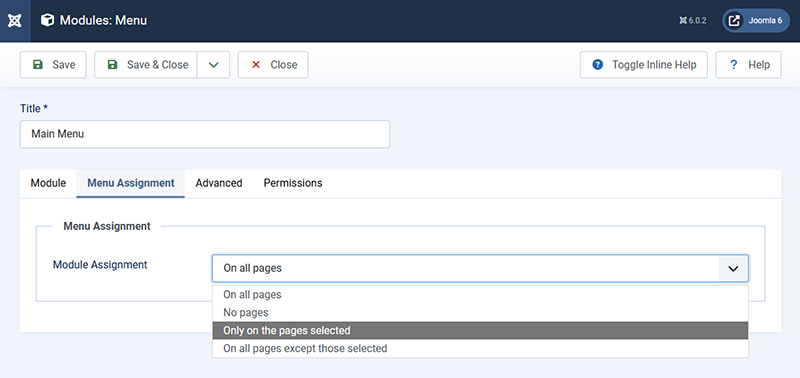
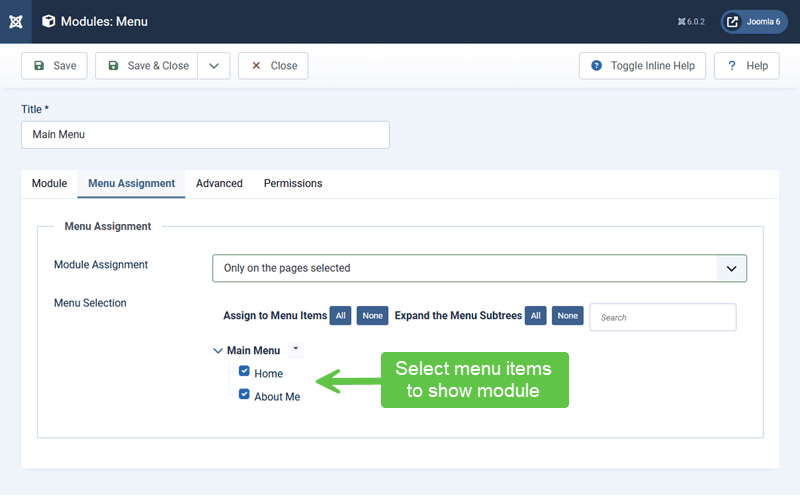
- Selected menu items
- Entire menu branches
Branch-based assignment scales better than page-by-page selection.
Using Menus to Create Layout Zones
Menus can define layout zones without duplicating content.
Examples
- Different sidebars for sections
- Landing pages with minimal modules
- Resource sections with persistent navigation
This keeps layout logic centralized.
Category Views and Module Positioning
Category views often act as section entry points.
Why This Matters
- Modules assigned to category menu items apply to all child content
- New articles inherit the layout automatically when creating a "Category" menu item type.
- Consistency improves as content grows
This is one of Joomla’s most powerful patterns.
Avoiding Content-Driven Layout Hacks
Layout decisions should not live inside articles.
Practices to Avoid
- Inline layout markup
- Hardcoded module positions in content
- Manual spacing to compensate for layout issues
These shortcuts increase maintenance costs.
Testing Layout Changes Safely
Layout changes should be reviewed in context.
Good Testing Habits
- Test on multiple pages within a section
- Check logged-in and logged-out views
- Review mobile and desktop layouts
Menu context makes testing predictable.
Verify Your Results
- Modules appear where expected.
- Layouts remain consistent across sections.
- New content inherits correct parameters.
- Layout logic is centralized.
Common Issues
- Modules appearing unexpectedly: Menu assignment mismatch.
- Missing modules: Incorrect menu context.
- Layout drift: Article-level workarounds.
Related Tutorials / Next Steps
- Next: Final Checks Before Going Live
- Creating Menu Items Correctly
- Common Menu Configuration Mistakes
When content, menus, and modules are connected intentionally, Joomla becomes calm and predictable rather than fragile.