
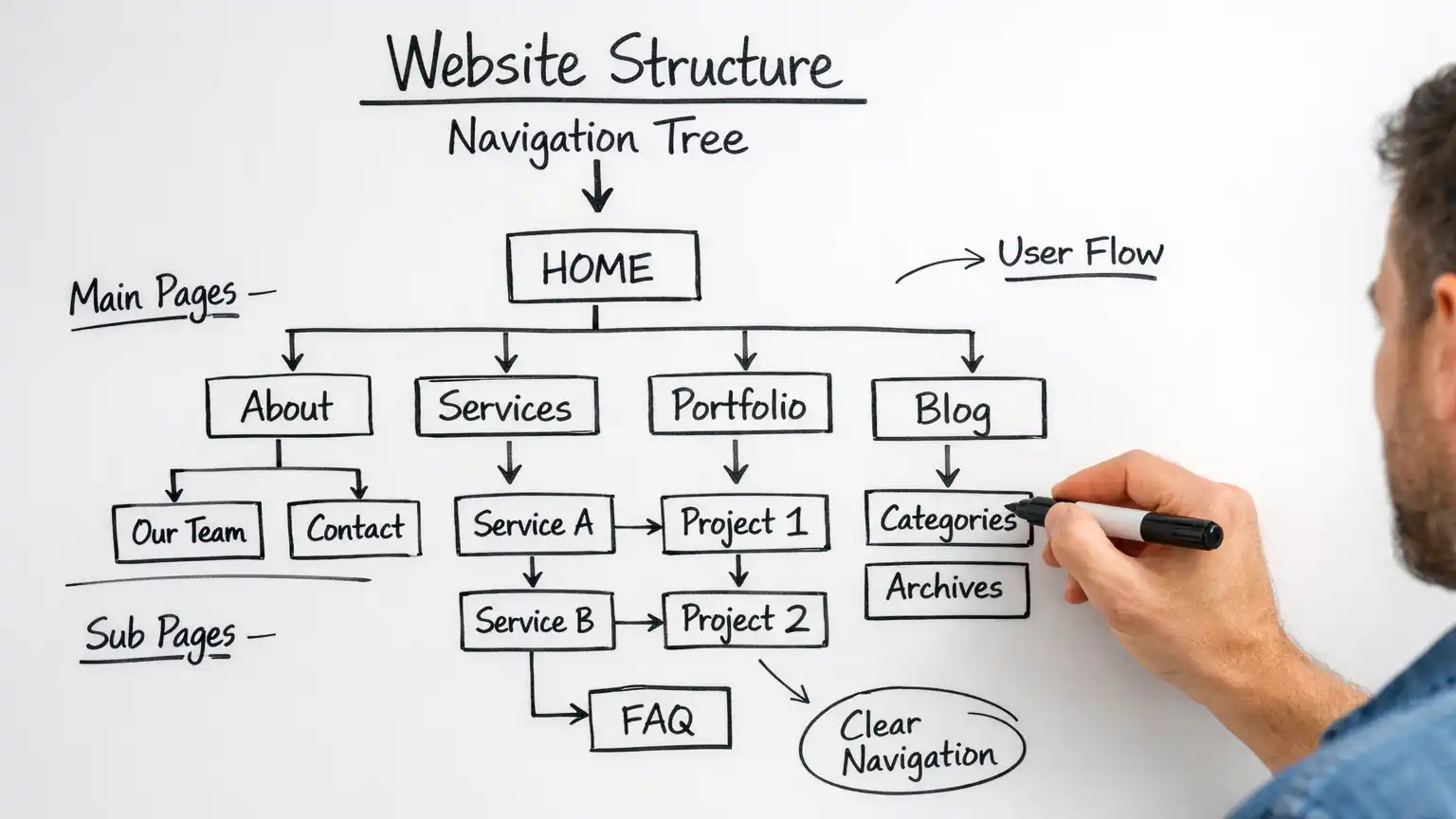
Navigation helps visitors move efficiently through a website, but it also provides search engines with links they can use to discover pages and understand how different parts of the site are connected.
On a CMS website, those pathways can include the primary menu, section and category pages, secondary navigation, pagination, breadcrumbs, and other recurring links generated by the site's templates and components. These navigation pathways are one part of the broader relationship explained in How CMS Structure Influences SEO Over Time.
Good navigation does not guarantee that a page will be indexed or rank well. Google uses many signals when crawling, indexing, and ranking content. Navigation has a more fundamental job: helping important pages remain connected to the rest of the website through links that visitors and crawlers can follow.
NOTE: Navigation and contextual internal links perform related but different jobs. Navigation creates recurring paths through the website, while contextual links connect pages because their subjects are meaningfully related.
Search Engines Discover Pages Through Links
Search engines can learn about URLs in several ways, including links and XML sitemaps. On the website itself, navigation provides some of the most consistent links available.
A primary menu might lead from the homepage to major sections. A section page can lead to categories or individual articles. Pagination can provide access to older entries. Breadcrumbs can connect a page back through its hierarchy.
Together, these links create routes through the site.
This is particularly important for a growing publication. An article may be easy to find when it first appears on the homepage, but that temporary placement eventually disappears. If the article remains reachable through a category, section, contextual link, or another persistent pathway, it stays connected after newer content replaces it.
The objective is not to put every page in the main menu. It is to make sure important content has sensible crawlable routes from other parts of the website.
Primary Navigation Should Represent Major Destinations
Primary navigation has limited space, so it normally works best when it represents the major destinations visitors need rather than attempting to expose every article directly.
For a publication, those destinations might be broad subject areas. For a business website, they may include services, products, resources, contact information, and other major sections.
From those destinations, additional navigation can lead deeper into the site.
This creates a hierarchy without requiring an enormous menu.
| Navigation element | Typical purpose |
|---|---|
| Primary menu | Provides access to major site destinations |
| Section or category pages | Group and expose related content |
| Secondary navigation | Provides additional routes within a section |
| Breadcrumbs | Show hierarchical context and link back through that path |
| Pagination | Provides access through multi-page listings |
| Contextual links | Connect relevant pages within article content |
The exact arrangement depends on the website. What matters is that navigation has an understandable purpose rather than growing through a series of unrelated additions.
Navigation Depth Is Useful, but Click Counts Are Not a Magic Formula
SEO advice sometimes reduces website architecture to a rule that every page must be reachable within a particular number of clicks from the homepage.
That can be a useful diagnostic idea, but it should not be treated as a universal requirement.
A website with hundreds or thousands of pages naturally needs more depth than a five-page business site. Some pages are also more important than others and do not need identical prominence.
The more practical question is whether important content becomes unnecessarily difficult to reach.
If an article can only be found by opening a section, choosing a category, moving through many pages of an archive, and then locating an old entry, it has a weaker discovery path than an article connected from several relevant places.
That does not prove Google will fail to crawl or index the deeper page. It does indicate that the site's own navigation provides fewer convenient routes to it.
Contextual internal links can help by connecting useful older content to newer or more prominent pages where the relationship makes sense.
Category and Section Pages Can Keep Older Content Connected
CMS category pages are useful partly because they create persistent collections of related content.
When a new article is assigned to a category, the CMS can automatically include it in that category's listing. As more content is published, older articles remain part of the collection even after they disappear from the homepage or other recent-content displays.
This gives category and section pages a practical discovery role.
The value depends on how they are implemented. A category containing a coherent collection of articles can help visitors explore a subject. A category created only because the CMS requires somewhere to store miscellaneous content provides much less structural meaning.
Likewise, category names and boundaries should reflect the publication rather than multiplying unnecessarily as new articles are added.
The purpose is not to create categories for SEO. It is to maintain useful collections that also provide stable links to the content they contain.
Pagination Can Matter on Large Listings
When a category or archive contains more articles than can reasonably appear on one page, the CMS may divide the listing across several pages.
Those pagination links provide routes to older content.
If older articles can only be reached through a listing, the way that listing is paginated can affect how easy those articles are to discover through normal site navigation.
This is one reason an apparently minor template or extension decision can have structural consequences. A design that visually hides older content or requires interactions that crawlers cannot reliably follow may provide a poorer discovery path than conventional crawlable links.
Pagination does not mean every page of an archive needs to rank in search results. Its navigational role is different: it can help provide a route through a larger collection.
Navigation Links Need to Be Crawlable
A menu that works visually for a visitor is not necessarily implemented in the most accessible way for crawlers.
Standard HTML links provide a clear destination through an href attribute. Modern websites can also use JavaScript to create menus, filters, buttons, and other interactive navigation.
JavaScript itself is not automatically an SEO problem. Google can process JavaScript in many circumstances. The concern is whether important navigation ultimately exposes links and URLs that can be discovered reliably.
For important site destinations, conventional crawlable links provide a straightforward foundation.
This consideration also overlaps with accessibility and usability. Navigation that depends on unusual interaction patterns may create difficulties for keyboard users, assistive technology, visitors with scripts unavailable, and automated crawlers.
Good navigation generally benefits from being understandable without requiring unnecessary technical complexity.
Mobile Navigation Should Lead to the Same Important Content
Responsive design often changes how navigation is presented on smaller screens. A full desktop menu may become a collapsed menu, drawer, or other compact interface.
The presentation can change without changing the underlying site architecture.
Important destinations should not disappear merely because the visitor is using a phone.
This is particularly relevant because Google primarily uses the mobile version of content for indexing. If important navigation or content relationships differ substantially between desktop and mobile implementations, the mobile version deserves careful review.
A collapsed mobile menu is not inherently a problem. What matters is whether its links remain available and functional.
Navigation Changes Can Affect More Than Appearance
Changing a menu can look like a design adjustment, but it may alter how pages are connected across the site.
Removing a section from primary navigation does not necessarily harm indexing. The section may still have strong links from other relevant locations.
Likewise, adding something to the primary menu does not guarantee better rankings.
The useful question is what happens to the site's pathways after the change.
If removing a menu item leaves an important section accessible only through an obscure archive, the change deserves more attention. If the same section remains clearly connected through another logical route, the effect may be minor.
This is why navigation changes on mature websites should be considered structurally as well as visually.
Watch for Orphaned and Poorly Connected Pages
An orphan page is generally understood as a page with no internal links pointing to it.
The URL may still be known to a search engine through an XML sitemap, an external link, or previous crawling. That does not make the page well integrated into the website.
CMS sites can create orphaned or poorly connected content after:
- menu restructuring;
- category changes;
- content migrations;
- removing old modules or landing pages;
- redesigning templates;
- retiring sections without reviewing the articles beneath them.
Not every page needs prominent navigation. Some utility pages legitimately have limited internal visibility.
For articles and other content intended to remain useful, however, having no meaningful route from the rest of the site is worth reviewing.
Internal Linking Complements Navigation
Navigation cannot express every useful relationship between articles.
Imagine a website with a Website Management section containing articles about maintenance, hosting, CMS updates, and website architecture. The section navigation can establish that these articles belong to the same broad area.
Inside an article about CMS updates, however, a contextual link to an explanation of long-term website maintainability expresses a more specific relationship.
That is the role of contextual internal linking.
Navigation provides recurring structure. Contextual links add editorial relationships within that structure.
This distinction is examined more closely in Why Internal Linking Structure Matters for CMS SEO.
XML Sitemaps Support Discovery but Do Not Replace Navigation
An XML sitemap can help search engines discover URLs that the website wants crawled. It is especially useful on larger sites and can provide another route to newer or deeper pages.
That does not mean a sitemap should substitute for an internally connected website.
A page included in a sitemap but disconnected from normal navigation and internal links may still be discovered, but its isolation raises a separate question: if the page is important, why does the website itself provide no useful path to it?
Sitemaps and navigation therefore perform different roles.
The sitemap provides a machine-readable list of URLs. Navigation and internal links show how pages participate in the website visitors actually use.
Avoid Building Navigation for Search Engines Alone
Because internal links help crawlers discover pages, it can be tempting to add menu items primarily for SEO.
That can quickly produce cluttered navigation.
A useful menu should first help visitors understand where they can go and how the website is organized. Search engines benefit from many of the same qualities: descriptive destinations, consistent links, logical grouping, and accessible implementation.
This makes usability a useful constraint on structural SEO.
If a navigation scheme requires dozens of repetitive menu links simply to make pages appear more important, the underlying content organization may deserve review instead.
Review Navigation as the Website Grows
A navigation system that worked when a site contained twenty articles may become less useful after several years of publishing.
New subject areas may emerge. Older categories may become too broad. Some sections may no longer deserve primary navigation while others have become central to the publication.
Periodic review can identify:
- important sections that are unnecessarily difficult to reach;
- old menu items that no longer serve a useful purpose;
- categories that have become too broad or too fragmented;
- articles that depend entirely on deep archives for discovery;
- broken or redirected navigation links;
- desktop and mobile navigation that no longer provide equivalent access;
- content left disconnected after restructuring
Changes should still be deliberate. Reorganizing menus constantly in pursuit of an SEO advantage can create unnecessary work and make the site harder for returning visitors to learn.
The objective is a navigation system that can evolve when the content genuinely requires it.
Navigation Provides Paths, Not Ranking Guarantees
Navigation influences SEO most directly by determining how the website connects its own pages.
Menus, categories, section pages, pagination, breadcrumbs, and other recurring links can provide crawlable paths into both new and older content. Contextual links can then connect articles whose subjects have more specific relationships.
None of this guarantees indexing or rankings. A page can be easy to discover and still be excluded from Google's index for other reasons, and a prominent menu link cannot compensate for content that provides little value.
The practical objective is simpler: important content should not become difficult to find merely because the CMS has grown around it.
When navigation reflects the site's actual organization, exposes useful crawlable links, and works together with categories and contextual linking, it provides a durable foundation for both visitors and search engines.
Related Website Structure Articles
Explore additional articles covering website structure, content organization, navigation, internal linking, and how site architecture affects long-term growth.