
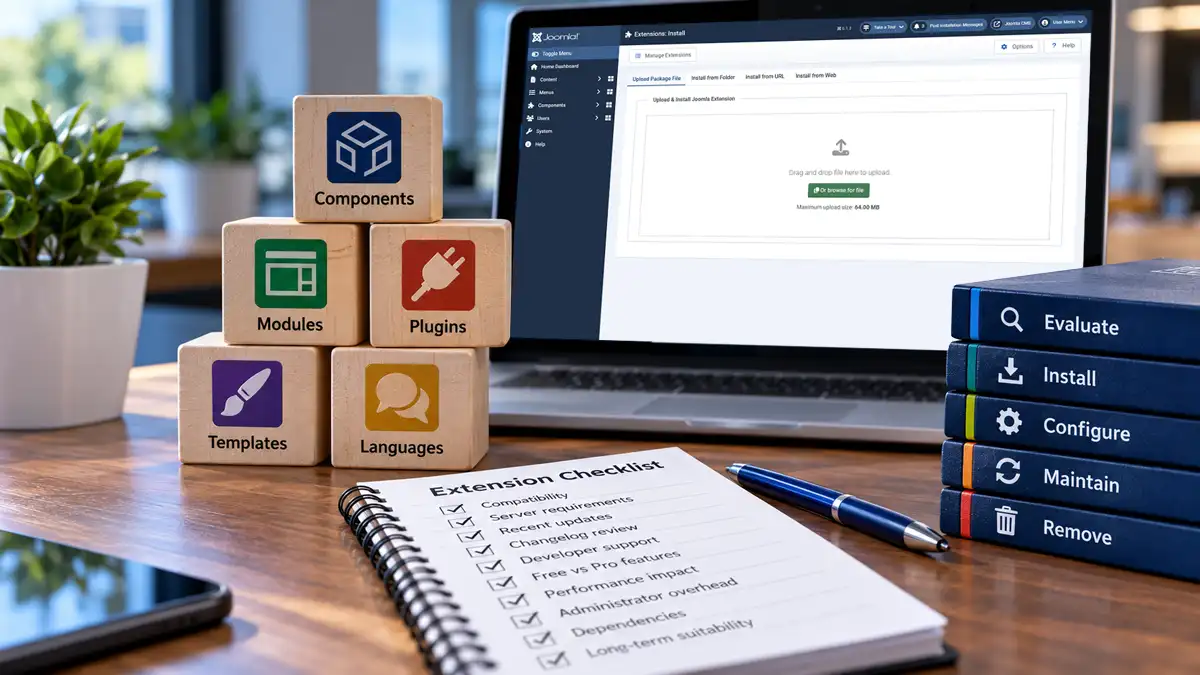
Joomla extensions make it possible to add features, customize functionality, and expand a website beyond its built-in capabilities. However, every extension introduces additional software that must be evaluated, configured, maintained, and eventually replaced or removed when it is no longer needed.
Installing an extension should therefore be treated as more than a quick way to add a feature. Compatibility requirements, developer support, performance overhead, licensing, and long-term maintenance all influence whether an extension is a suitable choice.
A responsible approach begins before installation and continues throughout the extension's lifecycle. Understanding what to look for can help website owners avoid unnecessary complexity while making better use of Joomla's flexibility.
Why Responsible Extension Management Matters
One of Joomla's greatest strengths is its extensibility. Components, modules, plugins, templates, and other extension types allow website owners to introduce functionality that may not be available through the core installation.
However, extensions also become part of the website's operating environment. Their code may interact with Joomla's database, rendering process, administrator interface, and other installed software.
Each additional extension can introduce responsibilities such as:
- Monitoring compatibility with Joomla and the hosting environment.
- Reviewing and applying extension updates.
- Maintaining configuration settings and dependencies.
- Evaluating performance and security implications.
- Managing licensing, subscriptions, and developer support.
- Planning for replacement or removal when requirements change.
These responsibilities do not make extensions undesirable. They simply mean that each extension should provide enough value to justify its continued presence.
Extensions Should Solve a Defined Problem
Before searching for an extension, identify the functionality the website actually needs.
For example, a website may require a contact form, an image gallery, a specialized content display, or integration with an external service.
Knowing the requirement makes it easier to compare available solutions and avoid installing software simply because it offers an impressive collection of features.
An extension that performs one required task reliably may be a better choice than a larger package containing numerous features that will never be used.
Check Joomla's Built-In Capabilities First
Joomla already includes a substantial collection of website management and publishing features. Before adding another extension, determine whether the required functionality can be achieved using existing Joomla capabilities.
Depending on the requirement, Joomla's built-in features may already provide:
- Article publishing, categories, and content organization.
- Menus, navigation, and menu item configuration.
- Modules and module position assignments.
- User groups, access levels, and permissions.
- Custom fields for additional content information.
- Template styles, layouts, and template overrides.
- Basic search engine optimization and URL management.
Using Joomla's existing functionality can reduce the number of external dependencies that need to be maintained.
However, avoiding extensions should not become a goal in itself. A well-designed extension may provide a more reliable and maintainable solution than attempting to reproduce specialized functionality through extensive custom modifications.
The objective is to select the most appropriate solution, not necessarily the one with the fewest installed extensions.
A Practical Checklist for Evaluating Joomla Extensions
Before installing an extension, it is worth reviewing more than its feature list or promotional description.
A structured evaluation helps identify compatibility concerns, ongoing costs, unnecessary overhead, and potential maintenance difficulties before the extension becomes part of the website.
The following checklist provides a practical starting point.
| Evaluation Area | What to Check |
|---|---|
| Joomla compatibility | Supported Joomla versions and compatibility with the current installation. |
| Server requirements | Minimum PHP version, required PHP extensions, database compatibility, and other dependencies. |
| Maintenance activity | Most recent release date, update frequency, and evidence of continued development. |
| Changelog | Bug fixes, security updates, compatibility changes, and new functionality. |
| Developer support | Documentation, support availability, response quality, and maintenance reputation. |
| Free versus Pro | Required features, licensing restrictions, subscription costs, and upgrade requirements. |
| Performance overhead | Additional scripts, stylesheets, database operations, and processing requirements. |
| Administrator overhead | Additional dashboards, onboarding screens, notices, menus, and configuration complexity. |
| Functionality overlap | Whether Joomla or an existing extension already provides the required functionality. |
| Long-term suitability | Dependencies, data portability, licensing continuity, and the consequences of replacing the extension. |
Not every criterion carries the same importance for every website. A small informational site and a commercial website with customer accounts may have substantially different requirements.
However, compatibility, maintenance, security, and the availability of required features should always receive careful consideration.
Practical recommendation: Keep a record of the extensions you evaluate, including their compatibility requirements, licensing conditions, and reasons for selection. This provides useful reference information when reviewing the website later.
Understanding Joomla and Server Compatibility
An extension may provide exactly the functionality a website needs but still be unsuitable for the environment in which Joomla is running.
Compatibility involves more than confirming that the extension supports Joomla. The server environment, installed PHP version, required dependencies, and other technical requirements can determine whether the extension will function correctly.
Check the Supported Joomla Versions
Before downloading an extension, confirm that the developer explicitly supports the Joomla version installed on the website.
An extension developed for an earlier Joomla release may still install on a newer version, but successful installation does not guarantee that every feature will work correctly.
Compatibility problems may involve deprecated APIs, changes to Joomla's event system, database interactions, or other differences between major releases.
When reviewing compatibility information:
- Check the developer's stated minimum and maximum supported Joomla versions, where provided.
- Look for confirmation of compatibility with the current Joomla major release.
- Review recent changelog entries for Joomla compatibility updates.
- Check whether known compatibility issues or limitations have been documented.
- Confirm that the developer has a reasonable plan for supporting future Joomla releases.
Do not assume that an extension is compatible simply because its installation package is accepted by Joomla.
Review PHP and Other Server Requirements
Extensions can have technical requirements that differ from Joomla's minimum requirements.
For example, an extension may require a newer PHP version than the one currently running on the hosting account, even though Joomla itself functions normally.
Other requirements may include:
- Specific PHP extensions or libraries.
- Minimum database server versions.
- Additional server memory or execution resources.
- Particular PHP configuration settings.
- External services, scheduled tasks, or command-line access.
These requirements are especially important when considering complex extensions that process images, generate documents, communicate with external services, or perform substantial background operations.
Check the extension's published requirements against the actual hosting environment before installation.
Important: An extension's minimum PHP requirement is not necessarily its recommended configuration. Where possible, follow the developer's supported and recommended environment rather than relying only on the lowest version that may allow installation.
Evaluating Maintenance History and Changelogs
An extension becomes an ongoing dependency once it is installed. Its maintenance history can provide useful insight into how reliably that dependency is likely to be supported.
Two particularly useful sources of information are the date of the most recent release and the extension's changelog.
When Was the Extension Last Updated?
The date of the most recent update is one of the first details worth checking.
Regular releases may indicate that the developer continues to address compatibility requirements, defects, security issues, and requests from users.
However, update frequency should be considered in context.
A relatively simple extension may not require frequent releases if its functionality remains stable. Conversely, an extension that receives frequent updates is not necessarily well maintained if those releases repeatedly introduce new problems.
Look for a maintenance pattern rather than relying on a single date.
What Does the Changelog Reveal?
A changelog provides a record of changes made between extension releases. It can reveal considerably more about maintenance quality than a version number alone.
When reviewing a changelog, look for:
- Compatibility updates: Changes supporting newer Joomla or PHP versions.
- Security fixes: Corrections addressing vulnerabilities or unsafe behaviour.
- Bug fixes: Evidence that reported problems are being investigated and resolved.
- Feature development: Improvements that demonstrate continued investment in the extension.
- Breaking changes: Adjustments that may affect existing configurations, integrations, or stored information.
It is also worth examining how clearly the developer documents significant changes.
A useful changelog should help administrators understand what changed and whether an update requires additional preparation.
When a changelog is missing, vague, or consistently uninformative, it becomes more difficult to evaluate the risks associated with future updates.
Assessing Developer Support and Documentation
Even a well-designed extension may eventually require troubleshooting, configuration assistance, or clarification about compatibility.
Developer support and documentation therefore deserve consideration before the extension is installed.
Look Beyond Promotional Descriptions
Product descriptions generally emphasize features and benefits. Documentation provides a better indication of what administrators will need to understand when installing and maintaining the extension.
Useful documentation may include:
- Installation and configuration instructions.
- Compatibility and server requirements.
- Descriptions of available settings and features.
- Known limitations and troubleshooting procedures.
- Upgrade instructions and migration requirements.
- Uninstallation procedures and information about retained data.
Clear documentation can reduce the time required to configure an extension and make future maintenance considerably easier.
Consider the Quality of Support
When possible, review the developer's available support channels and how they respond to reported problems.
Consider whether support is provided through documentation, community forums, a ticket system, or a paid subscription.
Look for evidence that questions receive meaningful responses and that confirmed defects are addressed.
For commercial extensions, check whether support is included with the licence and whether access continues after the initial subscription period.
Support availability becomes particularly important when an extension performs a function that is essential to the website's operation.
Comparing Free and Pro Versions
Many Joomla extension developers offer both free and commercial editions of their software.
A free version can be useful for evaluating basic functionality, but it may not include the particular feature that originally prompted the search.
Before choosing an edition, compare the available features against the website's actual requirements.
Identify the Features You Really Need
Start by listing the capabilities the extension must provide.
Then determine which edition includes those capabilities.
Pay particular attention to features such as:
- Advanced configuration or customization options.
- Additional integrations with Joomla or external services.
- Importing, exporting, or migrating information.
- Access control or user-specific functionality.
- Automation, scheduling, or reporting features.
- Developer support and access to updates.
The availability of these features varies between extensions. A capability included in one developer's free edition may require a commercial licence from another.
Consider the Full Cost of Ownership
The purchase price is only one part of an extension's long-term cost.
Before selecting a commercial edition, determine:
- Whether the licence is a one-time purchase or a recurring subscription.
- How many websites or installations the licence covers.
- Whether updates and support are included.
- What happens when the subscription expires.
- Whether essential features continue working without an active subscription.
- Whether renewal costs or upgrade requirements may change over time.
Some extensions continue operating after a subscription expires but no longer receive updates or support. Others may restrict particular services or features.
These conditions should be confirmed through the developer's licensing terms rather than assumed.
Free Does Not Always Mean Lower Cost
A free extension may be entirely appropriate when it meets the website's requirements and receives reliable maintenance.
However, a free edition that requires workarounds, additional extensions, or substantial configuration effort may ultimately be less practical than a commercial alternative.
Similarly, purchasing a Pro edition does not automatically make it the better choice.
The appropriate edition is the one that provides the required functionality, acceptable maintenance arrangements, and a sustainable cost for the website.
Considering Frontend and Administrator Overhead
An extension's impact is not limited to the feature it provides. Depending on how it is developed, it may introduce additional processing, database activity, interface elements, and maintenance requirements throughout the website.
These effects are worth considering before installation, particularly when several extensions perform related tasks.
Frontend Performance Overhead
Some extensions load additional JavaScript files, stylesheets, fonts, or other resources into the public-facing website.
Others perform database queries, process content through plugins, or communicate with external services when pages are requested.
The resulting overhead depends on how the extension operates and where its functionality is used.
For example, an extension that loads its scripts only on pages requiring a particular feature may have less widespread impact than one that loads the same resources throughout the entire website.
When evaluating frontend overhead, consider:
- Whether scripts and stylesheets load only where they are needed.
- Whether the extension introduces additional database queries or processing.
- Whether external services are required to display content.
- Whether unused features can be disabled.
- Whether the extension noticeably affects page loading or responsiveness.
Not every additional resource represents a problem. The important question is whether the overhead is reasonable for the functionality being provided.
Administrator Interface Overhead
Extensions can also affect Joomla's administration area, sometimes in ways that are less obvious during the initial evaluation.
An extension may introduce additional menu items, dashboard panels, configuration screens, notifications, or onboarding features.
These additions can be useful when they provide relevant information or simplify routine tasks. However, they can also create unnecessary clutter when they remain visible after the initial setup.
Common examples include:
- Onboarding panels that continue appearing after configuration is complete.
- Promotional notices encouraging upgrades to commercial editions.
- Dashboard widgets that provide little ongoing value.
- Additional administrator menus for rarely used features.
- Notifications or background checks that are difficult to manage.
Administrator overhead is not exclusively a performance concern. It can also affect usability, particularly when several extensions compete for attention within the same interface.
Before adopting an extension, consider whether its optional administrative features can be disabled or configured to remain unobtrusive.
How Many Joomla Extensions Are Too Many?
There is no universal number of extensions that makes a Joomla website excessive or poorly maintained.
A website with numerous well-supported extensions may operate reliably, while another with only a handful of poorly maintained extensions may experience recurring problems.
The number of installed extensions matters, but it is only one part of the overall picture.
Extension Count Is Not the Same as Extension Complexity
Different extensions introduce different levels of complexity.
A small plugin performing a narrowly defined task may require little configuration or ongoing attention. A complex component with multiple integrations, background processes, and supporting plugins may introduce substantially more maintenance work.
It is also important to understand that an extension package may install several related extension entries, including components, modules, plugins, or libraries.
Consequently, the number of entries displayed in Joomla's extension management interface does not necessarily represent the number of separate products an administrator has chosen to install.
When the Extension Collection Becomes a Problem
Rather than focusing on an arbitrary number, look for signs that the installed extension collection is becoming difficult to manage.
Potential warning signs include:
- Multiple extensions providing substantially overlapping functionality.
- Extensions remaining installed even though their original purpose no longer exists.
- Frequent compatibility concerns during Joomla or PHP upgrades.
- Difficulty identifying which extension controls a particular feature.
- Unnecessary scripts or processing affecting website performance.
- Abandoned extensions that no longer receive appropriate maintenance.
- Dependencies that make upgrades or removal unnecessarily complicated.
These conditions indicate that the extension environment may benefit from review, regardless of the total number installed.
Quality and Purpose Matter More Than a Target Number
The objective should not be to reduce the extension count simply to reach a particular number.
Removing a useful, well-maintained extension may create more work if its functionality must then be recreated through custom code or less suitable alternatives.
A better approach is to ensure that each installed extension has a clear purpose, remains compatible, and continues providing value.
Practical recommendation: Treat extension count as an inventory consideration rather than a performance score. Evaluate what each extension does, how it operates, and whether it remains necessary.
Installing Extensions Deliberately
Once an extension has been evaluated and selected, installation should be approached as a controlled change to the website.
Even a reputable extension can introduce unexpected behaviour when combined with an existing Joomla configuration, template, or collection of installed extensions.
Prepare Before Installation
Before installing a new extension on a live website:
- Confirm that the extension supports the installed Joomla version and server environment.
- Review the installation documentation and any known requirements.
- Identify possible overlap with existing extensions or Joomla features.
- Confirm that a recent, restorable website backup is available.
- Use a staging environment when the extension introduces substantial functionality or risk.
- Record the current configuration if the installation will change existing website behaviour.
These precautions make it easier to investigate problems or restore the previous environment if the installation does not proceed as expected.
Use Joomla's Extension Installer
Joomla provides an administration interface for installing supported extension packages.
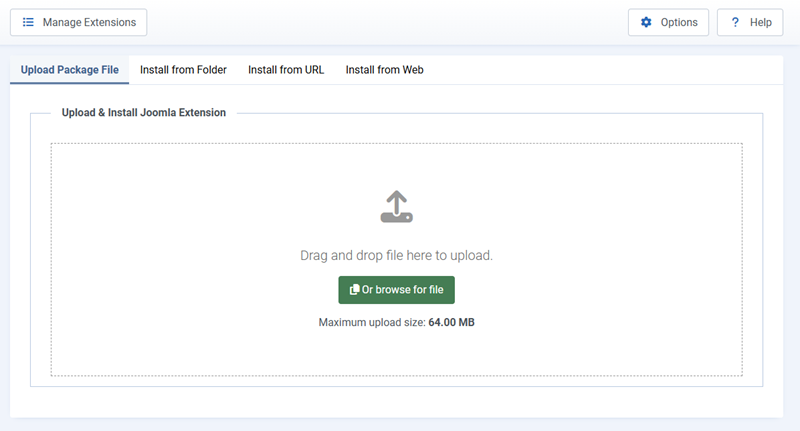
To access the installer, navigate to:
System → Install → Extensions
Depending on the Joomla version and available installation methods, extensions may be installed by uploading a package or using another supported installation option.
Always obtain installation packages from the extension developer or another trusted distribution source.
Review Joomla's installation messages carefully. A successful installation message confirms that the installation process completed, but it does not establish that every feature has been configured or tested.
Install and Verify One Extension at a Time
Installing several unrelated extensions simultaneously makes it more difficult to identify the cause of unexpected changes.
Where practical, install and configure one extension before proceeding to the next.
After installation:
- Confirm that Joomla reports a successful installation.
- Review any additional setup instructions.
- Check whether supporting plugins or modules were installed.
- Verify that the extension's primary functionality works.
- Check relevant frontend and administrator pages for unexpected changes.
- Review any new warnings or error messages.
If the extension changes existing website functionality, test the affected areas before considering the installation complete.
Configure Extensions With a Clear Purpose
Installation is only the beginning of an extension's integration into the website.
Many extensions include optional features, default settings, integrations, or supporting plugins that may not be appropriate for every installation.
Review Default Settings
Before enabling an extension's full functionality, review its configuration options and identify which features are actually required.
Pay particular attention to:
- Features enabled automatically during installation.
- Access permissions and administrative capabilities.
- Frontend scripts, stylesheets, and display options.
- Notifications, logging, and background processing.
- Integrations with other extensions or external services.
- Data retention and privacy-related settings.
Disable unnecessary optional features where the extension supports doing so and where disabling them will not interfere with required functionality.
Understand Supporting Extensions and Dependencies
Some Joomla products install multiple extension types as part of a single package.
For example, a component may rely on supporting plugins to process events or provide integrations with other Joomla features.
Before disabling an unfamiliar plugin or module, determine whether it is required by the primary extension.
Disabling a dependency simply because it appears unused can prevent an otherwise functional extension from operating correctly.
Use the developer's documentation to distinguish optional functionality from required supporting components.
Confirm the Final Configuration
Once the required features are configured, test the extension under conditions that reflect its intended use.
This may involve checking public pages, registered-user access, form submissions, scheduled operations, or integration with other installed software.
Document any important configuration decisions so they can be understood during future maintenance or troubleshooting.
Maintaining an Extension Inventory
As a Joomla website develops, it becomes increasingly important to know which third-party extensions are installed, why they were selected, and how they are maintained.
An extension inventory provides a reference for routine maintenance, troubleshooting, and future Joomla or PHP upgrades.
What Should an Extension Inventory Include?
An inventory does not need to be complicated. A spreadsheet or simple document can provide enough information for many websites.
Useful details include:
- Extension name and developer: Identify the product and its source.
- Purpose: Record the functionality it provides and why it was installed.
- Installed version: Maintain a reference to the version currently in use.
- Compatibility: Note supported Joomla and PHP versions where relevant.
- Licensing: Record whether the extension is free, commercially licensed, or subscription-based.
- Dependencies: Identify supporting plugins, modules, libraries, or external services.
- Maintenance status: Note whether updates and developer support remain available.
- Important configuration: Document settings or integrations that may affect future maintenance.
For commercial extensions, recording subscription renewal dates can also help prevent unexpected interruptions to updates or support.
Review the inventory whenever an extension is installed, upgraded, replaced, or removed.
Use Joomla's Extension Management Tools
Joomla's administration interface provides tools for reviewing installed extensions and available updates.
These tools can help identify extension versions, installation details, and software that may require attention.
However, Joomla's extension listings do not necessarily explain why a particular product was installed or whether its functionality remains necessary.
Maintaining a separate record of important third-party extensions can provide that additional context.
Keeping Extensions Updated and Compatible
Extension maintenance is an ongoing responsibility. Developers may release updates to correct defects, address security vulnerabilities, improve compatibility, or introduce functionality.
Ignoring updates indefinitely can increase the risk of compatibility and security problems, particularly as Joomla and the server environment evolve.
Review Updates Before Applying Them
Before updating an extension, review the developer's release notes or changelog.
Pay particular attention to changes involving:
- Joomla or PHP compatibility.
- Security vulnerabilities and their corrections.
- Changes to configuration options or default behaviour.
- Database modifications or migration requirements.
- Deprecated features or removed functionality.
- Dependencies on other extensions or external services.
Not every update requires the same preparation. A minor maintenance release may be straightforward, while a major version change may require additional testing or configuration work.
Security updates should be evaluated promptly, with the urgency determined by the vulnerability and its relevance to the website.
Check Template Overrides After Extension Updates
Extension updates can also affect template overrides used by the website.
Joomla allows templates to override the output layouts of certain components and modules. These Joomla template overrides provide greater control over presentation, but they may also depend on the structure and behaviour of the extension's original layout files.
When an extension is updated, its original layout files may change while the template continues using an older override.
This can result in missing functionality, unexpected display problems, or incompatibilities between the updated extension and the existing override.
After updating an extension that uses template overrides:
- Check whether Joomla reports any updated override files requiring review.
- Compare affected overrides with the extension's updated layout files.
- Review relevant changelog entries for layout or template compatibility changes.
- Test the frontend pages that use the affected overrides.
- Update custom overrides where necessary, preserving intentional customizations.
Not every extension update requires an override change. However, template overrides should be included in the verification process whenever an extension's output layouts have been customized.
Important: Do not automatically replace customized template overrides with newer extension layout files. Review the differences first to avoid losing intentional modifications.
Verify Important Functionality After Updates
After updating an extension, confirm that its primary features continue working as expected.
Where applicable, check supporting plugins, modules, integrations, and any frontend pages that depend on the extension.
For complex or business-critical extensions, testing updates in a staging environment can reduce the risk of unexpected problems on the live website.
The broader process of preparing for and verifying Joomla updates is covered separately in our website maintenance articles.
Review Installed Extensions Periodically
An extension that was useful when a website was first developed may no longer be necessary several years later.
Website requirements change, Joomla introduces new capabilities, and alternative solutions become available.
Periodic reviews help ensure that the installed extension collection continues to reflect the website's actual needs.
Questions to Ask During an Extension Review
For each significant third-party extension, consider:
- Is the functionality still required?
- Does the extension continue to work correctly?
- Is it compatible with the current Joomla and PHP environment?
- Does the developer still provide appropriate maintenance and support?
- Does another installed extension or Joomla itself now provide the same functionality?
- Is its performance and administrative overhead still reasonable?
- Are its licensing costs justified by the value it provides?
- Would replacing or removing it introduce dependencies or data migration requirements?
These questions can help identify extensions that should be retained, reconfigured, replaced, or considered for removal.
Recognizing Abandoned or Unsupported Extensions
Extensions that no longer receive maintenance deserve particular attention.
A lack of recent updates does not automatically mean an extension is abandoned, especially when its functionality is relatively simple.
However, warning signs may include:
- No documented compatibility with supported Joomla releases.
- Unresolved security concerns.
- Broken or unavailable developer support channels.
- Repeated compatibility problems without corrective releases.
- Dependence on obsolete PHP features or unsupported software.
If an extension appears to be unsupported, evaluate the risk and investigate alternatives before it becomes an obstacle to future website maintenance.
Disabling and Removing Extensions Safely
Removing an extension can be more complicated than installing it, particularly when other features depend on its functionality or when it stores information in the database.
Before removing an extension, determine what it controls and what may be affected.
Disabling Is Not the Same as Uninstalling
Disabling an extension generally prevents some or all of its functionality from operating without necessarily removing its files, configuration, or stored information.
Uninstalling an extension invokes its removal process and may delete associated files, database structures, or configuration data.
The exact behaviour depends on the extension type and how the developer implemented its installation and removal procedures.
Not every Joomla extension type supports disabling in the same way. Some components, for example, may remain installed even when related plugins or modules are disabled.
Do not assume that disabling an extension removes its maintenance or security responsibilities.
Check Dependencies Before Removal
Some extensions rely on supporting plugins, modules, libraries, or other components.
Removing one part of a package without understanding these relationships can cause related functionality to stop working.
Before proceeding:
- Identify the extension's installed components and supporting elements.
- Check whether other extensions depend on its functionality.
- Review the developer's recommended removal procedure.
- Determine whether stored information needs to be exported or preserved.
- Confirm that a restorable backup is available.
For extensions that manage important website information, consider testing the removal procedure in a staging environment first.
Use the Supported Uninstallation Procedure
When an extension is no longer required, use Joomla's extension management tools and follow any additional instructions supplied by the developer.
A responsible removal process generally involves:
- Confirming that the extension is no longer needed.
- Backing up the website and preserving any required extension data.
- Reviewing dependencies and developer removal instructions.
- Uninstalling the extension through Joomla's supported management interface.
- Checking that related website functionality continues working.
- Updating the extension inventory and maintenance records.
Some extensions may retain data intentionally so it can be recovered after reinstallation. Others may remove stored information during uninstallation.
Do not manually delete database tables or extension files simply because they appear to be leftovers. Confirm their purpose and follow documented cleanup procedures.
Verify the Website After Removal
Once an extension has been removed, review the areas of the website that previously depended on it.
Check for broken menu items, missing modules, unexpected error messages, and features that may still reference the removed extension.
Also review relevant administrator pages and any scheduled processes or integrations associated with the extension.
If the removal was intended to improve performance or reduce complexity, evaluate whether it produced the expected result.
Building a Sustainable Joomla Extension Environment
Responsible extension management is not about avoiding third-party software or keeping the installed extension count as low as possible.
It is about selecting software that meets genuine requirements, understanding its dependencies, and maintaining it throughout its useful life.
Compatibility checks, changelog reviews, realistic Free versus Pro comparisons, and awareness of frontend and administrator overhead all contribute to better decisions before installation.
Once installed, extensions should remain documented, appropriately configured, updated, and periodically reviewed.
A well-managed Joomla website can use numerous extensions successfully, provided each one has a clear purpose and remains a maintainable part of the overall system.
Related Website Management Articles
Explore additional articles covering website management, ongoing site operations, administration, and long-term website planning.