
One of the most common sources of confusion in Joomla is understanding how content, menus, and modules work together. Many site owners assume that articles control pages directly. In Joomla, that is rarely true. This tutorial explains how these three elements interact and why menu items are usually the most important piece of the puzzle.
Before You Start
- You should have basic familiarity with the Joomla Administrator interface.
- You should know how to access Articles, Menus, and Modules in the admin area.
- No extensions are required.
- This tutorial applies to recent Joomla versions (5.x or 6.x; current stable is 6.0.2 as of January 2026).
Joomla vs WordPress: Quick Mapping for Migrants
If you're coming from WordPress, here's a fast comparison of these core elements to help bridge the mental gap.
| Joomla Element | WordPress Equivalent | Key Difference |
|---|---|---|
| Content (Articles) | Posts/Pages | Articles hold data only; no direct control over layout or sidebars |
| Menu Item | Page + Template/Widget settings | Defines the "page type", component view, module visibility, metadata; not just a link |
| Module | Widget/Block in sidebar/header | Assigned per menu item (page context), not globally per post |
The Three Core Elements
Every Joomla page is the result of three elements working together:
- Content – what is displayed (articles or component output)
- Menus – how Joomla defines page context
- Modules – what appears around the main content
Understanding their roles and limits prevents most layout and navigation mistakes.
Content: What It Is (and What It Is Not)
In Joomla, content does not define pages by itself. Articles live in categories and hold text, images, and media, but they do not control:
- Page layout
- Which modules appear
- How navigation behaves
An article becomes a “page” only when it is displayed through a menu item or another component view.
Articles Are Reusable
The same article can be displayed in multiple contexts:
- As a single article page
- Inside a category blog or list
- Linked from different menus
This reuse is powerful, but it also means articles are intentionally limited in control.
Menus: The Real Page Controllers
In Joomla, a menu item defines the page. When a visitor loads a page, Joomla first looks at the menu item that matches the URL.
What a Menu Item Controls
A menu item can define:
- Which component is used (Articles, Contact, Search, etc)
- Which view or layout does that component use
- Which modules are shown or hidden
- Page metadata and browser title (depending on configuration)
This is why two pages using the same article can behave differently.
Menu Items Are Not Just Navigation
Even hidden or unused menu items can be critical. Joomla often requires a menu item to:
- Assign a layout to a page
- Trigger correct routing
- Control module visibility
Key idea: You can have menu items that exist only for structure and control, not for visible navigation (often called "hidden menus"; more on that in future tutorials).
Modules: Context-Aware Supporting Elements
Modules provide supporting content around the main component output. Common examples include menus, breadcrumbs, login forms, banners, and custom HTML blocks.
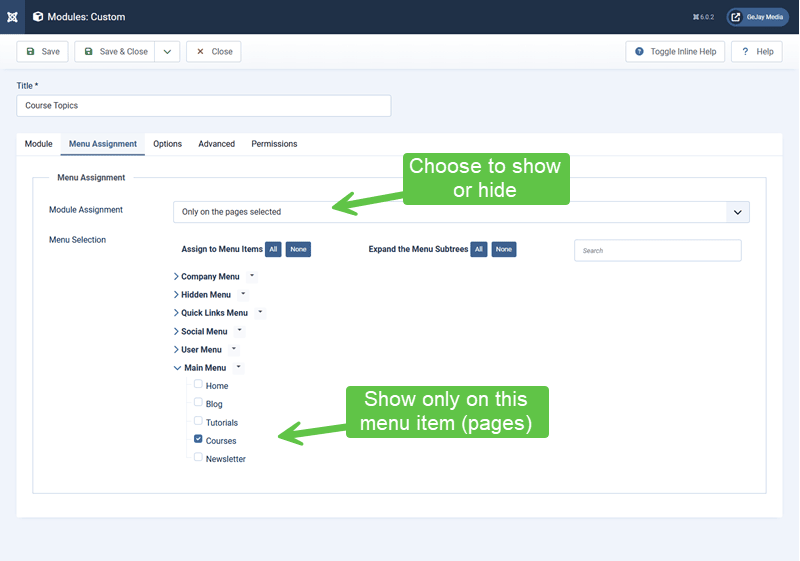
Module Assignment Is Page-Based
Modules can be assigned:
- To all pages
- To selected menu items
- To all pages except selected menu items
This means module visibility is almost always tied to menu items, not articles. Let's look at an example with a module and where it's to be shown:
Why Modules “Disappear”
If a module does not appear where you expect, common causes include:
- It is not assigned to the active menu item
- The template position is not rendered on that layout
- It's not published
- Access levels prevent it from displaying
How These Three Work Together on a Page
Most Joomla pages follow this sequence:
Step 1: A Menu Item Is Matched
The menu item determines the page context and tells Joomla what kind of page to build.
Step 2: The Component Outputs the Main Content
The component linked to the menu item generates the main content area (for example, a single article or a category blog).
Step 3: Modules Are Rendered Based on Menu Assignment
Modules assigned to that menu item (and template positions) are displayed.
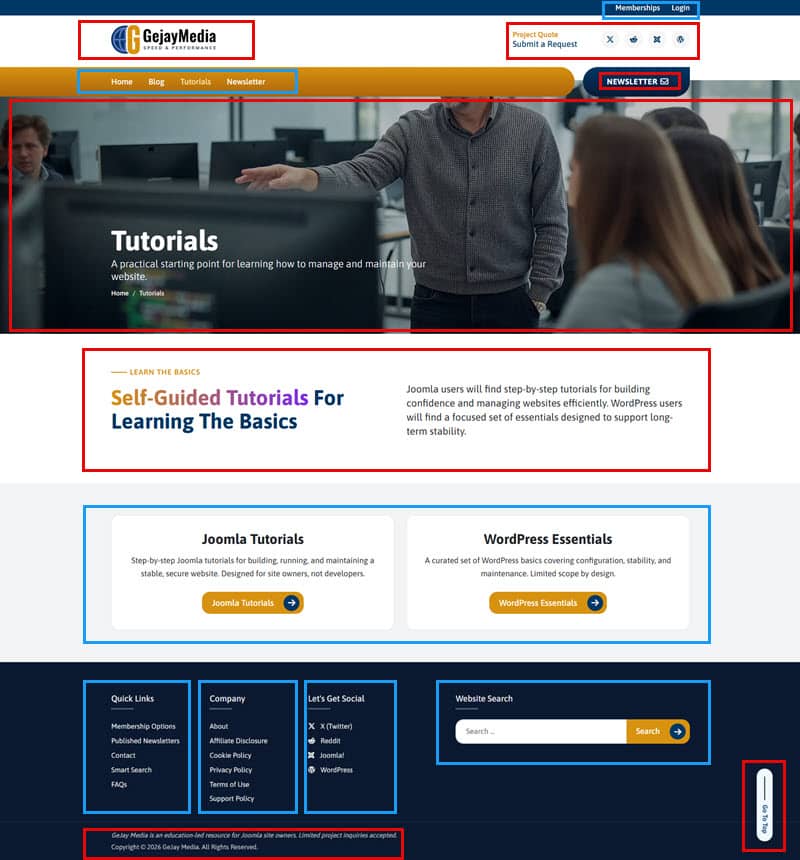
Step 4: The Template Assembles Everything
The template places the component output and modules into a final page layout. I will use GeJay Media's website for this example, where the template components are red, and modules are blue.
Common Misunderstandings
- “I changed the article, but the layout didn’t change.” Layout is controlled by the menu item and template, not the article.
- “This module should appear on all pages.” Check module assignment rules and menu item exclusions.
- “I don’t need menu items for pages I don’t show in navigation.” Joomla often relies on menu items even when they are hidden.
Why Joomla Works This Way
This separation gives Joomla long-term flexibility:
- Content can be reused safely
- Layouts can change without rewriting content
- Modules can adapt to different sections of the site
It also encourages planning and structure rather than ad-hoc page creation.
Verify Your Results
- You understand that menu items define page behaviour.
- You know why modules depend on menu assignment.
- You can explain why an article alone does not control layout.
- You know where to look first when a page behaves unexpectedly.
Common Issues
- Unexpected layout differences: Different menu items may use different component views or template styles.
- Modules showing on the wrong pages: Review module assignment and access levels.
- Duplicate content URLs: Multiple menu items pointing to the same content can create multiple URLs if not managed carefully.
- Content appears but modules are missing: Double-check module assignment to the specific menu item; global "on all pages" can be overridden by exclusions.
Related Tutorials / Next Steps
To learn more, check these out:
- Next: Core Joomla Concepts Every Site Owner Should Know
- Understanding How Joomla Is Structured
- Common Beginner Misunderstandings About Joomla
Once you understand how content, menus, and modules interact, most Joomla layout and navigation issues become predictable instead of frustrating. Master menu items first; they unlock everything else.