

Caching is one of the ways Joomla can improve website performance by reducing the amount of processing required to deliver content. However, Joomla offers several caching mechanisms, and enabling them without understanding their differences can lead to outdated information, unexpected behaviour, or features that stop working correctly.
For website owners, the challenge is determining which caching options are appropriate for their content and how those settings affect the visitor experience. A configuration that works well for a largely static informational website may be unsuitable for a site with personalized content, frequently changing information, or interactive features.
Understanding Joomla's caching options makes it easier to improve performance without sacrificing the accuracy and reliability of the website.
What Caching Actually Does in Joomla
When someone requests a page, Joomla may need to retrieve information from the database, process content through plugins, generate component output, render modules, and assemble the resulting page.
Some of this work produces the same result across multiple requests. Caching allows Joomla to store certain results temporarily so they can be reused instead of being generated again every time.
Depending on the caching mechanism, stored information may include:
- Output generated by components or modules.
- Processed information that would otherwise require repeated calculations or database operations.
- Complete HTML responses for eligible pages.
Reusing these results can reduce server processing and improve response times, particularly when many visitors request the same content.
The Trade-Off Between Speed and Freshness
Cached information represents a previously generated result. If the underlying content changes, the cached version may continue to be served until it expires or is cleared.
For example, an article may be updated in Joomla's administration area while visitors continue seeing an earlier version because a caching layer has not yet refreshed its stored output.
This does not necessarily indicate a problem with the article or database. The website may simply be serving a cached result.
The appropriate balance depends on how frequently information changes and whether visitors need to see those changes immediately.
Important: Caching should improve performance without compromising correct website behaviour. Faster delivery is not beneficial if visitors receive inappropriate, outdated, or incorrect information.
Understanding Joomla's Main Caching Options
Joomla provides several caching mechanisms that operate at different levels. The main options include system caching configured through Global Configuration, module-level caching, and full-page caching through the System - Page Cache plugin.
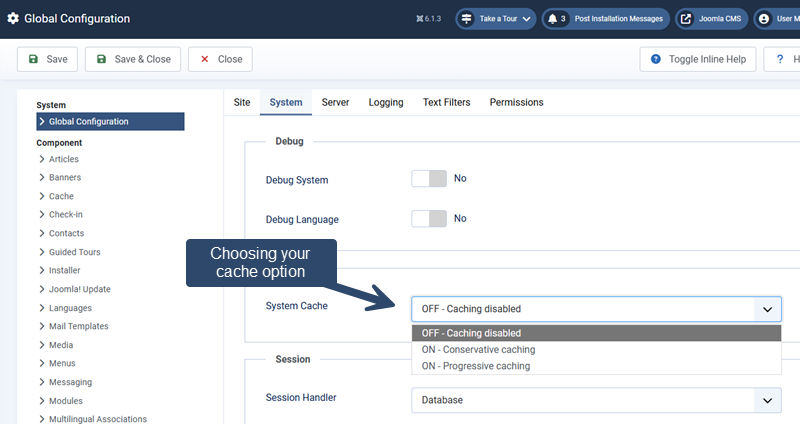
To locate Joomla's main caching options, open the administration area and navigate to:
System → Global Configuration → System → Cache Settings
These mechanisms are related, but they do not perform identical tasks.
Conservative Caching
Conservative caching is one of the caching modes available through Joomla's Global Configuration.
It allows eligible cached results to be reused while giving individual modules greater control over whether their output should be cached.
This makes Conservative caching a reasonable starting point when a website contains a mixture of relatively stable content and modules that need more frequent updates.
For example, a module displaying largely unchanged informational content may benefit from caching, while another module showing frequently changing information may need caching disabled.
However, the actual behaviour depends on the module and how it implements Joomla's caching mechanisms.
Progressive Caching
Progressive caching is another option available through Global Configuration. It provides broader caching of eligible module output and is generally more aggressive than Conservative caching.
This approach may reduce repeated processing, but it also requires greater care when modules display information that varies between visitors or changes frequently.
Progressive caching should not be assumed to provide better performance in every situation. Its suitability depends on the website's functionality, installed extensions, and caching requirements.
For many websites, starting with Conservative caching and evaluating the results is a more cautious approach than immediately selecting Progressive caching.
Module-Level Caching
Joomla modules can have caching settings that influence whether their generated output is stored and reused. The available options depend on the module and the site's broader caching configuration.
Module caching can be useful for content that remains relatively stable, such as certain navigation or informational modules.
Greater care is needed with modules that display:
- Information specific to the logged-in user.
- Frequently changing or time-sensitive content.
- Interactive features that depend on current session information.
- Output affected by visitor-specific conditions.
Not every module provides the same caching controls, and third-party modules may implement caching differently.
It is therefore important to review the available settings and test the module's actual behaviour rather than assuming that all modules respond identically.
Full-Page Caching with the System - Page Cache Plugin
Joomla also includes the System - Page Cache plugin, which can store complete rendered page responses for eligible requests.
Instead of regenerating the entire page for each eligible request, Joomla may serve previously cached output. This can reduce processing considerably for suitable public-facing content.
However, full-page caching requires particular care because the stored response may include output from multiple components, modules, and plugins.
Pages containing personalized information, session-dependent functionality, or other dynamic elements may be unsuitable for this approach.
The plugin has its own configuration and eligibility behaviour. It should not be treated as simply another name for Conservative or Progressive caching.
Before enabling full-page caching, review the plugin's available settings and test important visitor interactions to confirm that the website behaves correctly.
How Component and Extension Caching Fits In
Beyond Joomla's general caching settings, individual components and third-party extensions may implement their own caching mechanisms.
For example, an extension might temporarily store the results of an expensive database operation or reuse generated output that would otherwise require additional processing.
These mechanisms can operate independently of some of Joomla's broader caching options, depending on how the extension was developed.
When evaluating extension caching, consider:
- What is cached: Complete output, selected information, or results of specific operations.
- When it refreshes: Whether cached information expires automatically or is cleared when content changes.
- Who receives it: Whether the cached result is shared or varies according to the visitor.
- How it is controlled: Whether the extension provides its own cache settings or relies on Joomla's configuration.
Extension documentation is particularly important because Joomla's general cache settings do not necessarily describe every caching mechanism used by installed software.
Cache Storage and Expiration
Joomla needs somewhere to store cached information and a way to determine when that information should be generated again.
Global Configuration includes settings for the cache handler and cache lifetime. These affect how supported caching mechanisms store and reuse their results.
Understanding Cache Handlers
A cache handler determines how cached information is stored. Depending on the Joomla installation and server environment, available handlers may use files or other supported storage systems.
The available choices depend on the hosting configuration and the caching capabilities supported by the installed software.
For a typical Joomla website, the default supported handler is often a reasonable starting point.
Alternative handlers may offer advantages in particular environments, but they should not be selected solely because they appear more advanced.
Before changing the handler, confirm that the required server support is available and that the selected method works reliably with the website.
Understanding Cache Lifetime
Cache lifetime controls how long eligible cached information can remain valid before Joomla needs to generate a replacement.
A longer lifetime may reduce repeated processing, but it can also increase the period during which visitors receive previously generated information.
A shorter lifetime generally allows cached results to be refreshed more frequently, although it may reduce the performance benefit.
The appropriate setting depends on the content and how quickly changes need to become visible.
For example:
- Relatively stable content: May tolerate a longer cache lifetime.
- Frequently updated information: May benefit from a shorter lifetime or selective caching.
- Personalized or session-dependent content: May require caching to be disabled or handled through a mechanism designed for that purpose.
Cache lifetime is not a universal refresh timer for the entire website. Other caching mechanisms may have separate expiration rules.
When Caching Helps and When It Can Cause Problems
Caching is most useful when the same information can be safely reused across multiple requests.
It becomes more complicated when page output changes according to the visitor, current session, or frequently updated information.
Content That Is Generally Suitable for Caching
Public informational content is often a good candidate because many visitors receive substantially the same output.
Examples may include:
- Published articles that do not change frequently.
- Informational pages with stable content.
- Modules displaying information shared by all visitors.
- Other public content that does not depend on individual sessions.
Suitability still depends on the caching mechanism and any interactive functionality included on the page.
Content That Requires Greater Care
Some website features depend on information that should remain current or specific to an individual visitor.
Examples include:
- Customer accounts: Account information and other user-specific details must not be served to the wrong visitor.
- Shopping carts and checkout: Cart contents, prices, availability, and transaction information may depend on the current session.
- Forms: Some forms rely on session-specific tokens or other values that must remain valid.
- Time-sensitive information: Content that changes frequently may become misleading when an older result is served.
- Access-controlled content: Cached output must continue to respect the website's access restrictions.
These features do not necessarily prevent all caching. However, they require mechanisms that preserve the correct visitor context and avoid sharing inappropriate cached information.
Important: Do not assume that a page is safe for full-page caching simply because it loads correctly during an initial test. Login states, form submissions, and other visitor interactions should also be checked.
When Changes Do Not Appear Immediately
One of the most noticeable caching problems occurs when an administrator updates content but the public website continues displaying the previous version.
Before assuming that the content was not saved, consider whether Joomla or another caching layer is serving an earlier result.
Clearing the relevant cache may resolve the immediate problem, but repeated occurrences should prompt a review of the caching configuration and how updates are invalidated.
The objective is not to clear every cache after every content change. It is to understand which caching mechanism is responsible and configure it appropriately.
Why Multiple Caching Layers Can Be Confusing
Joomla's caching mechanisms are not necessarily the only systems storing website content. Depending on the hosting environment, additional caching may occur at the web server, content delivery network (CDN), or visitor's browser.
These layers can improve performance, but they can also make troubleshooting more complicated when a change does not appear as expected.
Joomla Application Caching
Joomla's built-in caching mechanisms operate within the application and can reduce repeated processing when generating website content.
These include the caching options configured through Global Configuration, eligible module caching, and the System - Page Cache plugin.
Each mechanism has its own scope and may use different rules for storing and refreshing information.
Server-Level Caching
Some hosting environments provide caching through the web server or an additional caching service.
Depending on the configuration, these systems may store complete responses or other information before requests reach Joomla.
Consequently, clearing Joomla's cache may not remove content stored by the hosting environment.
Administrators should check their hosting documentation or control panel to determine whether server-level caching is active.
Browser and CDN Caching
Browsers can store certain website resources locally, while a CDN may cache eligible content at servers distributed across different locations.
These mechanisms commonly affect images, stylesheets, JavaScript files, and other static resources. Depending on the configuration, they may also cache HTML responses.
For example, a stylesheet change may appear correctly in one browser while another continues using a previously cached file.
This is a different problem from Joomla serving an outdated article through its application cache.
Why Clearing One Cache May Not Be Enough
When multiple caching layers are active, clearing one layer does not necessarily invalidate the others.
If an update is not appearing, the cause may be:
- Cached output retained by Joomla.
- A server-level cache serving an earlier response.
- A CDN retaining an older version of the requested resource.
- A browser using a previously stored file.
Identifying which layer is responsible is more useful than repeatedly clearing caches without understanding the cause.
Choosing a Sensible Joomla Caching Configuration
There is no single caching configuration that is appropriate for every Joomla website.
A relatively simple informational website may benefit from broader caching, while a website with customer accounts, interactive features, or frequently changing content may require more selective settings.
The most reliable approach is to introduce caching deliberately and verify the results.
Start With the Website's Actual Requirements
Before enabling or changing caching settings, consider how the website is used.
- Content stability: How often do articles, modules, and other visible information change?
- Visitor differences: Does the website display different information to logged-in users or individual customers?
- Interactive functionality: Are forms, account features, shopping carts, or other session-dependent tools present?
- Existing caching: Does the hosting provider or CDN already cache website responses?
- Performance needs: Is repeated server processing contributing to a measurable performance problem?
These questions help determine whether caching is likely to provide a meaningful benefit and which mechanisms deserve consideration.
Make Changes Incrementally
Rather than enabling every caching option at once, begin with a configuration that is appropriate for the website's existing functionality.
For many conventional Joomla websites, evaluating Conservative caching before considering more aggressive options provides a manageable starting point.
After making a change, check whether it improves performance and whether the website continues behaving correctly.
If several caching mechanisms are changed simultaneously, it becomes more difficult to identify which setting caused an improvement or introduced a problem.
Test Different Visitor States
Testing only the public homepage is insufficient when the website contains features that behave differently for registered users.
Where applicable, verify the following:
- Public pages display the expected content.
- Registered users receive the correct information and permissions.
- Login and logout functions operate normally.
- Forms can be submitted successfully.
- Account and customer information remains specific to the correct user.
- Content updates become visible within an acceptable period.
For websites with complex functionality, test caching changes in a staging environment before applying them to the live website.
Measure Whether Caching Actually Helps
Caching should produce a useful improvement rather than simply add another layer of configuration.
Compare performance before and after making changes, using consistent testing conditions wherever possible.
Consider server response times, repeated page requests, and the website's behaviour under typical visitor activity.
Remember that caching cannot correct every performance problem. Large images, inefficient scripts, slow external services, and other bottlenecks may continue affecting the visitor experience.
Practical recommendation: Record the original caching settings before making changes. If a problem develops, this makes it easier to restore the previous configuration and investigate one change at a time.
Recognizing and Troubleshooting Cache-Related Problems
When caching causes unexpected behaviour, the symptoms are not always obvious. A page may load normally while displaying outdated information, or a feature may work for one visitor but behave differently for another.
The objective is to determine whether caching is responsible before changing unrelated Joomla settings or reinstalling extensions.
Updated Content Is Not Appearing
If an article or module has been updated but the public website continues displaying an earlier version, begin by confirming that the changes were saved and published correctly.
Next, consider whether cached output is being served.
- Check the page using a separate browser session.
- Review Joomla's active caching settings.
- Clear the relevant Joomla cache through the administration interface if necessary.
- Check whether the hosting provider or CDN has additional caching enabled.
- Allow for any applicable cache expiration settings.
Joomla provides cache management tools in the administration area, including options for clearing stored cache entries.
Clearing a cache can help confirm the source of an outdated result, but it should not become a substitute for identifying an unsuitable configuration.
A Feature Works for Some Visitors but Not Others
Inconsistent behaviour between visitors can indicate that cached output is being reused in a context where the response should be different.
For example, a module may display information correctly to a guest but behave unexpectedly after login.
When investigating this type of problem:
- Compare the behaviour while logged out and logged in.
- Test with more than one appropriate user account.
- Determine whether the affected module or extension has its own caching controls.
- Check whether full-page caching is active.
- Review extension documentation for known caching limitations.
Do not use another customer's account or expose private information while testing. Use authorized test accounts and a controlled environment where possible.
Forms or Interactive Features Behave Unexpectedly
Forms and other interactive features may depend on session information, security tokens, or values generated for a particular request.
If these features begin failing after a caching change, investigate whether the relevant pages or output are being cached inappropriately.
Temporarily disabling the suspected caching mechanism in a staging environment can help determine whether it contributes to the problem.
If normal behaviour returns, review the caching configuration and the extension's requirements before re-enabling it.
However, not every form or session problem is caused by caching. Extension errors, configuration issues, and other conditions may produce similar symptoms.
Performance Does Not Improve After Enabling Caching
Enabling caching does not guarantee a noticeable improvement.
The website may already benefit from server-level caching, or its performance limitations may occur elsewhere.
Possible explanations include:
- The affected pages or modules are not eligible for the selected caching mechanism.
- Cached entries expire before they can be reused effectively.
- The main performance bottleneck is unrelated to repeated Joomla processing.
- Another caching layer already provides much of the potential benefit.
- Testing conditions vary too much to reveal a reliable difference.
Review the results before increasing caching aggressiveness. More caching is not necessarily the correct response to a performance problem.
Using Caching Without Sacrificing Correctness
Joomla provides several caching mechanisms because websites have different performance requirements. Conservative caching, Progressive caching, module caching, and full-page caching each operate within a particular scope.
The most appropriate configuration depends on the website's content, extensions, visitor interactions, and existing hosting environment.
Start with a clear understanding of what needs to be cached, introduce changes incrementally, and verify the results across the website's important functions.
When caching is configured deliberately, it can reduce unnecessary processing while preserving accurate content and reliable behaviour. The goal is not to enable every available option, but to achieve a useful balance between performance and correctness.
Related Website Management Articles
Explore additional articles covering website management, ongoing site operations, administration, and long-term website planning.