
Joomla includes a comprehensive built-in help system that is often overlooked. Many site owners search externally for answers that already exist inside the administrator interface.
The value of Joomla’s help system is not that it replaces tutorials or experience. Its value is that it provides accurate, version-matched explanations exactly where configuration decisions are made.
This tutorial explains how to use Joomla’s built-in help effectively, when to rely on it, and how to combine it with external learning for better long-term understanding.
Before You Start
This tutorial assumes you have access to the Joomla administrator interface.
No configuration changes are required. The goal is orientation and skill-building.
This tutorial does not reproduce help content. It teaches how to use it intentionally.
What the Joomla Help System Is
Joomla’s help system is a collection of official documentation pages linked directly from the administrator interface.
These pages are:
- Maintained by the Joomla project
- Matched to the installed Joomla version
- Contextual to the screen you are viewing
This makes the help system especially useful when working with unfamiliar configuration screens.
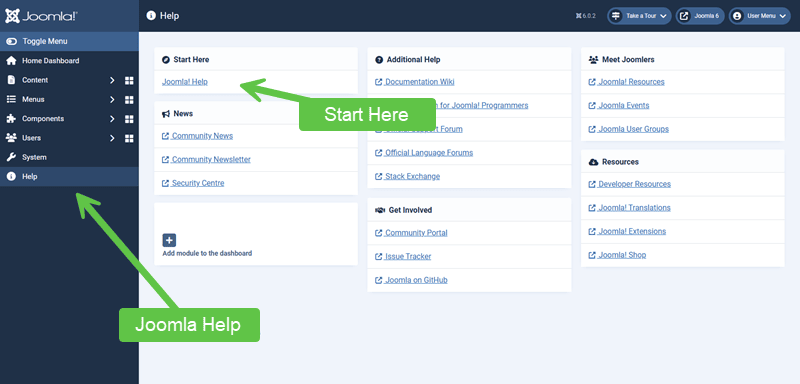
Where to Find Help in the Administrator Interface
Help links are available throughout the administrator interface.
Common locations include:
- The Help button in the left column navigational group
- Contextual help icons on configuration screens
- Linked documentation within some components
Using Contextual Help Effectively
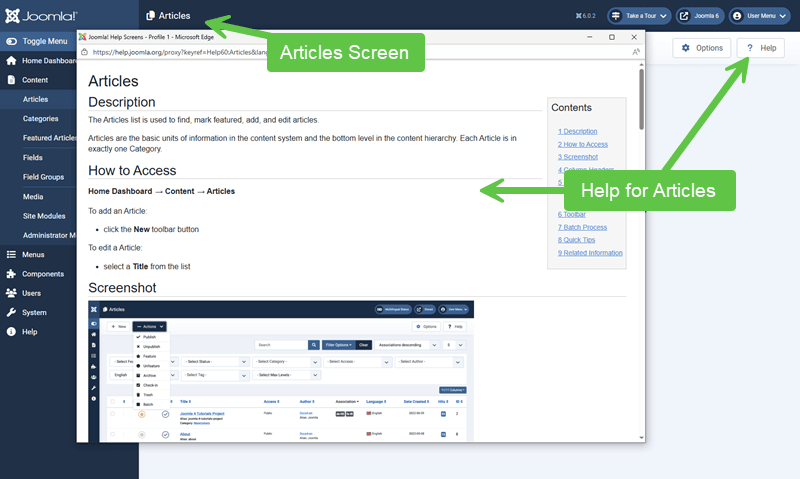
Contextual help opens documentation related to the screen you are currently viewing.
This is important because:
- Settings are explained in the correct context
- Terminology matches the interface labels
- Descriptions reflect current Joomla versions
Using contextual help reduces guesswork and prevents assumptions based on outdated tutorials. Let's give you a screenshot showing the Help documentation if you visit the Articles screen:
What the Help System Is Best At
Joomla’s built-in help excels at explaining:
- What a setting does
- Where a configuration applies
- Which options affect which parts of the site
It is particularly strong for:
- Global Configuration options
- Component configuration screens
- Less frequently used features
What the Help System Does Not Do
The help system is not a tutorial series.
It generally does not:
- Explain design decisions
- Recommend best practices
- Warn against poor structural choices
- Teach workflow or strategy
This is where structured tutorials and experience fill the gap.
Combining Help with Tutorials
The most effective learning approach combines both sources.
A practical pattern is:
- Use tutorials to understand structure and responsibility
- Use built-in help to confirm specific settings
- Return to tutorials when decisions affect long-term design
This prevents both blind configuration and unnecessary searching.
Developing a Self-Support Habit
Regular use of the help system builds confidence.
Over time, administrators become more comfortable:
- Exploring unfamiliar screens
- Understanding option consequences
- Making informed configuration decisions
This reduces reliance on guesswork and reactive troubleshooting.
Verify Your Results
- You know where to find contextual help
- You can interpret help descriptions accurately
- You understand when help is sufficient and when deeper learning is needed
Common Issues
- Ignoring help entirely: Leads to unnecessary errors and rework.
- Relying on help alone: Leaves structural decisions unexamined.
- Using outdated external guides: Conflicts with current Joomla versions.
Related Tutorials / Next Steps
- Cleaning up the Joomla Administration Area
- Menu Architecture in Joomla: Defining Pages and Context
Knowing how to use Joomla’s built-in help effectively is a self-support skill. When combined with structured learning, it allows site owners to work with confidence instead of trial and error.
Key Terms
- Contextual help
- Documentation linked directly from a specific administrator screen, explaining options in that exact context.
- Administrator interface
- The backend area of a Joomla site where configuration and management tasks are performed.
- Official documentation
- Help content maintained by the Joomla project and matched to the installed Joomla version.