
Access Control in Joomla is one of its most powerful features, and also one of the easiest to misuse. When permissions are unclear, sites become fragile, difficult to manage, and prone to accidental damage. A good example of using ACL is this website you are on, and how the tutorials are set up with special access for members.
Most ACL problems are not caused by complexity alone. They are caused by configuring permissions without a clear plan, or by using access control to compensate for unresolved structural issues.
This tutorial explains how to design permissions intentionally, starting with a clear mental model and progressing to practical configuration patterns that scale as a site grows.
Before You Start
This tutorial assumes administrator access and basic familiarity with Joomla users, user groups, and menu items.
You do not need to create custom extensions or write code. All examples rely on Joomla core functionality.
This tutorial does not attempt to cover every possible permission combination. The focus is on understanding responsibility, inheritance, and safe design patterns.
What Access Control Solves
Access Control determines who can see content, who can modify it, and who can perform administrative actions.
Used correctly, ACL allows:
- Multiple people working safely in the same site
- Clear separation of responsibilities
- Reduced risk of accidental changes
- Scalable governance as sites grow
Used incorrectly, ACL becomes a source of confusion and unexpected restrictions.
The Core ACL Building Blocks
Joomla access control is built from three core elements. Understanding how they relate is essential.
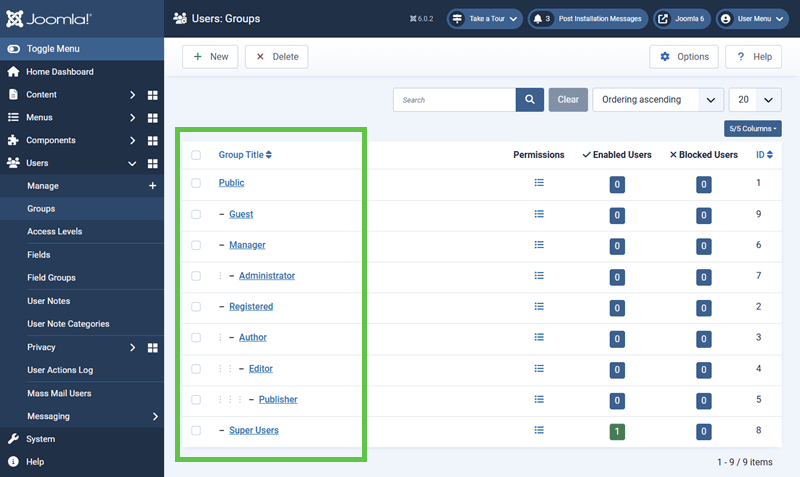
User Groups
User groups represent roles or responsibilities, not individual people.
Examples include:
- Editors
- Managers
- Support staff
Users can belong to multiple groups. Permissions accumulate through group membership.
Access Levels
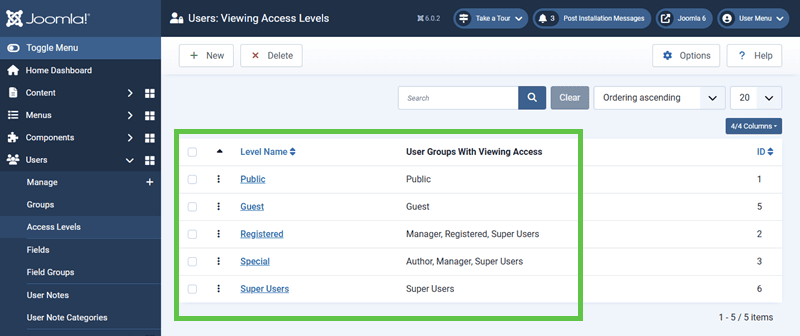
Access levels determine who can see content.
An access level is a collection of user groups. If a user belongs to any group included in an access level, they can view content assigned to that level.
Access levels do not grant editing or administrative rights. They only control visibility.
Permissions
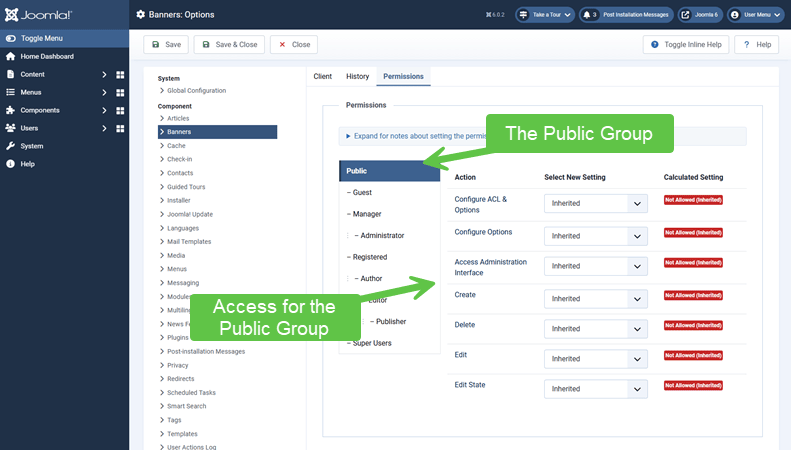
Permissions determine what actions users can perform, such as creating, editing, deleting, or configuring items.
Permissions are assigned to user groups and evaluated in context, such as:
- Global configuration
- Components
- Categories
- Individual items
Understanding Permission Inheritance
Permissions in Joomla are inherited down the structure unless explicitly changed.
This means:
- Global permissions apply everywhere unless overridden
- Component permissions apply to all items in that component
- Category permissions apply only within that category
Overrides should be used sparingly. Each override adds cognitive and maintenance overhead with the potential of creating unexpected access problems.
Designing Permissions Before Configuring Them
Effective ACL starts with design, not clicking checkboxes.
Before changing permissions, clarify:
- Who needs access?
- What actions do they need to perform?
- Where should those actions apply?
Permissions should reflect responsibility, not convenience.
Common Permission Design Patterns
Stable sites often follow patterns such as:
- Editors can create and edit content, but not publish globally
- Managers can publish but not configure extensions
- Administrators are limited to a small, trusted group
These patterns reduce risk without blocking productivity.
Where to Apply Permissions
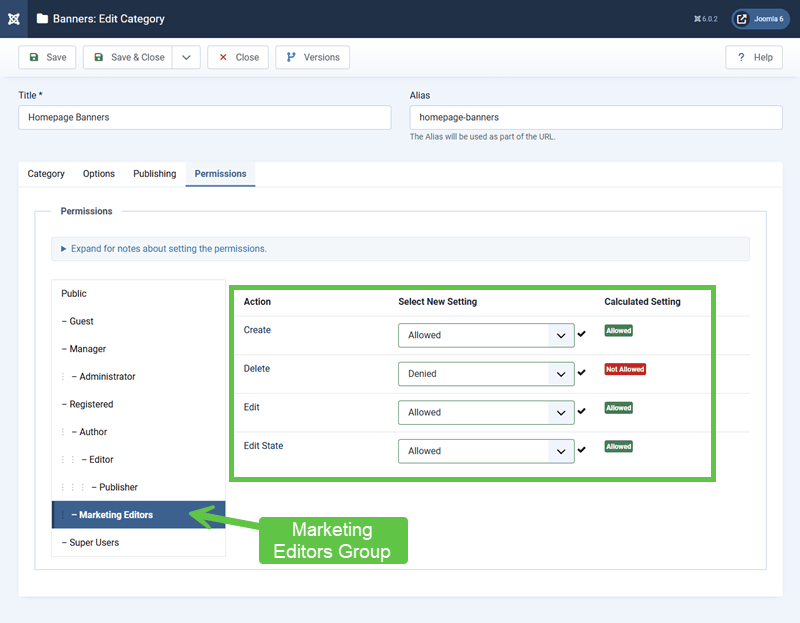
Permissions can be applied at different levels. Choosing the right level matters. We will use the Joomla Banners component as an example, and with a new access group called "Marketing Editors". We will set the permissions for anyone who is assigned to this group. We will purposely set the Delete permission as denied.
Guidelines include:
- Use global permissions sparingly
- Apply component-level permissions for broad rules
- Use category permissions for content ownership
- Avoid menu item-level permissions unless necessary
Common ACL Anti-Patterns
Certain practices repeatedly cause problems:
- Using access control to hide layout issues
- Creating many user groups without documentation
- Overriding permissions at too many levels
- Testing permissions with an administrator account only
When permission logic becomes difficult to explain, it is usually too complex.
Verify Your Results
- Each user group has a clear purpose
- Access levels reflect visibility requirements only
- Permissions align with responsibility boundaries
- Overrides are minimal and intentional
Common Issues
- Users cannot see content: Access level does not include their group.
- Users can edit too much: Permissions applied too broadly.
- Unexpected restrictions: An inherited override is blocking access.
- Difficult troubleshooting: Too many overrides exist.
Related Tutorials / Next Steps
- Menu Architecture in Joomla: Defining Pages and Context
- Admin Clean-Up and Site Organization
Well-designed access control protects both content and people. When permissions reflect responsibility, sites remain usable, secure, and easier to manage over time.
Key Terms
- Access Control (ACL)
- The system Joomla uses to determine who can see content and perform actions within the site.
- User group
- A role-based grouping that determines which permissions apply to a user.
- Access level
- A visibility rule that defines which user groups are allowed to view specific content.
- Permission inheritance
- The process by which permissions applied at higher levels automatically apply to lower levels unless explicitly overridden.